
Email signatures and disclaimers may look like tiny, boring footers at the bottom of your emails. But when it comes to compliance and long-term risk management, they’re a lot more important than you might realize (and even small mistakes can have big consequences).
Not quite sure if regulations like GDPR or HIPAA apply to your organization? Wondering if your current email setup is actually compliant?
You’re in the right place.
Read on for our full guide on email signature compliance, with everything you need to know about GDPR requirements, HIPAA safeguards, disclaimer best practices, and how to standardize compliance across your entire organization.
Quick Answer: A HIPAA compliant email signature identifies the sender (name, role, organization, contact details) and carries a short confidentiality notice: the message may contain protected health information, it is intended only for the named recipient, unintended recipients should notify the sender and delete it, and disclosure is prohibited. The disclaimer does not replace encryption, access controls or a business associate agreement; it supports them. This guide covers the HIPAA checklist for healthcare teams and, because many organizations handle EU data too, the matching GDPR requirements for signatures and disclaimers. This is general information, not legal advice.
What Is Email Signature Compliance?
Email compliance refers to the legal and regulatory requirements that govern how organizations send and manage email communications, especially when those emails contain personal, sensitive, or marketing-related data.
Depending on the regulations that apply to your organization, nearly every aspect of an email can fall under compliance rules, including the main message, the email signature, disclaimers, contact details, and even embedded links.
For most organizations, email signature compliance typically involves a combination of:
- Data protection laws (like GDPR) that regulate how personal data is handled.
- Industry-specific regulations (like HIPAA) for sensitive health information.
- Marketing laws (like CAN-SPAM) that govern promotional emails and opt-out requirements.
- Internal governance policies that control how employees communicate externally.
One of the biggest challenges for organizations is that these rules often overlap. A single email might need to meet multiple regulatory standards at once, depending on who you’re contacting and what information is included. And to make things even more complicated, often require coordination across multiple departments, such as brand, IT, and legal.
Why Email Signatures Are a High-Risk Compliance Touchpoint
This is where the role of email signatures becomes critical. They’re applied automatically to every message, used by every employee, and rarely reviewed with the same level of scrutiny as other compliance touchpoints. That combination makes them one of the most common sources of risk, with outdated disclaimers, inconsistent contact details, missing opt-out links, and unnecessary personal data creating compliance gaps that multiply across your entire organization.
For the purposes of this article, we’re focusing specifically on GDPR and HIPAA, breaking down what each regulation requires and how to structure email signatures and disclaimers that align with both.
GDPR Basics Every Email Sender Should Understand
First things first, what does GDPR even mean?
Here are four essential facts to get you up to speed:
- The General Data Protection Regulation (GDPR) is an EU law that governs how organizations collect, process, store, and share personal data.
- It applies to any organization operating in the European Union and to companies operating outside the EU that communicate with EU citizens and individuals located in the EU.
- In email communication, GDPR regulations apply to both the message content and the email signature attached to it. Even routine actions (like adding a banner, updating a disclaimer, or sharing contact details) count as processing personal data.
- Data protection authorities can review your email practices as part of broader GDPR investigations, with non-compliance leading to corrective actions, increased oversight, and in some cases, financial penalties on global revenue.
So to put it simply: if you’re sending emails to individuals in the EU, GDPR applies. And that means GDPR best practices should be built into your email setup.
What Is Legally Required in a GDPR-Compliant Email Signature?
A GDPR-compliant signature should include sender identification, company contact information, privacy policy links, and clear opt-out options for marketing communications. Sometimes, references to legal requirements are also needed.
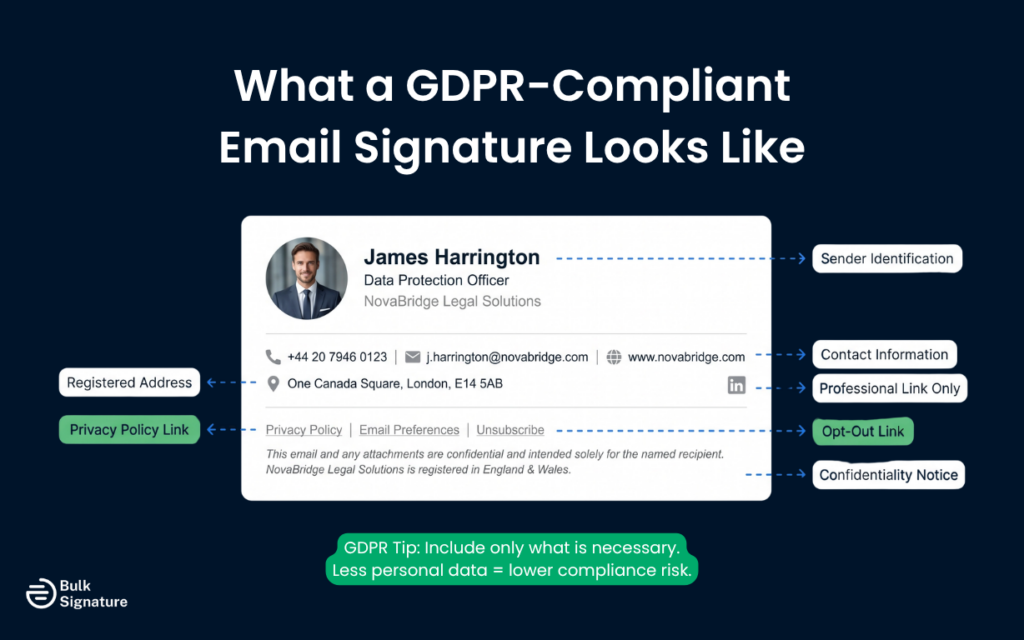
Building a compliant email signature isn’t rocket science, but it does require some thought about your specific email marketing strategies and data protection needs.
Required or Recommended Elements
For most businesses conducting email marketing, a compliant GDPR email marketing signature should include:
- Your name and job title (to provide transparency about who’s sending)
- Company name and registered address
- Clear contact information for data protection inquiries
- Link to your privacy policy
- Link to email preferences center (for marketing emails)
If you’re also subject to CAN-SPAM requirements (for US recipients), you’ll also need to include your physical business address.
When do you need an Unsubscribe Link?
You don’t necessarily need an unsubscribe link in every email signature, but you absolutely need one in all marketing communications.
For marketing emails, place your unsubscribe link prominently, either in the signature itself or in a clear footer below the signature. Make sure the process is simple and doesn’t require the recipient to log in or jump through hoops. A poorly designed opt-out process can send emails straight to the spam folder.
For transactional emails, you typically don’t need unsubscribe options, since these aren’t for direct marketing purposes.
Can You Use Disclaimers Instead of Explicit Consent in Email Signatures?
No. Email signature disclaimers can’t substitute for proper consent obtained through opt-in processes required before sending marketing communications. You must have unambiguous consent, which, according to Recital 32 in GDPR, means the recipient voluntarily gave consent and was informed of how their information would be used.
In short, while signature disclaimers are helpful for setting expectations and demonstrating transparency, they’re not a replacement for obtaining explicit consent.
If you’re adding new contacts to your email marketing campaigns, you must obtain consent through proper opt-in processes, like a sign-up form with clear language about what they’re agreeing to receive, not some vague “you might hear from us sometimes” approach.
Avoiding Pre-Checked Boxes and Soft Opt-Ins
GDPR is very clear about consent quality. Pre-checked boxes are explicitly prohibited, and soft opt-in methods (like automatically adding customers to marketing lists after purchase) are generally not acceptable for direct marketing purposes. As a best practice, always include an unchecked opt-in box when collecting email addresses for marketing purposes.
Your signature can include language about your commitment to data protection, but it can’t create consent where none exists.
How Do Data Privacy Laws Impact Email Security and Signatures?
Data privacy laws require businesses to implement appropriate email security measures and include transparent information in signatures to protect personal data and maintain compliance.
While your signature shouldn’t be a legal dissertation, it can reinforce your commitment to data security and privacy.
Signature Notices About Confidentiality and Email Security
Many businesses include confidentiality notices in their signatures to show their commitment to email security. While these show your data security measures, they don’t provide legal protection if you’re not actually following proper practices.
In general, it’s a good idea to keep these notices brief and professional. Something like “This email and any attachments are confidential and may be subject to legal privilege” should be enough.
Handling Breach Disclosures or Sensitive Data Mentions
Your email signature isn’t the place to discuss data breaches or sensitive consumer data processing activities. If you need to communicate about a data breach, do it through proper channels with appropriate security measures.
Supporting Data Subject Requests Through Email Signatures
Data subjects (including your email recipients) have rights under GDPR, including the right to access their data, correct inaccuracies, and request email data erasure. Your signature should make it easy for people to contact you about these data subject rights.
As a best practice, make sure to include clear contact information and consider adding a link to a page that explains how to make user requests about their data.
The Complete GDPR Compliance Checklist for Email Signatures and Disclaimers
Now that you understand when GDPR applies and why email signatures and disclaimers matter, the next step is knowing what good compliance actually looks like in practice.
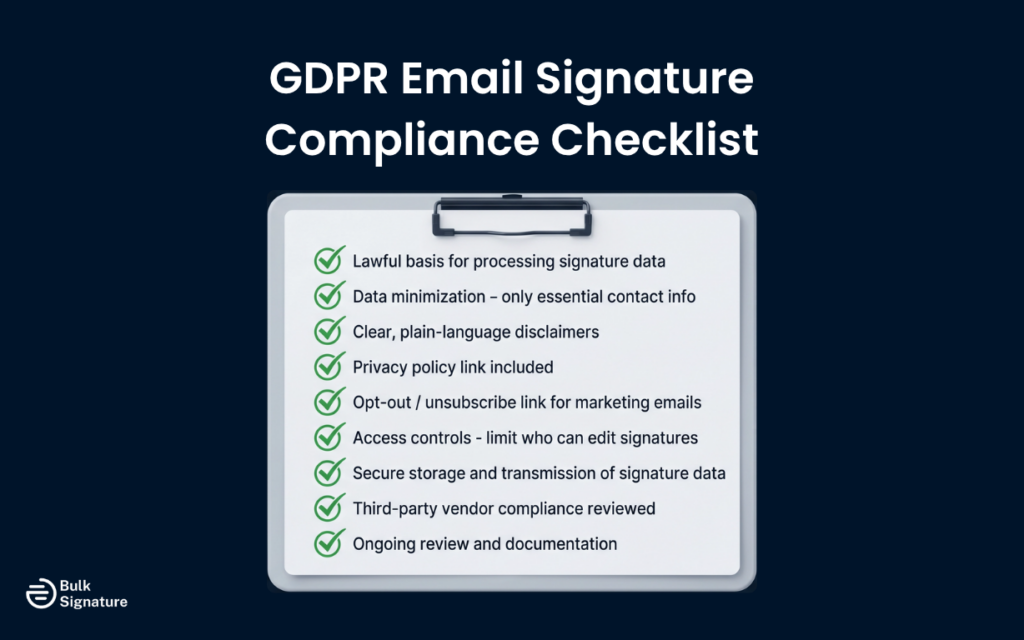
The following checklist breaks down the specific technical and organizational measures organizations can take to structure, manage, and review email signatures in line with GDPR requirements. Each item maps directly to core data protection principles outlined in the GDPR framework and reflects common expectations from supervisory authorities.
GDPR Email Signature Compliance Checklist
|
Compliance Area |
What This Means |
Key Actions & Considerations |
|---|---|---|
|
1. Lawful Basis for Processing Data |
Under GDPR, personal data can’t be included “just because it’s always been there.” This means every piece of personal information in an email signature (like names, job titles, phone numbers, even profile links) must have a clear and lawful reason for being processed. |
|
|
2. Data Privacy, Minimization, and Purpose Limitation |
Email signatures should include only the information needed to help someone contact you professionally, nothing more. |
|
|
3. Transparency & Clear Language |
Disclaimers should clearly explain how data is handled, using language people can actually understand. |
|
|
4. Data Subject Rights |
People must be able to easily exercise their GDPR rights through email communication. |
|
|
5. Access & Editing Controls |
Not everyone should be able to edit email signatures, as unrestricted changes increase compliance risk. |
|
|
6. Secure Data Processing & Storage |
Personal data used in email signatures must be stored and protected just like any other personal data. This means knowing where signature data lives, making sure it’s encrypted when sent and stored, and having safeguards in place to prevent unauthorized access. |
|
|
7. Third-Party Processing & Transfers |
If you use vendors or tools to manage email signatures, they are considered to be handling personal data on your behalf, and therefore, GDPR still applies. |
|
|
8. Data Breach Preparedness |
Even small mistakes in email signatures can lead to data exposure, so it’s important to know what to do if something goes wrong. |
|
|
9. Documentation & Ongoing Oversight |
GDPR compliance doesn’t end once signatures are set; it requires ongoing review and documentation. |
|
Common GDPR Mistakes in Email Signatures and Disclaimers
Even organizations with strong data protection programs can often overlook email signatures and disclaimers. Here are a few of the most common issues that can create GDPR compliance gaps.
Including Excessive or Irrelevant Personal Data
One of the most common mistakes is simply including too much personal information. This can easily happen over time, as email signatures grow with extra phone numbers, personal links, or outdated details that get added and never removed.
Why This Matters:
- It conflicts with data minimization principles.
- It increases exposure if data is shared or misused.
- It complicates responses to data subject rights requests.
What You Can Do: Make it a habit to regularly review email signatures and remove any information that isn’t strictly necessary for professional communication.
Relying on Generic or Outdated Disclaimers
Many organizations use the same email disclaimer they’ve had for years, often copied from another company or a generic template. These disclaimers frequently include outdated legal references or fail to accurately reflect current data processing practices.
Why This Matters:
- It fails to meet transparency requirements.
- It can create confusion about how data is actually handled.
- It may not provide the intended legal protection.
What You Can Do: Review your disclaimers regularly to make sure they accurately reflect your current data practices and link to an up-to-date privacy policy.
Failing to Provide Clear Opt-Out Mechanisms
While not every email requires an unsubscribe link, marketing and promotional emails must provide a clear and easy way for recipients to opt out. Hiding this link or making the process overly complicated is a direct violation of GDPR.
Why This Matters:
- It violates the right to withdraw consent.
- It can lead to increased spam complaints and deliverability issues.
- It directly conflicts with core GDPR requirements for marketing communications.
What You Can Do: Make sure all marketing emails include a visible, easy-to-use unsubscribe link, either within the signature or clearly positioned below it.
HIPAA Basics Every Email Sender Should Understand
While GDPR focuses on personal data and privacy rights across industries, healthcare organizations face an additional layer of responsibility.
The Health Insurance Portability and Accountability Act requires healthcare providers to implement appropriate safeguards when transmitting protected health information through email communication. Your signature typically contains the last information patients see, making it a critical touchpoint for demonstrating your commitment to patient privacy.
Email’s Role in Healthcare Communication
Healthcare providers rely heavily on email communication for patient referrals, treatment updates, and internal coordination. However, these communications frequently contain sensitive patient information that requires special protection under HIPAA regulations.
Without proper safeguards in email signatures, healthcare organizations increase the risk of accidental data exposure. This can include inappropriate disclosure of patient information, insufficient confidentiality notices, and a lack of clear instructions for unintended recipients. Missing links to patient privacy rights can also limit transparency and make it harder for patients to understand how their data is handled.
Consequences of Non-Compliant Email Signatures
Healthcare organizations face serious consequences when email signatures don’t meet HIPAA compliance standards. Financial penalties can be substantial, and according to the American Medical Association, violations can range from $100 to $50,000 per incident, with repeat issues potentially exceeding $1.5 million annually. Beyond fines, legal costs and remediation efforts can also quickly add up, creating additional financial strain.
The operational impact can be just as significant. Data breaches often require time-intensive investigations and formal reporting, while patient trust can erode, affecting long-term relationships and reputation. Internally, organizations may need to invest in staff retraining and system updates, pulling resources away from core operations. Increased regulatory scrutiny can also lead to ongoing oversight and stricter compliance requirements.
What Must Be Included in a HIPAA-Compliant Email Signature?
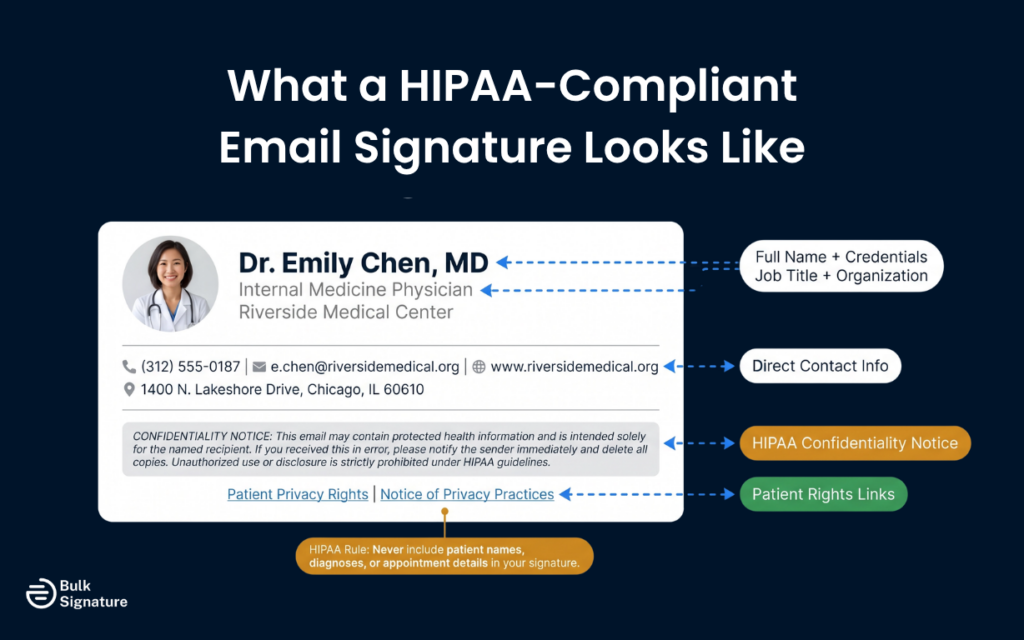
To align with HIPAA requirements, an email signature should include sender identification, confidentiality notices, and clear instructions for protecting sensitive patient health information.
Essential Email Disclaimer Language
Your HIPAA email disclaimer should address the sensitive nature of healthcare communications and provide clear guidance for recipients.
Here are the core disclaimer elements to include:
- Statement that emails may contain confidential information
- Notice that the content is intended solely for the named recipients
- Instructions for unintended recipients to notify the sender immediately
- Warning that unauthorized disclosure is strictly prohibited
Together, these elements set clear expectations for how sensitive information should be handled and reduce the risk of accidental disclosure. While a disclaimer won’t replace proper security controls, it reinforces your organization’s commitment to protecting patient data and provides an extra layer of clarity for anyone who receives your emails.
Sample HIPAA Compliant Email Disclaimer
Here’s an example of what a HIPAA disclaimer can look like:
“This email may contain protected health information and is intended solely for the named recipient. If you received this email in error, please notify the sender immediately and delete all copies. Unauthorized use, disclosure, or distribution is strictly prohibited under HIPAA guidelines.”
Required Sender Information
It’s also important to include complete professional identification while avoiding any reference to specific patient information. Here’s a breakdown of what to include and what to avoid.
Must Include:
- Full name and professional credentials
- Job title and department
- Medical organization name
- Direct contact information (phone, secure email)
Never Include:
- Patient names or reference numbers
- Appointment details or case information
- Treatment specifics or medical conditions
- Billing or insurance information
By limiting signatures to essential identification details and excluding any patient-related information, healthcare organizations can reduce the likelihood of accidental exposure while maintaining consistent, compliant communication across every message.
Confidentiality Notice Requirements
Your confidentiality notice reinforces that email communication contains sensitive information and requires special care.
This notice should:
- Clearly state the confidential nature of healthcare communications
- Specify that information is intended solely for authorized recipients
- Explain the consequences of unauthorized access or disclosure
- Provide clear instructions for handling misdirected emails
When written clearly and applied consistently, a confidentiality notice helps set expectations for how information should be handled and reduces the risk of misuse. While it doesn’t replace technical safeguards like encryption, it plays an important role in reinforcing privacy practices and guiding recipients on the correct next steps if an email is received in error.
Privacy Policy and Patient Rights Links
While optional, adding links helps patients understand their rights by including clickable links to your healthcare organization’s privacy notice.
These links help improve transparency, provide easy access to important patient rights information, and signal a clear commitment to HIPAA compliance. They also help build trust by communicating privacy practices in a way that’s visible and accessible in every email interaction.
How Should Healthcare Providers Design HIPAA-Compliant Signatures?
Healthcare organizations should prioritize compliance over aesthetics, keeping the signature design clean, professional, and secure while avoiding interactive elements that could compromise patient privacy.
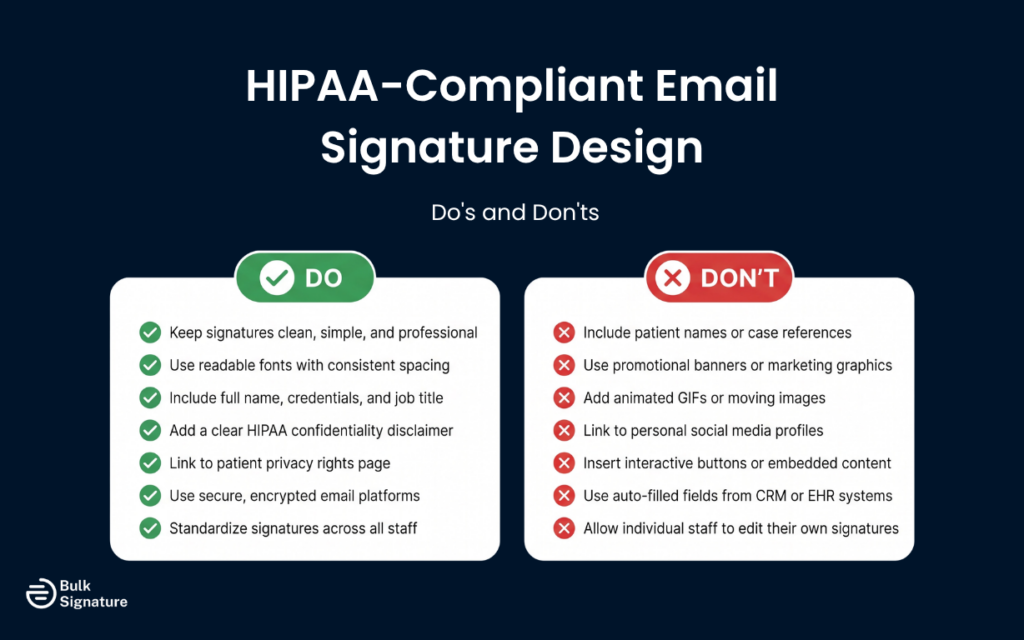
The following table outlines a few simple dos and don’ts.
Do’s and Don’ts of HIPAA-Compliant Email Signature Design
|
Do’s |
Don’ts |
|
|
A Note on Email Security for HIPAA-Compliant Emails
Email signature compliance doesn’t exist in isolation. It relies on the security of the systems that send, store, and manage your email communications.
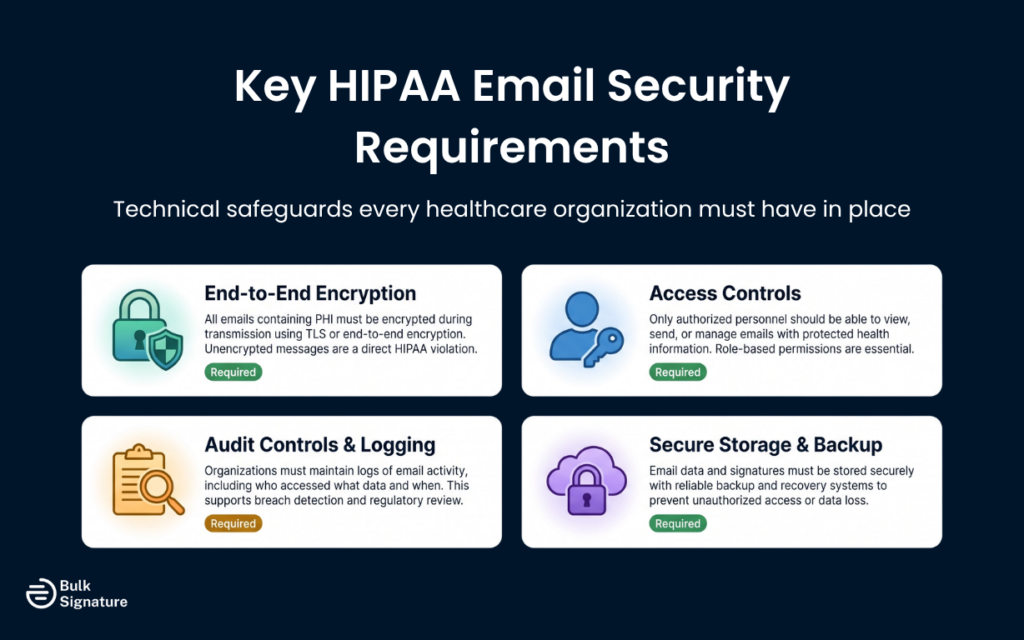
Healthcare providers must use secure email platforms that support end-to-end encryption and meet the technical safeguard requirements outlined under HIPAA. This includes encrypting protected health information during transmission, using secure servers with appropriate audit controls, and applying strict access controls to limit who can view sensitive patient data. Reliable data backup and recovery systems are also essential to protect information and prevent unauthorized access in the event of a disruption.
It’s also important to avoid free consumer email services that lack the necessary safeguards for handling healthcare data. Instead, organizations should use HIPAA-compliant email providers that offer Business Associate Agreements (BAAs) and align with federal security requirements.
Without a secure email infrastructure in place, even the most carefully designed email signature cannot fully support HIPAA compliance.
The Complete HIPAA Compliance Checklist for Email Signatures and Disclaimers
To help you identify compliance gaps and standardize best practices across your organization, we’ve put together the following checklist outlining the core technical, administrative, and communication safeguards required to align your email signatures with HIPAA standards.
HIPAA Email Signature Compliance Checklist
|
Compliance Area |
What This Means |
Key Actions & Considerations |
|
1. Protection of PHI (Privacy Rule for Protected Health Information) |
Email signatures must never introduce or expose protected health information. Even indirect references can create compliance risks. |
|
|
2. Transparency & Patient Awareness |
Patients should understand that email may not always be fully secure, and how their data is handled. |
|
|
3. Confidentiality Disclaimer Standards |
Disclaimers reinforce expectations and guide recipients in case of misdirected emails. |
|
|
4. Secure Transmission (Security Rule – Technical Safeguards) |
Emails containing protected health information must be protected during transmission. |
|
|
5. Access Controls & Signature Management |
Unauthorized changes to signatures can introduce compliance risks. |
|
|
6. Audit Controls & Monitoring |
Organizations must be able to track how email systems are used. |
|
|
7. Third-Party Vendor Compliance |
Any tool managing email signatures is a Business Associate under HIPAA. |
|
|
8. Device & Platform Consistency |
Inconsistent signatures across devices can introduce compliance gaps. |
|
|
9. Ongoing Review & Compliance Oversight |
HIPAA compliance requires continuous monitoring and updates. |
|
Common HIPAA Mistakes in Email Signatures and Disclaimers
Even healthcare organizations with strong compliance programs can overlook how email signatures contribute to HIPAA risk. These issues are often small in isolation but can create consistent exposure across large volumes of communication.
Including or Referencing Protected Health Information (PHI)
One of the most serious mistakes is allowing patient-related information to appear in email signatures, either directly or indirectly. This can happen through auto-filled fields, CRM integrations, or poorly designed templates.
Why This Matters:
- It creates an immediate HIPAA violation.
- It increases the risk of unauthorized disclosure.
- It can trigger breach reporting requirements.
What You Can Do: Keep signatures strictly limited to professional identification. Avoid any dynamic fields or integrations that could introduce patient data.
Using Overly Complex or Inconsistent Disclaimers
Many organizations either overload their disclaimers with legal jargon or fail to standardize them across teams. Inconsistent or unclear language can reduce effectiveness and create confusion for recipients.
Why This Matters:
- It weakens communication around data handling expectations.
- It creates inconsistency across departments.
- It may not properly guide unintended recipients.
What You Can Do: Use clear, concise, and standardized disclaimer language across all users. Focus on readability and consistency rather than length.
Failing to Control Signature Management Across the Organization
Allowing individual employees to create or modify their own signatures often leads to inconsistent formats, missing compliance elements, and increased risk.
Why This Matters:
- Required disclaimers may be removed or altered.
- Signatures can vary across devices and email clients.
- Compliance gaps become difficult to track and fix.
What You Can Do: Implement centralized email signature management with controlled templates, locked compliance elements, and role-based access to reduce risk and maintain consistency.
How BulkSignature Supports Compliant Email Signatures and Disclaimers
Managing email signatures and disclaimers across an entire organization can be a compliance headache, especially when relying on manual updates or individual employees to get it right.

BulkSignature simplifies this process by providing centralized control over email signatures and disclaimers.
With BulkSignature, you can:
- Enforce Consistency: Make sure every employee uses the correct, approved signature and disclaimer, eliminating the risk of outdated or non-compliant information.
- Lock Required Fields: Prevent unauthorized changes to essential compliance elements, such as privacy policy links or legal disclaimers.
- Manage Updates Centrally: Instantly update disclaimers or signature details across the entire organization when policies or regulations change.
- Support Data Minimization: Standardize signature templates to include only necessary professional information, reducing the risk of excessive data sharing.
By centralizing signature management, BulkSignature helps organizations maintain GDPR and HIPAA alignment without relying on manual oversight or individual compliance.
For more on how BulkSignature handles your data responsibly, see What You Need to Know about the Privacy of Your Email Signature Software.
You may also find these related articles useful: Is an Email Legally Binding? Understanding the Legal Risks and What You Legally Need to Add to Your Email Signature (in Germany).
Frequently Asked Questions About Email Signature Compliance
What is GDPR data protection and how does it apply to email signatures?
GDPR data protection refers to the European Union’s General Data Protection Regulation that governs how businesses handle personal information. Your email signature contains personal data like names, phone numbers, and email addresses that must be processed lawfully and transparently.
When you include contact information in your signature, you’re processing personal information that’s subject to GDPR rules. This means you need to be transparent about how you use this information and give recipients control over their data.
How do data security requirements affect email signatures?
Data security under GDPR requires businesses to protect personal information with appropriate technical and organizational measures. Your email signature should include security disclaimers and links to your privacy policy to demonstrate your commitment to protecting recipient data.
What role does a data protection officer play in email signature compliance?
A data protection officer (DPO) should review your email signature standards and templates to help you remain compliant with GDPR requirements. They can provide guidance on what information to include, how to handle data subject consent properly, and how to create an efficient process for managing signatures across your team.
For larger organizations, having your DPO review signature templates helps avoid common compliance mistakes. They can also help you understand when you need explicit consent versus when you can rely on legitimate interest for existing subscribers.
How can email signatures help improve email marketing practices under GDPR?
Email signatures can act as compliance tools that demonstrate transparency and build trust with both potential customers and existing contacts. They should include unsubscribe links, privacy policy links, and clear contact information to support GDPR requirements.
GDPR-compliant signatures can also improve email deliverability and reduce bounce rates. When recipients see professional signatures with clear privacy information and easy opt-out options, they are less likely to mark emails as spam, which helps maintain a strong sender reputation.
When is a data protection impact assessment required for email communication?
A data protection impact assessment (DPIA) may be needed when email systems handle personal data at scale, involve higher-risk processing, or connect to multiple tools and third-party services. This often includes situations where email signatures or disclaimers are rolled out across large teams or managed through external platforms.
The purpose of a DPIA is to help teams identify potential data protection risks early and document how those risks are being managed before issues arise.
Do email disclaimers alone make an organization GDPR compliant?
No. Disclaimers can help explain how data is handled, but they do not make an organization compliant on their own. GDPR compliance depends on lawful processing, strong data security, respect for individual rights, and clear technical and organizational controls across your email systems.
How does the healthcare industry use email communication while staying HIPAA-compliant?
The healthcare industry relies on email communication for internal coordination and patient updates by using secure platforms and avoiding sharing protected health information (PHI) unless proper encryption and safeguards are in place. Covered entities must use platforms designed to protect patient data rather than standard consumer email services.
What qualifies as protected health information in email communication?
Protected health information includes any patient data, such as names, diagnoses, or appointment details, that can be linked to an individual. Sharing it without proper encryption and safeguards violates HIPAA regulations. Even referencing a patient’s name alongside health details qualifies as PHI and requires careful handling.
Are mental health practices subject to the same email security rules as hospitals?
Yes, mental health professionals are covered entities under HIPAA and must protect electronically protected health information using the same security measures, including encryption and access controls, as hospitals. Mental health practices often require additional caution because the information they manage, such as therapy notes, diagnoses, and treatment plans, is highly sensitive.
What are the risks of sending healthcare emails without proper data protection?
Sending emails without proper safeguards can lead to HIPAA violations, loss of patient trust, and legal penalties. Unencrypted messages containing personal health information may be intercepted or misdirected, potentially resulting in fines ranging from $100 to $50,000 per incident and regulatory oversight from the U.S. Department of Health & Human Services.


