

Most people assume their inbox is already safe. Sending messages, receiving replies, and checking emails are just part of the routine.
Gmail, Outlook, and other major email services promise security out of the box, so terms like end-to-end encryption sound like something only large companies or the financial sector really need.
In reality, secure email is important across the board. At the same time, using the best secure email solution for every single message is often unnecessary. Some emails carry high-risk data, while others are simple internal notes that pass through regular email safely.
The key is to figure out when you actually need extra security features, and when built-in protection is more than enough.
This guide explains what security means for inboxes, how standard email security actually works, and when Proton-style encryption makes sense.
Understanding Email Security: How Does it Actually Work?
When most users describe a secure email, they usually mean that their email message reaches the intended recipient without any outside parties reading it along the way.
In practical terms, secure email refers to the combination of email security, authentication, and encryption that protects email communications during transmission, storage, and access. A strong secure email service focuses on three core areas:
- Protecting email data while it moves between mail servers
- Preventing unauthorized access to the email account
- Blocking phishing attempts, spoofed senders, and malicious attachments
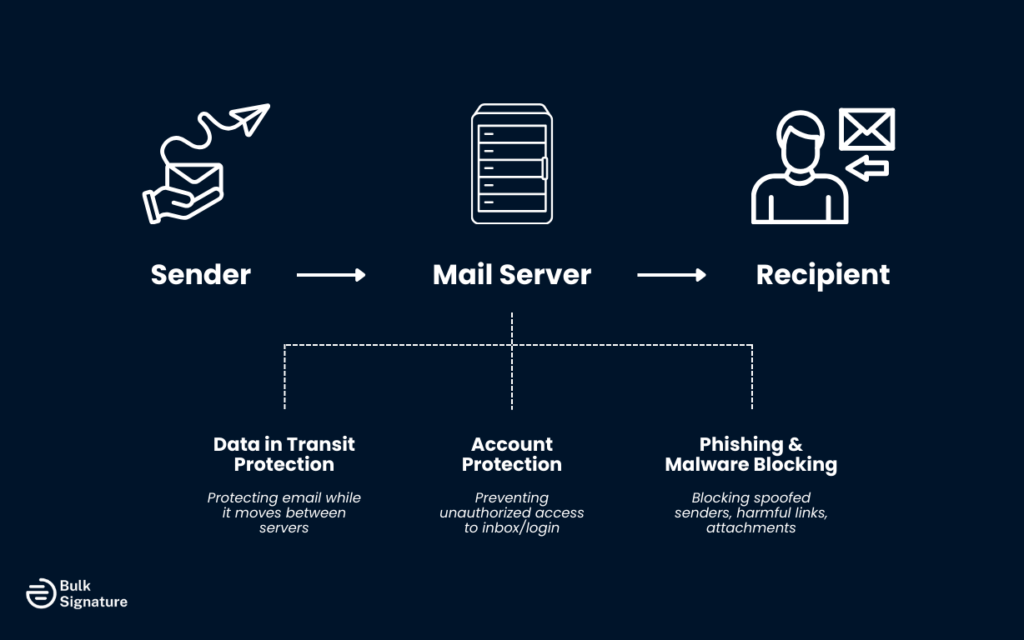
Confusion usually starts to set in when people try to understand the gap between everyday email security and fully encrypted messages protected by cryptographic keys.
Security Features You Get With Most Email Providers
Most popular email service providers already include several built-in security features. These protect a wide range of everyday risks for users, internal teams, and customers.
Transport Layer Security and Message Delivery
Nearly all major providers use Transport Layer Security to encrypt the connection between mail servers. This protects the email while it’s being sent, preventing attackers from easily intercepting or modifying its email content.
Built-in security is why many people already benefit from pretty good privacy, even when using Gmail or Outlook.
Authentication Techniques and Account Protection
Standard email authentication relies on SPF, DKIM, and DMARC. These authentication techniques help confirm that both the sender and the sending domain are legitimate. They play a major role in stopping spoofing and many common phishing attacks.
Users also rely on passwords, login alerts, device verification, and sometimes an SMS code for added protection. Together, these layers control access to the email account itself.
For everyday internal mail, customer conversations, and general email communications, this level of protection works well.
If this part sounds confusing, check out our latest article: SPF vs DKIM: Understanding the Difference and Using Them Correctly.
Where Normal Email Becomes Risky
Security problems begin when sensitive data or sensitive information flows through regular inboxes. This data can include financial records, personal health details, legal contracts, and information tied to regulatory compliance.
TLS protects data while it travels, but many systems store email data in readable form once it reaches the recipient’s mailbox. If attackers gain access through stolen passwords or server breaches, sensitive information can be exposed.
Human Error and Cyber Threats
The most common cause of major incidents is still human error. A weak password. A rushed click. A document forwarded to the wrong email address.
Modern cyber threats exploit this by harvesting credentials, phishing, and hiding malware in malicious attachments. Once attackers access a single email account, they often watch conversations, impersonate the sender, and target other users.
This is how many data breaches, identity theft cases, and even significant financial losses begin.
Encrypted Email vs Standard Email
With standard email, message contents are often readable once they reach the server. With encrypted email, the message stays locked from sender to recipient.
In end-to-end encryption, the sender uses the recipient’s public key to lock the message. Only the recipient’s private key can unlock it. Even the mail servers that handle delivery only see encrypted data.
How End-to-End Encryption Works:
- Only the intended recipient can access the message
- Email data stays encrypted while stored
- Compromised servers cannot expose message contents
- Attachments remain protected along with the message
Some services also encrypt the subject line and other metadata. Others encrypt only the body of the email. Either way, the goal is simple: the wrong person cannot read the message.
This extra protection comes with additional steps for recipient authentication, such as one-time passwords, secure portals, or verification codes.
When Proton-Style Encryption Is Truly Necessary
Full encryption becomes essential when a single exposed message could trigger legal action, regulatory penalties, or major business harm. Use cases include:
- The financial sector
- Healthcare and medical services
- Legal and compliance-driven organizations
- Research, defense, and sensitive investigations
These environments handle high-risk data every day. One leak can lead to lawsuits, compliance violations, and lasting reputational damage to a company’s reputation.
In these cases, encrypted email shifts from an upgrade to a baseline requirement.
Standard Email for Everyday Communication
For many businesses, most daily email communications fall into a low-risk category. Scheduling, sales updates, internal coordination, customer support, and marketing discussions rarely involve sensitive information.
In these cases, standard email security, combined with strong passwords, smart authentication practices, staff awareness, and basic secure email practices, provides reliable protection without slowing daily workflows.
Using encrypted email for every low-risk message often adds hassle without reducing meaningful risk.
Encrypted Email From a User's Point of View
Encrypted email changes the user experience slightly. Some systems work inside familiar email clients. Others require web portals or dedicated apps.
Recipients may need to:
- Open a secure link
- Enter a temporary password
- Confirm access using an SMS code
- Complete additional identity checks
For teams that work with sensitive information daily, this process soon feels routine. For low-risk teams, it can feel unnecessary or overwhelming.
This balance between encryption strength and user-friendly design is often the deciding factor in which tools organizations choose.
Common Misunderstandings About Secure Email
Secure email is powerful, but it does not replace human judgment. Encryption protects message content. It does not stop someone from clicking a malicious link. It also doesn’t prevent social engineering. And most importantly, it doesn’t automatically remove all phishing attacks.
Another frequent misunderstanding involves metadata. Some secure email services encrypt the subject line and routing details. Others do not. Many users assume everything is hidden by default, which is not always true.
Secure email works best when paired with smart user behavior and clear internal policies.
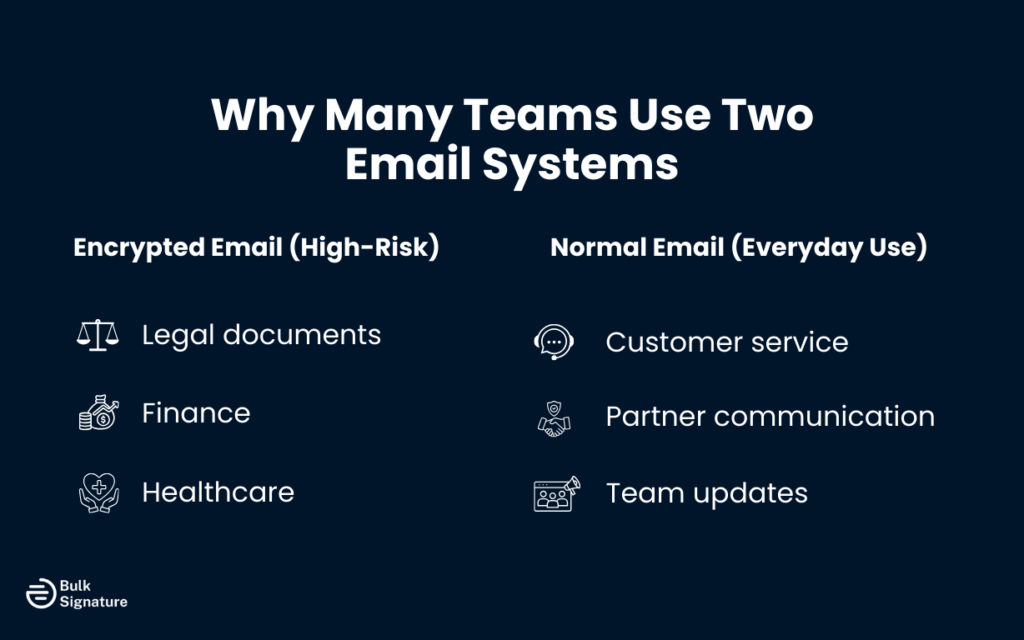
Why Many Teams Use Two Email Systems
Many organizations use a mixed setup:
- Encrypted email for legal, financial, and sensitive workflows
- Normal email for customers, partners, and everyday operations
This approach balances protection with simplicity. Sensitive conversations stay protected, while daily communication remains fast and familiar for users and email clients.
Choosing the Right Secure Email Solution
There is no single best secure email solution for every situation. The right choice depends on:
- How often you handle sensitive data
- The size of your user base
- Your compliance and regulatory compliance requirements
- Daily workflow complexity
- How many additional steps users can tolerate
For example, some organizations only need encrypted email for a small group. Others require it across the entire company. Either way, ease of use often matters as much as raw encryption strength.
Reinforcing Trust with a Professional Email Signature
Security also depends on trust. Before a recipient even reads a message, they decide whether the sender looks legitimate through a quick scan.
A consistent professional email signature supports that trust by confirming the sender, company, job title, and verified contact details before any secure interaction begins.
This becomes especially important when messages include secure links, authentication steps, or portals. Clear identity reduces hesitation and lowers the risk of mistaken distrust.
Tools like BulkSignature support this trust layer by keeping professional signatures consistent across teams and devices. And while it doesn’t replace encryption, a professional email signature does a lot for brand credibility.
Best Practices for Keeping Inboxes Secure
Technology alone cannot prevent every incident. The strongest protection still comes from consistent habits:
- Strong passwords
- Multi-factor authentication
- Careful handling of attachments
- Verifying links and sender addresses
- Avoiding rushed replies in sensitive threads
These behaviors protect both encrypted and non-encrypted systems.
The Real Business Impact of Poor Email Security
Weak email security remains one of the fastest routes to financial losses and long-term reputational damage. A single compromised inbox can lead to fraud, regulatory violations, customer losses, and erosion of public trust.
Email breaches rarely remain contained. They spread quickly across contacts, vendors, payment systems, and partner networks.
Strong email security protects both information and long-term brand stability.
Wrap-Up: A Practical Way of Approaching Email Security
A practical way to think about secure email is to match the level of protection to the level of risk. Everyday messages usually only need strong basic security. Emails that contain sensitive information, financial details, or regulated data likely need an additional layer of protection, such as encryption.
Even with encryption in place, trust still depends on the small details. Clear sender identity, consistent branding, and accurate contact information all affect how secure and legitimate a message feels to the recipient. This is where BulkSignature supports your wider security efforts by keeping email signatures consistent, compliant, and up to date across every mailbox.
Book a free BulkSignature demo and see how consistent email signatures protect your brand and build trust with every message.
Frequently Asked Questions About Secure Email
What is a secure email in simple terms?
A secure email protects both the delivery path and the message itself so only the intended recipient can access the contents.
Does encrypted email stop phishing attempts?
Encrypted email protects the message content, not user behavior. Phishing protection still depends on filters and user awareness.
Is Gmail secure for business communication?
Gmail offers strong transport security and authentication for everyday use. It does not provide default end-to-end encryption for stored messages.
Can secure emails be revoked after they’ve been sent?
Some secure email services support message revoke features, depending on access controls and platform design.
Does encryption protect attachments and subject lines?
Attachments are usually encrypted with the message. Subject line protection depends on the provider being used.


