Your email signature shows up in front of clients, prospects, partners, and suppliers hundreds of times per week. With over 360 billion emails sent daily in 2026, that tiny block of text and branding at the bottom of every message is one of the most-seen pieces of marketing collateral any company produces — yet most organizations still treat it as an afterthought.
The companies getting this right are seeing measurable results. Well-optimized email signatures with strategic CTAs drive up to 40% higher engagement than generic sign-offs, and including a professional headshot increases email response rates by roughly 32%. Meanwhile, organizations using centralized signature management report 85% better brand consistency across teams.
This guide covers the nine email signature design trends shaping 2026, five outdated practices worth dropping, a step-by-step design process, and professional examples by role. If you manage signatures for more than a handful of people, the section on managing email signatures at scale is especially relevant.
Why Email Signature Design Still Matters
Email signatures used to be a name, a title, and a phone number. That approach no longer holds up.
Today, a professional email signature reinforces brand identity with every outgoing message, gives recipients clear ways to continue the conversation across other channels, and supports email marketing strategies through well-placed calls to action. At the same time, it helps legal and IT teams maintain consistent, compliant communication across the organization.
The numbers support this shift. The email signature software market was valued at roughly $1.2 billion in 2024 and is projected to reach $2.5 billion by 2033 — a sign that organizations across industries recognize every email as a brand touchpoint worth managing carefully.
Centralized email signature management tools like BulkSignature make this practical at scale. Instead of every employee building their own signature, marketing and IT can design and deploy company-wide signatures through a single system that connects to Google Workspace or Microsoft 365. For a detailed cost breakdown of managing signatures yourself versus using a dedicated platform, see our DIY vs dedicated email signature platform comparison.
What a Professional Email Signature Includes in 2026
Before getting into trends, it helps to cover the baseline. Regardless of industry, a professional email signature is built from three layers:
Core Details
Every business email signature starts with a clear text block showing the sender’s full name, job title, company name, direct phone number or main office number, and company website. Recipients glance at this block and quickly confirm who they are dealing with, what that person does, and how to reach them outside the email thread.
Brand Elements
Modern signatures also include a company logo in a web-safe format, brand colors applied thoughtfully to accents, links, or divider lines, and a consistent font style that matches wider marketing materials. These elements transform a basic sign-off into a recognizable extension of the brand. For guidance on choosing the right typeface, see our breakdown of the best fonts for email signatures.
Functional Extras
Beyond the basics, many signatures now include social media icons linking to official company profiles, a short legal disclaimer (see our email disclaimer examples for templates), optional pronouns for inclusive communication, and a compact call to action — such as “Book a demo” or “Read our latest case study.” The general principle: give recipients essential details and a single clear next step, wrapped in a design that displays correctly in Gmail, Outlook, Apple Mail, and Yahoo Mail.
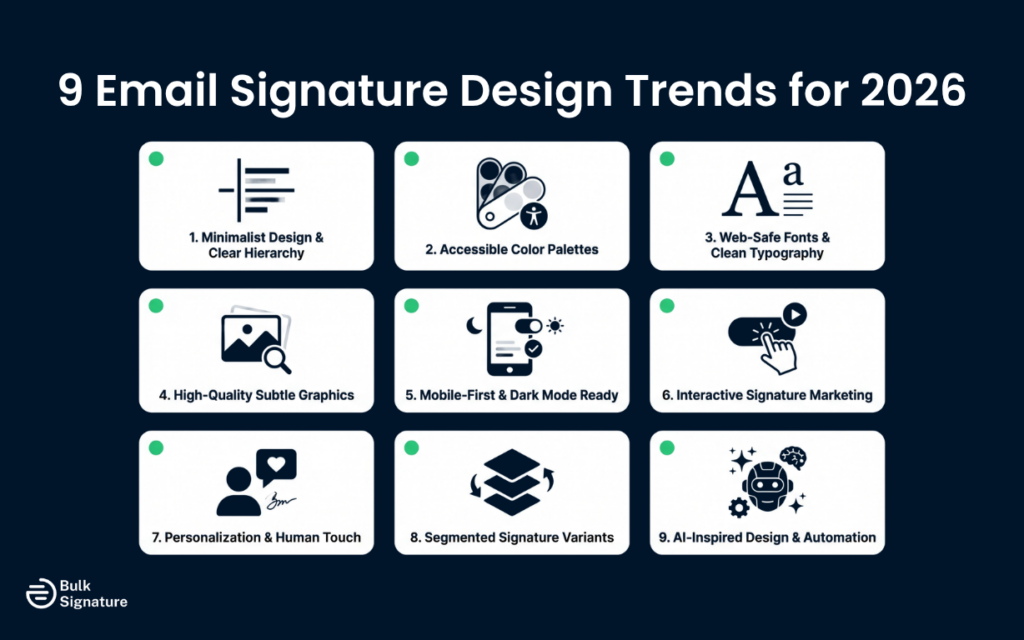
9 Email Signature Design Trends Shaping 2026
Email signature design continues to evolve as expectations around branding, usability, and consistency grow. Here are the nine trends defining how companies approach signatures this year.
1. Minimalist Layouts With Clear Visual Hierarchy
Minimalist email signature design stays dominant in 2026. Companies want signatures that feel light, load quickly, and render reliably on laptops and mobile phones alike.
A typical minimalist signature uses a single column of text, restrained color, generous white space, and a legible font at 14–16px. Full name, job title, and company name sit at the top — sometimes in a slightly larger or bolder weight. Contact details follow, then social links and CTAs below that. Left-aligned, single-column designs consistently outperform multi-column layouts; in one A/B test, they generated 3x higher CTA click rates because they scan more naturally on mobile.
2. Accessible Color Palettes and Dark Mode Support
Muted color palettes continue to define professional email signatures. Most designs rely on a single primary brand color, a neutral shade for body text, and an optional accent for links or icons. Contrast ratios of at least 4.5:1 between text and background are now standard to ensure readability across light and dark themes.
Dark mode deserves special attention. It is now the default on Apple Mail iOS, Gmail mobile, and Outlook for Microsoft 365. A signature that breaks in dark mode — logos that disappear against dark backgrounds, text that becomes invisible — is a brand liability. Logos need transparent backgrounds, and text colors should remain visible against both white and near-black backgrounds.
3. Web-Safe Fonts and Consistent Typography
An email signature that looks polished on your screen can render poorly in a client’s Outlook desktop app or webmail. To prevent this, most organizations stick to web-safe fonts — Arial, Helvetica, Verdana, Georgia, and Times New Roman — that display consistently across all email clients and devices.
Current best practice uses one or two font styles at most. Job titles might appear slightly lighter or smaller than names. Company names sometimes carry a subtle weight or color shift. The goal is keeping reading effortless, especially on smaller screens where every pixel matters.
4. Purposeful Images Over Decorative Ones
Images remain common in modern email signatures, but the approach has become far more deliberate. Teams now focus on a well-optimized company logo, a compact headshot for client-facing roles (professional headshots increase response rates by about 32%), and simple flat social media icons. Each element is sized to enhance the signature without overwhelming it.
Optimization is critical. Image files should be clear but lightweight — keep total image weight under 50 KB. Oversized or poorly compressed graphics slow loading, increase email size, and may trigger spam filters. For detailed sizing guidance, see our signature size and layout guide.
5. Mobile-First, Responsive Design
Over 60% of business emails are now opened on mobile devices at least part of the day. Signatures that look perfect on desktops can shrink into unreadable blocks on phones.
Current best practice means designing with mobile in mind first: keep signature width under 600 pixels, avoid multi-column layouts that collapse unpredictably, and maintain enough spacing between lines and clickable elements to support easy tapping. Line height of at least 1.5 and a minimum font size of 14px both help readability on small screens.
6. Email Signature Marketing With Subtle CTAs
Email signature marketing has moved into the mainstream, but implementation stays subtle. Rather than filling the design with flashy promotions, the most effective approach is adding one interactive element that aligns with current marketing campaigns. Top-performing CTAs include calendar booking links (averaging a 26% click rate), digital business card links (28%), and resource offers like case studies or reports (19%).
These elements give recipients gentle nudges without disrupting the main email message. Over time, they drive steady traffic to key marketing materials and support wider campaigns. For tracking, UTM-tagged signature links let you measure performance in Google Analytics.
7. Personalization and Human Touch
Even in large organizations, recipients respond best when they feel they are communicating with a real person. Many modern email signatures now include a professional profile photo, a short tagline beneath the job title, and links to personal professional profiles like LinkedIn.
This trend blends with the broader personal branding movement. Employees in consulting, sales, and advisory roles increasingly treat the email signature like a digital business card that supports both the company and their individual professional reputation. The balance to strike is personality within a consistent structure, so every signature still looks like it belongs to the same team.
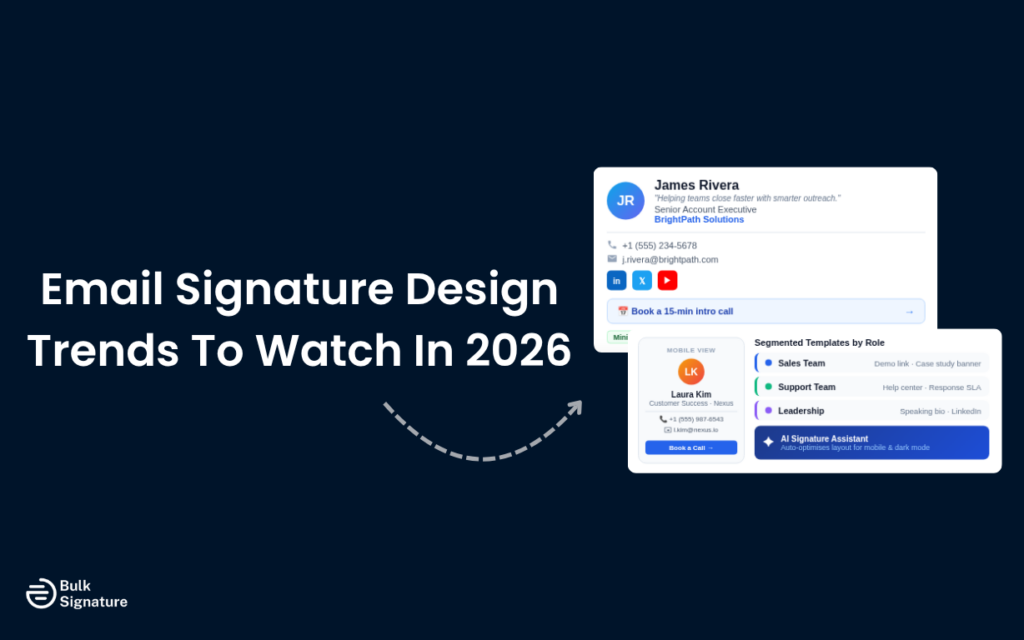
8. Segmented Templates by Role, Region, and Campaign
One size rarely fits all. A support agent and a CFO need different signature details. That is why organizations are moving toward segmented signature templates based on role, department, region, or active campaigns.
Customer support signatures might emphasize help center links and contact details. Sales signatures might lead with demo booking links and social proof. Leadership signatures might highlight board roles or publications. Email signature management tools like BulkSignature make this practical — marketing can design several templates and assign each to the right user groups through an editor that syncs with Google Workspace or Microsoft 365.
9. AI-Assisted Design and Smart Automation
Nearly half of organizations (48.6%) now believe AI can improve email signature engagement through personalization, and adoption is growing fast. AI tools can automatically optimize layouts for mobile and desktop, suggest calls to action based on role or campaign context, and adapt formatting to meet the requirements of different email platforms.
BulkSignature’s AI email signature assistant makes it possible to generate, refine, and scale signatures quickly without building dozens of templates manually. This reduces the trial-and-error that slows down signature projects and helps teams launch faster without sacrificing consistency.
5 Outdated Practices to Drop in 2026
Knowing what is in matters — but knowing what is out can save even more time. These five practices are worth retiring.
1. Heavy Image-Only Signatures
Using a single large image as your entire email signature prevents clickable elements, hampers deliverability, and does not scale across devices. In 2026, signatures should be HTML-rich, responsive, and contain labeled clickable links. The image-as-signature shortcut simply does not work for organizations that care about consistency and deliverability.
2. Static One-Size-Fits-All Templates
Identical signatures for every employee in every department across every region are no longer fit for purpose. Clients and prospects expect context — different CTAs for sales versus support, different languages for different markets. One global template applied everywhere signals a lack of attention to detail.
3. Cluttered Multi-Column Layouts
Two- and three-column signature layouts were popular when most email was read on desktops. With 60% of business email now opened on mobile, multi-column designs collapse unpredictably and produce illegible blocks on smaller screens. Single-column, vertically stacked layouts render more reliably and are easier to scan.
4. Custom or Decorative Fonts
A signature using a niche custom font may look on-brand to the sender but render as a generic fallback in the recipient’s email client. Worse, it can look visually inconsistent or outright broken. Stick to web-safe fonts — consistency across clients is worth more than stylistic flair in a signature block.
5. Ignoring Signature Analytics
If you paste contact details into a signature footer and never revisit them, you are missing one of the easiest marketing channels to measure. In 2026, treat signatures as part of the marketing tech stack. Track click-throughs from CTA banners, measure banner swap performance, and integrate signature analytics into broader dashboards.
How to Design an Email Signature Step by Step
Whether you are building a personal signature or refreshing signatures across an entire organization, this process keeps everything aligned.
Step 1: Define Required Elements
Start by listing the essential details every signature must include: sender’s full name, job title, company name, direct phone number, and website. Additional elements — social links, legal disclaimers, a CTA — can be layered on where relevant. Establishing this baseline creates a consistent standard that guides every new design.
Step 2: Choose Your Layout
Many teams opt for a horizontal layout with a logo or headshot on one side and text stacked on the other. Others prefer a fully vertical, single-column structure — which tends to render more reliably on mobile. Define the structure early so spacing, alignment, and readability stay consistent.
Step 3: Select Fonts and Colors
Choose a web-safe font that looks clean across different screens and email clients. Pair it with a simple color scheme: dark gray or black for body text, one primary brand color for links or labels, and an optional accent for icons. Keep the palette aligned with your broader marketing materials.
Step 4: Add Branding and Social Links
Add your company logo (sized for fast loading and crisp display) and social media icons for the accounts that matter most — usually LinkedIn, X, or Instagram. Treat these as secondary elements. Core contact details should always be findable at a glance.
Step 5: Build It
Use an email signature generator to assemble the design, or work inside a dedicated editor that connects directly to your email platform. For individuals, a free generator is often the fastest route. For larger teams, a centralized management tool gives marketing and IT more control and keeps everything secure.
Step 6: Test Across Clients and Devices
Send test emails to Gmail, Outlook (desktop and web), Apple Mail, and at least one mobile device. Confirm that links work, images load, and formatting holds. This step also catches technical issues that could affect deliverability — like broken image links or an unbalanced text-to-image ratio.
Step 7: Roll Out
For small teams, share HTML versions or copy-paste instructions for each email client’s signature settings. For larger organizations, a tool like BulkSignature manages the rollout from one dashboard, so every user gets the right signature without manual work.
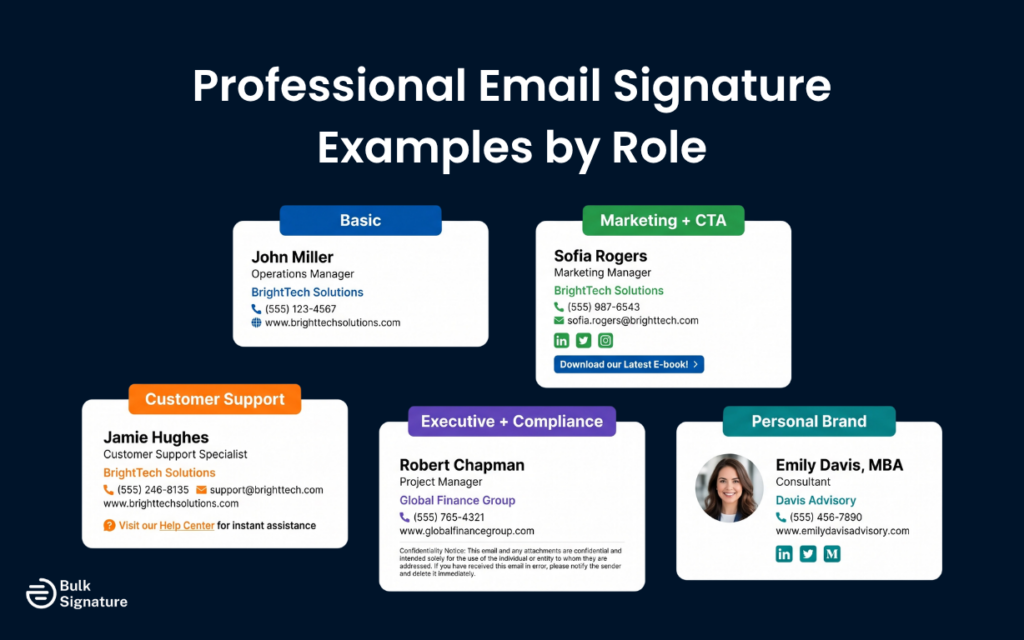
Professional Email Signature Examples by Role
Here are practical examples showing how these trends apply to different roles. Adapt these to your own team’s brand and structure.
Example 1: Basic Professional Signature
Works well for internal communication or straightforward professional correspondence.
John Miller
Operations Manager | BrightTech Solutions
Office: +1 (555) 123-4567 | Mobile: +1 (555) 123-4568
www.brighttech.com
Clean and functional. No graphic elements needed — still professional in any email client.
Example 2: Marketing Manager With CTA
Marketing roles benefit from a slightly more dynamic signature. For more email signature quote ideas, see our full collection.
Sofia Rogers
Marketing Manager | BrightTech Solutions
+1 (555) 987-6543 | s.rogers@brighttech.com
www.brighttech.com
Follow us: [LinkedIn] [Twitter] [Instagram]
[CTA Banner: “See our latest customer story →”]
Example 3: Customer Support
Support teams prioritize accessibility and clear paths to help.
Jamie Hughes
Customer Support Specialist | BrightTech Solutions
Support Line: +1 (555) 777-8888 | support@brighttech.com
www.brighttech.com/support
[Company Logo]
Need help faster? Visit our Help Center or start a Live Chat.
Example 4: Executive With Compliance Text
Leaders in regulated industries often need legal language. For disclaimer templates, see our guide on professional email disclaimers.
Robert Chapman
CFO | Global Finance Group
Direct: +1 (555) 987-6543 | www.globalfinance.com
[Company Logo]
Confidentiality Notice: This message may contain privileged information intended only for the recipient. Unauthorized use, dissemination, or copying is strictly prohibited.
Example 5: Sales Rep With Booking Link
Sales signatures convert best with a single clear action — a demo or meeting booking link. This format consistently outperforms cluttered multi-link designs.
Alex Kim
Senior Account Executive | BrightTech Solutions
+1 (555) 654-3210 | alex.kim@brighttech.com
[Professional Headshot + Logo]
[LinkedIn]
📅 Book a 15-minute intro call →
Technical Specs That Prevent Display Issues
Even the best design fails if technical details fall through the cracks. These specifications prevent the most common rendering problems:
- Maximum width: 600 pixels. Wider signatures break on mobile and get clipped in Outlook’s reading pane.
- Total image weight: Under 50 KB. Heavy images slow loading and can trigger spam filters.
- Headshot dimensions: 100×100 px (or similar square crop). Large photos are unnecessary and add file weight.
- Logo dimensions: Maximum 200×50 px. Sized for clarity without dominating the signature.
- Font size: 14–16 px for body text, 16–18 px for names. Anything smaller becomes hard to read on mobile.
- Line height: 1.5. Provides comfortable spacing for readability.
- Fonts: Use web-safe fonts — Arial, Helvetica, Verdana, Georgia, Times New Roman.
- Colors: Limit to 2–3 brand colors. Maintain a minimum 4.5:1 contrast ratio for accessibility.
- HTML: Use tables with inline CSS — not divs or external stylesheets. Email clients rewrite or strip complex layouts.
- Links: Use HTTPS URLs exclusively. HTTP links may trigger security warnings in some email clients.
- Total signature size: Under 100 KB including images. Gmail clips emails that exceed 102 KB total.
If you manage signatures across multiple domains or regions, document which templates are active, which campaigns connect to them, and how often you plan to review details. For comprehensive sizing guidance, see our email signature size and layout guide.
Managing Email Signatures Across an Entire Organization
For organizations with more than a small handful of employees, centralized email signature management is the clear path forward. Platforms like BulkSignature connect directly to your email infrastructure and let you:
- Create standard signature templates with locked branding elements
- Assign specific templates to departments, regions, or roles
- Update signature details across the entire organization from one dashboard
- Run campaigns using banners or CTAs inside company email signatures
- Use AI to generate templates, optimize layouts, and adapt signatures for different teams
Instead of asking each employee to create their own signature — and hoping they get the font, logo placement, and legal text right — you control brand identity, compliance, and message consistency in one place. That control also helps deliverability, since every outgoing email looks intentional and aligned rather than ad-hoc.
Ready to see it in action? Book a free BulkSignature demo and see how easy it is to keep every email on brand.
Frequently Asked Questions
How often should we update company email signatures?
Review at least twice a year — once to refresh design details and rotate marketing banners, and once to confirm that job titles, phone numbers, and links are still accurate. Many teams also time updates around rebrands, product launches, or major campaigns.
What must a professional email signature always include?
At minimum: full name, job title, company name, direct phone number, and website link. After that, add a company logo, social media icons, any required legal text, and one compact call to action.
How long is too long for an email signature?
If someone has to scroll past your signature, it runs too long. Aim for three to six lines of text plus a logo or headshot and a small set of icons. Long disclaimers should sit in a smaller font size or link to a page on your website so they do not crowd essential details.
Do free email signature generators work for large teams?
A free email signature generator works well for individuals or small teams. Once you manage dozens or hundreds of users, free tools become difficult to control. Centralized management platforms are better suited because they let admins update signatures organization-wide with consistent branding and compliance.
How do we make sure signatures display correctly across all email clients?
Keep the HTML simple (tables with inline CSS), use web-safe fonts, and test in Gmail, Outlook, Apple Mail, and Yahoo Mail. Send test emails to both desktop and mobile devices. This catches rendering issues and image-loading problems before signatures go live across the organization.
Can email signatures affect spam filters or deliverability?
Yes. Very heavy image use, broken links, or messy HTML can trigger spam filters. Large images sometimes push emails into promotions or junk folders. Keep the layout clean, use only well-optimized images, and avoid aggressive promotional language in banners to maintain deliverability.
What is the best way to roll out signature updates to everyone at once?
For organizations on Google Workspace or Microsoft 365, the most efficient route is a centralized management tool like BulkSignature. It connects to your existing email platform, lets you design standard templates, and applies them to users in bulk — no manual copy-paste work required.
How can AI help with email signature design?
AI can generate layouts, suggest CTAs tailored to different roles, and optimize formatting for different email clients automatically. It also speeds up creating content variations for different audiences and campaigns without requiring dozens of manual template builds.