
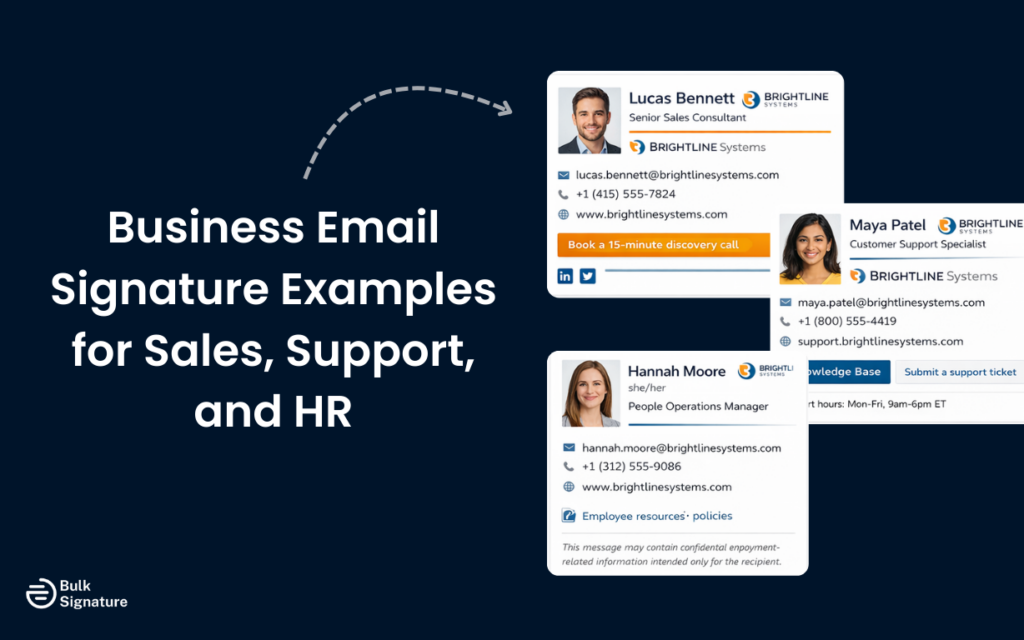
Have you ever noticed how a sales rep’s email signature can look completely different from the one used by HR, despite both coming from the same company?
It makes sense to customize signatures by role. After all, different teams often have completely different communications objectives. The real question, though, is whether that flexibility actually helps brands, or whether it leads to too many inconsistencies you can never fully control.
In this guide, we’ll show you how to tow this line with business email signature examples for different corporate teams (Sales, Support, and HR). You’ll see what works for each role, why certain elements matter, and how to design business email signature templates that support both individual communication goals and your company’s overall brand.
Why Different Roles Need Different Professional Email Signature Templates
A professional email signature serves multiple purposes beyond simply providing contact details. It establishes credibility, reinforces brand recognition, and guides recipients toward the next step in their relationship with your organization. However, what constitutes the “next step” varies significantly depending on who’s sending the email and why.
For example:
- Sales professionals are often trying to move prospects through a pipeline, which means their signatures should facilitate engagement and make it easy to schedule meetings or learn more about products.
- Support teams need to provide quick access to help resources and multiple contact options for urgent issues.
- HR professionals must balance professionalism with approachability, so their signatures should make employees feel comfortable reaching out about sensitive topics.
These different objectives require different signature elements, but they still all need to operate within a consistent framework that maintains your company’s overall brand image. The following sections break down what works for each role and how to implement these approaches effectively.
Professional Email Signature Examples for Sales Teams
The most effective sales signatures include several key components, including:
- Your full name and job title to establish who you are and your role in the organization.
- Company name and logo to enhance credibility.
- A professional headshot, which can add a personal touch and make email communications feel more human.
- Your direct phone number or direct line, so potential customers or clients can reach you immediately.
Beyond the basic contact details, sales signatures also benefit from including social channel links to platforms like LinkedIn, where prospects can get a feel for your personal brand and learn more about your background and expertise.
What to Include and What to Avoid
Sales email signatures should walk a fine line between being comprehensive and remaining focused.

Make sure to include your company logo and brand colors to reinforce brand identity, but avoid cluttering the signature with too many visual elements. Social media icons should link to your professional profiles, not personal accounts. And if you include a professional headshot, make sure it’s a flattering headshot with good lighting and a professional background.
What you should avoid is equally important. Don’t include multiple phone numbers or email addresses, as this creates confusion about the best way to reach you. You should also avoid animated email signature elements that might trigger spam filters or display incorrectly across different email clients. It’s also worth keeping quotes or personal mottos out of your signature, as they can come across as unprofessional in a business context.
Optimizing Sales Signatures for Conversion
The best sales email signatures include subtle elements that encourage engagement.
For example, a clickable link to your calendar for easy meeting scheduling removes friction from the sales process. Links to recent case studies or client testimonials can also help provide social proof.
Some sales professionals also like to include a small promotional banner highlighting a current marketing campaign or upcoming webinar, though this should be used strategically and updated regularly to remain relevant.
More on email signature marketing strategies here: What Is an Email Signature Ad, and How Can You Use It for Marketing?
Email Signature Design Examples for Support Teams
Support team signatures serve a completely different purpose than sales signatures. Here, the main priority is making it easy for customers to get help through their preferred channel, while also projecting competence and reliability.
Here’s what to include:
- Full name and professional title to clearly establish your role and expertise.
- Company name and logo.
- Direct phone number so customers can reach you quickly when real-time support is needed.
- Business email address (even if it’s the sending address) to make it easy for customers to save or reference later.
Beyond basic contact information, support email signatures also benefit from including links to self-service resources. This might be a link to your knowledge base, FAQ section, or community forum.
Some support teams also like to include their support ticket system URL, making it easy for customers to check the status of existing issues. Social media channels where your company provides support, such as a support handle on X, can also be valuable additions.
Creating Approachable Support Signatures
The tone of a support signature should be professional but approachable. While you want to project competence, you also want customers to feel comfortable reaching out when they need help. A professional headshot can help with this, putting a face to the name and making the interaction feel more personal.

Some support teams include their working hours or time zone in their signatures, which helps set expectations about response times. If your support team operates across multiple time zones, this information prevents frustration when customers don’t receive immediate responses outside of business hours. An email disclaimer about expected response times can also be helpful, though it should be brief and not dominate the signature.
Technical Considerations for Support Signatures
Support signatures need to work flawlessly across all platforms, as your customers use a wide variety of email clients and devices. Use standard fonts that display consistently everywhere, avoiding custom typography that might not render correctly.
It’s also important to make sure your email signature maintains responsive design principles, so it adapts easily to different screen sizes.
Business Email Signature Examples for HR Teams
HR signatures should always prioritize professionalism, approachability, and online accessibility.
Here are the essential elements to include:
- Full name and job title to clearly establish your role within the organization.
- Contact details, including your direct phone line and business email, so people know exactly how to reach you.
- Company logo to reinforce trust and brand consistency.
- Required disclaimers or legal notices, making sure they’re placed at the bottom in a smaller font to support compliance without distracting from key information.
Unlike sales signatures, HR signatures typically don’t need social links, unless you’re specifically recruiting or building an employer brand on platforms like LinkedIn.

Many HR professionals include their pronouns in their signatures as part of creating an inclusive workplace culture. This small addition signals that your organization values diversity and makes it easier for employees to use correct pronouns when referring to you.
Looking for more guidance on incorporating pronouns into your HR email signatures? Read this: Should You Include Pronouns in Email Signature Copy?
Adapting HR Signatures for Different Functions
HR encompasses many different functions, and signatures can vary depending on your specific role.
For example:
- Recruiters might include social media links to their LinkedIn profiles and a call to action encouraging candidates to connect.
- Benefits administrators might include links to the employee benefits portal or open enrollment information during relevant periods.
- Employee relations specialists might emphasize multiple ways to reach them, recognizing that some employees prefer phone calls while others prefer email for sensitive discussions.
The key is to think about what your specific audience needs from your signature. If you primarily work with current employees, your signature should make it easy for them to reach you and access relevant HR resources. If you’re in recruiting, your signature should facilitate connection with potential candidates and make it easy for them to learn more about opportunities at your organization.
Maintaining Professionalism in HR Signatures
HR signatures should avoid anything that might seem overly casual or unprofessional. While a professional headshot can help make you more approachable, make certain it’s a professional profile picture with appropriate attire and background. Avoid animated elements or excessive color, as these can undermine the serious nature of many HR conversations.
Your signature should also ensure compliance with any legal requirements specific to HR communications. Some organizations require specific legal disclaimer language in HR email messages, particularly those dealing with benefits, policies, or employment terms.
Managing Company Email Signatures Across Different Roles at Scale
Creating the right email signature for each role is one thing. But keeping those signatures consistent across a growing organization is a whole different story.
One approach is to let employees manage their own signatures (manually or with an email signature generator). But this can get messy fast, resulting in signatures that look and feel completely different, even when specific brand guidelines are in place.
Centralized email signature management tools (like BulkSignature) offer a cleaner, more efficient solution. For example, with BulkSignature, you can create role-specific templates for different teams across your company and automatically apply them organization-wide. So when roles or branding assets change, signatures update instantly (which can save you a ton of time and admin headaches).
If you’d like to see what this could look like for your team, we’d love to help. Book a free BulkSignature demo with us today to see centralized email signature management in action!
Frequently Asked Questions About Business Email Signatures
What should be included in a basic email signature?
A basic email signature should include your name, job title, company name, and clear contact details so people know who you are and how to reach you.
If you add social media links, stick to professional or company accounts, and include your website URL so recipients can easily learn more. Use legible, web-safe fonts and a simple color palette that matches your brand.
What is the best way to make my email signature mobile-friendly on every email platform?
The best way to make sure your email signature is mobile-friendly is to test it across major email clients on mobile, including Microsoft Outlook, Gmail, and Apple Mail.
What to Look For: Make sure all text remains readable, images scale correctly, and website links or social icons are large enough to tap easily on smaller screens.
How is a basic email signature generator different from a centralized email signature management platform?
A basic email signature generator helps individuals create their own email signature quickly by providing simple templates and formatting tools. Because each person has to manage their own setup and updates, this type of tool is best suited for individuals, freelancers, or very small teams with minimal branding or compliance requirements.
A centralized email signature management platform, on the other hand, is built for growing teams and businesses. Instead of relying on everyone to keep their signature details up to date, everything (like branding elements, contact details, role-based templates, and campaign banners) is managed in one place by a central admin team.


