
If you’ve started researching email signature software, you’ve almost certainly come across Exclaimer and CodeTwo. They’re two of the most visible names in the space, and they both have strong track records.
However, if you work in IT, you’ll already know that “well-known” and “right for your organization” aren’t always the same thing.
Exclaimer and CodeTwo are built primarily for enterprise environments. They come with the features, the pricing, and the complexity that enterprise environments tend to require. If your organization needs that level of sophistication, they’re worth evaluating seriously. But if your organization doesn’t, they can feel like a lot of overhead for a problem that doesn’t need a complicated solution.
So in this article, we’re comparing both platforms across the dimensions that matter most: features, pricing, support, and the types of organizations each tool is best suited for. We’ll also bring our own platform, BulkSignature, into the conversation, so you’ll be well-prepared to make a decision that fits your team and IT setup.
Quick Answer: BulkSignature is the best fit for most companies: it supports Google Workspace and Microsoft 365 equally, installs client-side so mail never leaves your platform, syncs names and titles from the directory, includes banner campaigns with click tracking on the standard plan, and costs $0.88 per user per month on annual billing with a 10-user minimum. Choose CodeTwo if you are Microsoft-only and specifically want server-side stamping. Choose Exclaimer if mail must be stamped on devices that cannot hold a signature and you have budget for its Standard or Pro tier ($1.45 to $1.75 per user per month). Pricing below is from each vendor’s pricing page, October 2026.
Exclaimer, CodeTwo, and BulkSignature: What Each Tool Is Built For
Before we get into the specifics of each exclaimer alternative, it helps to understand the positioning of each platform. Here’s a quick breakdown of who each platform is really designed for.
Exclaimer: Enterprise-Grade, Marketing-Focused
Exclaimer has been in the email signature space for decades, and it’s evolved into a platform aimed squarely at larger organizations.
The platform is often described as an email signature tool, but in reality, it leans more heavily into marketing use cases, with signatures becoming a distribution channel for campaigns, complete with banners, tracking, and integrations with CRM systems. That positioning makes sense in companies where email volume is high, and marketing teams want another surface to work with.
In terms of integrations, it supports Microsoft 365, Google Workspace, and Exchange, and it’s built to operate across complex environments where multiple departments are involved in managing communications.
The primary tradeoff is that it can feel a bit excessive if you’re not actively using those marketing features. And for teams who just want consistent signatures, the added layers can slow things down rather than help.
CodeTwo: IT-First, Microsoft-Centric
CodeTwo comes from a different angle. It’s tightly aligned with the Microsoft ecosystem and is built with IT administrators in mind.
Where Exclaimer expands outward into marketing, CodeTwo goes deeper into control and reliability. It integrates closely with Microsoft 365 and Exchange, and the experience reflects that focus, making it a strong fit in environments where Microsoft is already central and where precision matters more than flexibility.
With CodeTwo, you’re less likely to see emphasis on analytics or promotional features, and more of a focus on making sure signatures behave exactly as expected across users and devices.
For organizations that value that level of control, it works well. For others, it can feel overly technical for what is, at its core, a simple requirement.
BulkSignature: Simple, Practical, and Easy to Roll Out
BulkSignature is built for organizations that want centralized email signatures without having to introduce another complex system into their stack. The focus is on getting signatures consistent across a team quickly, without requiring ongoing management or specialized knowledge.

As a platform, it supports both Microsoft 365 and Google Workspace. Setup is straightforward, and day-to-day use doesn’t depend on IT involvement (though more advanced functionality is there if you need it).
That makes it a practical option for smaller teams or growing companies where the goal is consistency and control, not extensive marketing campaign management or deep IT customizations.
Key Features: What Each Platform Does Well
All three platforms share a common foundation. They all let you create signature templates, apply them centrally across your organization, and manage updates without relying on individual employees to configure their own settings. That’s the core value proposition of any email signature management tool.
Where they diverge, though, is in the advanced features layered on top of that foundation.
Exclaimer: Marketing, Campaigns, and Analytics
Exclaimer’s feature set is oriented heavily toward sales and marketing teams. It includes campaign banner management, built-in analytics for tracking engagement, and integrations with CRM platforms like Salesforce and HubSpot. It also supports conditional signature rules, which allow you to apply different professional templates based on attributes like department, location, or seniority.
CodeTwo: IT Control and Advanced Configuration
CodeTwo covers similar territory but adds a few capabilities that Exclaimer doesn’t offer.
For example, it includes centralized management of automatic replies and out-of-office messages, which is useful for IT teams that want to manage that function alongside signatures rather than separately. It also includes one-click customer satisfaction surveys with built-in analytics and source code editing in the signature editor for teams that need full layout control.
The platform also syncs user data every 15 minutes and allows administrators to trigger manual syncs in real time, which is considerably faster than Exclaimer’s twice-a-day sync cycle.
BulkSignature: Brand Consistency, Automation, and Ease of Use
BulkSignature sticks to the essentials, allowing you to create a set of approved signatures, apply them across your team, and keep everything up to date without chasing people to fix theirs.
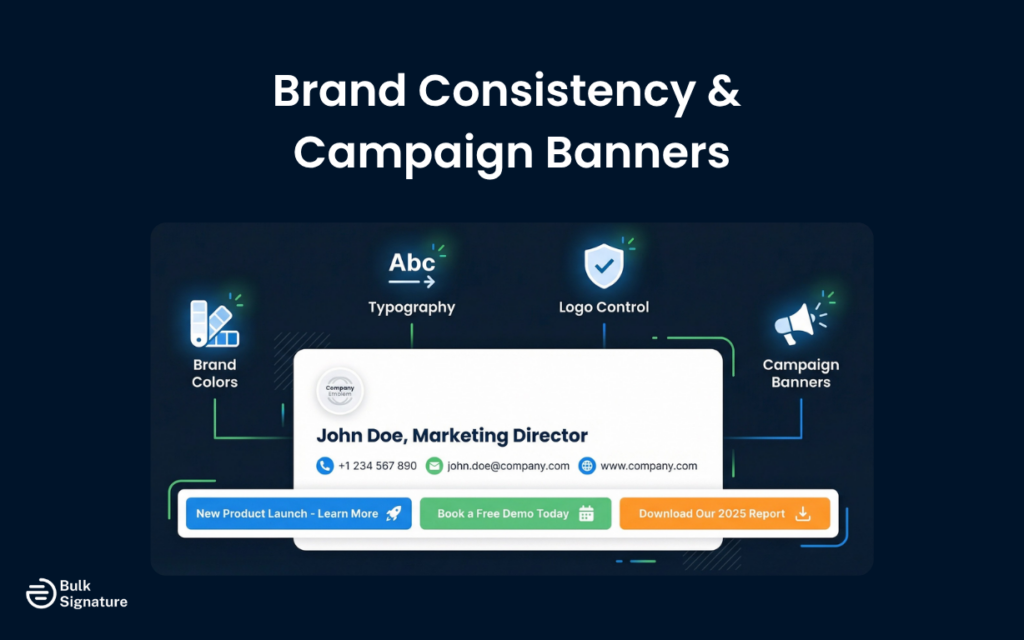
You can also add campaign banners, control who can edit what with role-based permissions, and sync employee data directly from Microsoft 365 or Google Workspace. Once it’s all set up, signatures update automatically, so you don’t have to rely on employees to update anything themselves. It’s also built to be quick to roll out and easy to manage day to day, even if you don’t have a dedicated IT person handling it.
All in all, BulkSignature allows you to still get the branding and IT control you need, just without the extra layers that tend to slow things down.
The table below summarizes the key features across each platform.
BulkSignature vs Exclaimer vs CodeTwo: Key Features Compared
|
Feature |
BulkSignature |
Exclaimer |
CodeTwo |
|
Centralized signature management |
Yes |
Yes |
Yes |
|
Microsoft 365 support |
Yes |
Yes |
Yes |
|
Google Workspace support |
Yes |
Yes |
Limited (based on CodeTwo’s published feature set as of April 2026) |
|
Campaign banners |
Yes |
Yes |
Yes |
|
CRM integrations |
No |
Yes |
Yes |
|
Built-in analytics |
Yes |
Yes |
Yes |
|
Automatic reply management |
No |
Yes |
Yes |
|
Source code editing |
Yes |
Yes |
Yes |
|
Directory sync speed |
Automatic syncs every 24 hours, manual syncs apply immediately. |
Automatic syncs twice per day, manual syncs can take up to 60 minutes to process (Outlook) and up to three hours (Gmail). |
Automatic syncs every 15 minutes, and administrators can configure the sync interval. |
|
Role-based access control |
Yes |
Yes |
Yes |
Pricing: What You’re Actually Paying For
On the surface, pricing across these platforms looks pretty similar. But when you look a little closer, the way each one structures plans and features is quite different. Here’s a quick look at how pricing works for each platform.
Pricing at a glance (vendor pricing pages, October 2026)
| Tool | Price per user per month | Minimum | What is included at that price | Trial |
|---|---|---|---|---|
| BulkSignature | $0.88 billed annually ($1.10 monthly); volume quote above 500 users | 10 users | Everything: directory sync, OU and group assignment, banner campaigns, click tracking, 24/5 support | 14 days, no card, no contract |
| Exclaimer | $0.90 Starter, $1.45 Standard, $1.75 Pro, billed annually; monthly billing available | 10 users | Campaigns, analytics and advanced rules sit in Standard and Pro | 14 days, no card |
| CodeTwo | $1.22 at 10 users on yearly billing, sliding to $0.73 at 500; monthly about 10% more | 10 users | All features in one tier; Microsoft 365 only | 14 days, extendable to 21 |
| Monthly cost, annual billing | 50 users | 200 users | 500 users |
|---|---|---|---|
| BulkSignature | $44 | $176 | Volume quote (lower per-user rate than list) |
| Exclaimer Standard | $72.50 | $290 | $725 |
| CodeTwo | $60.50 | $190 | $365 |
At every size most companies are, BulkSignature is the lowest cost with campaigns included. CodeTwo closes the gap above 300 users but remains Microsoft-only. Exclaimer costs 60 to 65 percent more than BulkSignature at the tier that has the features buyers actually want.
Exclaimer: Tiered Plans with Contract Commitments
Exclaimer lists $0.90 per user per month for Starter, https://exclaimer.com/pricing/.45 for Standard and https://exclaimer.com/pricing/.75 for Pro, billed annually, with monthly billing also offered. The Starter price is the one in the headline, but campaigns, analytics and advanced rules are in Standard and Pro, so most buyers pay https://exclaimer.com/pricing/.45 or more. For organizations that want to pay month-to-month with the flexibility to cancel, those terms are worth factoring into the decision.
CodeTwo: Flat Pricing with Everything Included
CodeTwo operates on a single pricing tier that includes all features. The price slides with volume: https://www.codetwo.com/email-signatures/pricing#scrollTo.22 per user per month at 10 users on yearly billing, down to $0.73 at 500 users, with monthly billing about 10% higher. There are no feature tiers to navigate, and support is included at the same level regardless of how much you pay. Monthly subscriptions are also available and can be canceled at any time. For organizations that want predictable costs and don’t want to manage a tiered plan structure, that simplicity has real value.
BulkSignature: Simple, Predictable, and Scales with You
BulkSignature is priced to be accessible for teams of all sizes, without the enterprise overhead built into Exclaimer and CodeTwo’s pricing models.
Plans start at a minimum of 10 users for $8.80 per month, which makes it an easy entry point for small teams. At the other end, organizations with 500 or more users get a volume rate and a written quote within one business day, so the per-user cost falls as you scale.
All features are included by default. That means there are no tiers to unlock or upgrades needed to access core functionality. You don’t have to pay extra for things like directory sync or role-based controls. What you see is what you get.
There are also discounts available for educational institutions and non-profits, which makes it a practical option for organizations that need to stay budget-conscious without sacrificing control.
Install model: client-side vs server-side
This difference decides what the vendor can see, how long your security review takes, and whether mail delivery depends on a third party.
| BulkSignature (client-side) | Exclaimer (server-side cloud) | CodeTwo (server-side, client-side option) | |
|---|---|---|---|
| How the signature gets applied | Written into each user’s Gmail or Outlook settings through admin-approved API scopes | Outgoing mail is routed through Exclaimer’s servers and stamped | Routed through CodeTwo’s Azure service, or applied by an Outlook add-in |
| Vendor sees email content | No | Yes, in transit | Yes in server-side mode |
| Sender sees the signature while writing | Yes | Not by default | Yes in client-side mode |
| Signatures on devices with no signature setting | No | Yes | Yes in server-side mode |
| Mail-flow dependency | None | Yes | Yes in server-side mode |
| Google Workspace | Yes, first-class | Yes | No |
If your email is sent from Gmail and Outlook on ordinary devices, which is nearly every company, client-side gives you a shorter procurement review and no risk of a vendor outage delaying mail. Server-side only earns its place when you must stamp mail from systems that cannot hold a signature.
Support: What Happens When You Need Help
Support quality is one of the most consistent differentiators between these platforms in independent user reviews, and it’s worth paying attention to.
Exclaimer’s support model is tiered. Phone support is only available for Pro plans, Signature Management Cloud (legacy), or Signature Marketing Cloud (legacy), and technical support is only available 5 days a week.
CodeTwo’s support is available 24/7 via phone and email, regardless of which plan you’re on. BulkSignature also provides direct, responsive support for all customers. For growing organizations that don’t have a large internal IT team, having access to knowledgeable support without needing to be on an enterprise plan is a practical advantage.
How Each Tool Handles Day-to-Day Management
Feature lists tell you what a tool can do. They don’t tell you what it’s like to actually use it week to week. That experience varies considerably across these three platforms, and it’s worth thinking through before you commit.
Exclaimer: Structured Control with Added Complexity
Exclaimer uses a separate campaign rules system for managing promotional banners and signature variations, which means IT and marketing teams often work in different parts of the platform. That separation can add complexity to the setup and make it harder for other teams to manage their own signature content without involving IT.
For organizations where marketing wants autonomy over campaign banners while IT retains control over the base signature, the permissions model needs to be configured carefully to avoid overlap.
This layered setup also carries over into support. Because Exclaimer support is tiered by plan, the level of assistance you receive depends on what you’re paying for, something that becomes more relevant as complexity increases or when issues need to be resolved quickly.
CodeTwo: Centralized Control with Flexible Delegation
CodeTwo’s approach is different. IT administrators get full control over the base signature and can delegate access to sales and marketing teams through role-based permissions, allowing those teams to manage campaign banners and analytics independently without needing to involve IT for every change.
The platform also allows administrators to track engagement data at a granular level, which is useful for teams that want to measure the impact of signature campaigns without relying on a separate analytics tool.
BulkSignature: Simplicity with Built-In Control
BulkSignature takes a more streamlined approach. The platform is built around the idea that most organizations don’t need to separate signature management into multiple systems with complex rules and permissions hierarchies. IT sets up the templates and access controls, and other teams can manage what they need to manage within those boundaries.
For organizations that want a clear, manageable setup without the overhead of configuring a complex rules engine, that approach is a practical fit.
Tracking and Analytics: What Each Platform Offers
For marketing teams, the ability to track engagement with signature banners is an important part of the value proposition. The three platforms take different approaches to this, with different levels of depth, automation, and integration.
Exclaimer: Built-In Analytics with Native Google Analytics Integration
Exclaimer includes built-in analytics for tracking clicks on signature banners, which allows marketing teams to measure the performance of campaigns without needing to set up external tracking. It also supports Google Analytics integration, which lets you track signature-driven traffic alongside your other marketing channels in a single dashboard.
For organizations that are already using Google Analytics and want to connect signature data to their broader marketing reporting, that integration is useful.
CodeTwo: Built-In Tracking with Survey Capabilities
CodeTwo includes built-in analytics for signature engagement and also supports one-click customer satisfaction surveys, which generate engagement data that can be reviewed within the platform. While it doesn’t have a native Google Analytics integration, UTM parameters can still be added to banner links to track traffic in Google Analytics manually.
BulkSignature: Simple Tracking That Covers the Essentials
BulkSignature includes click tracking for campaign banners, which gives marketing teams visibility into how signature campaigns are performing. For organizations that want to connect that data to Google Analytics, UTM parameters can be added to banner links in the same way as CodeTwo. For most growing organizations, that level of tracking is sufficient to measure the impact of signature campaigns without requiring a more complex analytics setup.
A Note on Switching Costs
One thing that often gets overlooked in these comparisons is how easy it is to change your mind later.
With Exclaimer, you’re typically committing to at least 12 months, along with a 30-day cancellation notice. That’s fairly standard for enterprise software, but it does mean you’re locked in if the tool turns out to be more than you need, or not quite the right fit.
CodeTwo is more flexible. You can pay monthly and cancel anytime, which makes it easier to test things in a real environment without feeling stuck. BulkSignature follows a similar approach, giving you room to try it out without committing long-term.
If you’re still figuring out what you actually need, that flexibility matters. It’s often easier to start with something you can adjust or walk away from, rather than locking into a longer contract before you’ve had a chance to see how it fits.
The Best Email Signature Software Comparison: BulkSignature vs Exclaimer vs CodeTwo
At this point, you’ve seen how each platform approaches features, pricing, and day-to-day use. But if you just want a clear, side-by-side view, this is where it all comes together.
This table simplifies the differences so you can quickly spot which tool aligns best with your team’s size, priorities, and level of complexity.
Exclaimer Alternatives: BulkSignature vs Exclaimer vs CodeTwo
|
Category |
BulkSignature |
Exclaimer |
CodeTwo |
|
Best For |
Small to mid-sized teams, growing companies |
Large organizations, marketing-led teams |
Microsoft-based organizations, IT-led teams |
|
Ease of Setup |
Very easy, minimal setup required |
Moderate to complex |
Moderate (more structured) |
|
Ongoing Management |
Low effort, minimal IT involvement |
Higher due to rules and segmentation |
Moderate, IT-managed |
|
Marketing Features |
Moderate (banners, tracking) |
Advanced (campaigns, analytics, CRM integrations) |
Moderate (banners, surveys, tracking) |
|
IT Control |
Built-in, without heavy configuration |
Strong but requires setup |
Very strong, granular control |
|
Microsoft 365 Support |
Yes |
Yes |
Yes |
|
Google Workspace Support |
Yes |
Yes |
Limited |
|
Analytics |
Built-in + UTM support |
Built-in + native GA integration |
Built-in + UTM support |
|
Pricing Structure |
Flat, all features included |
Tiered plans |
Single tier |
|
Contract Flexibility |
Flexible, no lock-in |
12-month minimum |
Monthly, cancel anytime |
|
Support Access |
Included for all users |
Tiered by plan |
24/7 included |
Still weighing up your options? You might find these articles helpful:
- BulkSignature vs Exclaimer
- BulkSignature vs Open Sense
- BulkSignature vs Wisestamp
- BulkSignature vs CodeTwo
Making the Right Decision for Your Business
The email signature software market has matured to the point where all three platforms in this comparison will reliably solve the core problem: getting consistent, centrally managed signatures into every outgoing email from your organization.
The differences lie in how much you need beyond that core, how much complexity you’re willing to manage, and how much you’re prepared to pay.
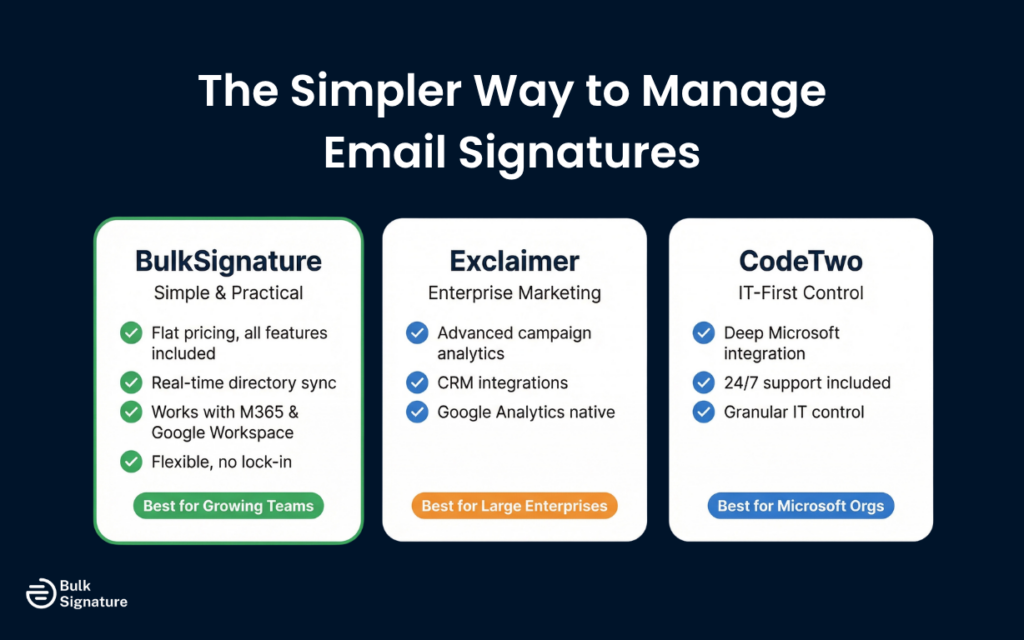
If you’re looking to cover the basics, like consistent signatures, automated updates, and basic campaign banners, BulkSignature covers that ground without the overhead of an enterprise platform.
If your requirements extend into deep CRM integration, advanced campaign analytics, or Microsoft-specific compliance certifications, Exclaimer and CodeTwo both warrant a closer look, with CodeTwo holding a meaningful edge on security credentials and support quality.
In the end, it’s less about which tool is “best” and more about which one fits how your team actually works.
If you’re looking for a simpler way to manage email signatures without getting locked into a complex system, try BulkSignature for free today — no credit card required!
Frequently Asked Questions About Exclaimer Alternatives
Is BulkSignature a good Exclaimer alternative?
BulkSignature is a practical Exclaimer alternative for organizations that don’t need the full enterprise feature set. It covers the core use cases, such as centralized template management, directory sync, campaign banners, and role-based access, without the pricing complexity, contract lock-in, or management overhead that comes with Exclaimer’s enterprise positioning.
For organizations that find Exclaimer’s pricing or contract terms difficult to justify, BulkSignature is worth considering.
For more options, see our full list of Exclaimer alternatives.
Is BulkSignature a good CodeTwo alternative?
Yes, BulkSignature can be a strong CodeTwo alternative for teams that don’t need deep Microsoft-specific configuration or advanced IT-level controls.
While CodeTwo is built for highly structured Microsoft environments with granular control, BulkSignature focuses on simplicity and speed. It still covers the essentials (like centralized management, automation, and directory sync), without requiring as much setup or ongoing administration.
For more options, see our full list of CodeTwo alternatives.
Which email signature software is easiest to set up?
BulkSignature is designed to be the most straightforward to set up and manage, particularly for organizations without a dedicated IT resource. Exclaimer and CodeTwo both have more complex feature sets that require more configuration time, though CodeTwo’s single pricing tier and clear documentation make it more predictable to implement than Exclaimer’s tiered structure.
For organizations that want to be operational quickly without a lengthy implementation process, BulkSignature is the most accessible starting point.
Does CodeTwo work with Google Workspace?
CodeTwo is built primarily for Microsoft environments. Its core product, CodeTwo Email Signatures 365, is designed for Microsoft 365 and Exchange. Google Workspace support is limited compared to its Microsoft integration. Organizations that are primarily Google Workspace-based will generally find better support from Exclaimer or BulkSignature, both of which treat Google Workspace as a first-class integration.
Is BulkSignature secure enough for businesses in finance, manufacturing, and healthcare?
Yes, BulkSignature is designed to meet the expectations of businesses operating in industries like finance, manufacturing, and healthcare.
It integrates directly with Microsoft 365 and Google Workspace for directory sync, which means it doesn’t rely on manual data handling or risky workarounds. Access controls let you define exactly who can create, edit, and deploy signatures, helping maintain consistency without opening up unnecessary permissions.
For most small to mid-sized organizations, it delivers the level of security and reliability you’d expect, without introducing the complexity that often comes with enterprise-heavy systems.


