
Email deliverability can feel like a black box. One day, your campaigns perform great. The next, they vanish into the spam folder without warning.
Even if you avoid obvious spam trigger words and send valuable content, your emails can still miss the inbox, which can be super frustrating if you rely on email as a key marketing channel for your business.
So to help you take control of your email deliverability, we’ve created this guide with practical, proven strategies to improve your sender reputation, strengthen authentication, optimize engagement, and dramatically increase your chances of landing in the inbox (not the spam folder).
Understanding How Spam Filters Work
Traditionally, spam filters relied heavily on basic rule-based systems. They scanned emails for specific “spam trigger” keywords, excessive punctuation, misleading subject lines, or suspicious formatting. And if your message contained too many red flags (like ALL CAPS, multiple exclamation points, or phrases such as “guaranteed winner”), it would automatically get flagged.
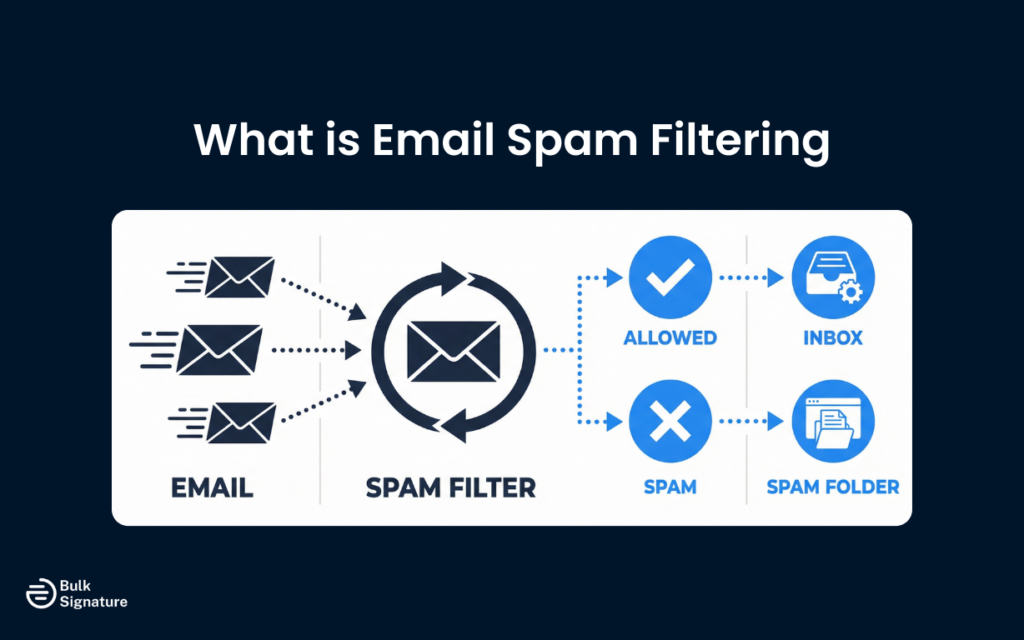
However, spam filters have evolved far beyond simple keyword detection. Today’s inbox providers use machine learning algorithms that analyze sending patterns, recipient behavior, and historical data to make split-second decisions about where your email should land. This means that even if you avoid spam trigger words, you can still end up in the spam folder if other signals suggest your email is unwanted.
The good news is that spam filters are designed to protect users, not to punish legitimate email senders. So if you follow best practices and send relevant content to engaged subscribers, you’ll have no trouble reaching the inbox.
Let’s break down exactly what you need to do with the following five tips.
Tip #1: Build and Maintain a Strong Sender Reputation
Your sender reputation is the single most important factor in email deliverability. Think of it as your credit score for email. Mailbox providers track how recipients interact with your emails, and they use this data to decide whether future marketing messages from your IP address and email domain deserve inbox placement.
A poor sender reputation can send your emails straight to spam, no matter how good your content is, while a strong reputation gives you the benefit of the doubt (even if you occasionally make a mistake).
Here’s how to build and protect your sender reputation.
Authenticate Your Email Domain
Proper authentication is the foundation of a good sender reputation. Authentication protocols like SPF, DKIM, and DMARC prove to inbox providers that you are who you say you are, and that your emails haven’t been tampered with. Without these authentication methods in place, your emails are far more likely to be flagged as spam or rejected entirely.
Here are the three core protocols you need to know:
- SPF (Sender Policy Framework): Tells receiving servers which IP addresses are allowed to send emails on behalf of your domain. If the sending server isn’t on the approved list, that’s a red flag.
- DKIM (DomainKeys Identified Mail): Adds a digital signature to your emails. This verifies that your message hasn’t been altered in transit and confirms it genuinely came from your domain.
- DMARC (Domain-based Message Authentication, Reporting, and Conformance): Builds on SPF and DKIM by telling inbox providers what to do if email authentication fails. It also gives you reports so you can see what’s happening behind the scenes.
When all three of these protocols are properly configured, inbox providers will trust your emails more.
Looking for more information on email authentication? Read this: What Is SMTP Authentication and Why Does It Matter For Email Security?
Monitor Your Sender Score
Your sender score is a numerical representation of your sender reputation, ranging from 0 to 100, with a higher score meaning better deliverability. If you’re not sure what your sender score actually is, you can always check it using free tools like Sender Score or Google Postmaster Tools.
If your sender score is low, it’s a sign that something is wrong. Common causes include high spam complaints, poor engagement metrics, sending to spam traps, or inconsistent sending patterns. To stay on top of any deliverability issues, try to monitor your score regularly and take proactive steps to address problems early.
Maintain Consistent Sending Patterns
Sudden spikes in email volume can trigger spam filters, especially if you have a new IP address or a limited sending history. Inbox providers see these spikes as suspicious behavior, and they may throttle your emails or send them to spam until they can verify that you’re a legitimate sender.
To avoid this, try to maintain consistent sending patterns. If you need to increase your sending volume, do it gradually over several weeks. This process (called IP warming), helps you build a positive reputation with mailbox providers and reduces the risk of deliverability issues.
Tip #2: Build a High-Quality Email List
Your email list is the foundation of your email marketing success. A high-quality list of engaged subscribers will deliver better results and protect your sender reputation, while a low-quality list full of unengaged subscribers, spam traps, and invalid addresses will drag down your deliverability and damage your brand.
Let’s take a quick look at what you can do to maintain a high-quality email list.
Use Double Opt-In
Double opt-in is a process where new subscribers confirm their email address by clicking a link in a confirmation email. This extra step verifies that the email address is valid and that the person actually wants to receive your emails.
While double opt-in may reduce the size of your list, it dramatically improves the quality. Subscribers who have opted in twice are more engaged, less likely to mark your emails as spam, and more valuable to your business. Most email service providers offer double opt-in as a standard feature.
Never Buy or Rent Email Lists
Buying or renting email lists is one of the fastest ways to destroy your sender reputation. These lists are full of people who never asked to hear from you, and they’re likely to include spam traps, invalid addresses, and recipients who will mark your emails as spam.
Spam complaints are one of the most damaging signals you can send to inbox providers, and even just a few complaints can tank your sender reputation and send all your future emails to spam. To prevent this from happening, always build your list organically by offering valuable content and encouraging people to opt in voluntarily.
Clean Your List Regularly
Even a high-quality list will degrade over time. People change jobs, abandon email addresses, and lose interest in your content. If you keep sending to these unengaged subscribers, your engagement metrics will suffer, and spam filters will take notice.
Clean your list regularly by removing hard bounces (invalid email addresses), soft bounces (temporary delivery failures), and unengaged subscribers who haven’t opened or clicked your emails in months. This will improve your engagement metrics and signal to inbox providers that you’re sending relevant content to people who want it.
Tip #3: Craft Email Content That Avoids Spam Triggers
Your email content plays a significant role in whether you land in the inbox or the spam folder. While modern spam filters are less focused on specific spam trigger words than they used to be, your content still matters.
Here’s how to create emails that pass the spam filter test.
Avoid Spam Trigger Words and Phrases
Certain words and phrases are commonly associated with spam emails. While using these words won’t automatically send you to spam, they can contribute to a higher spam score, especially if combined with other red flags.
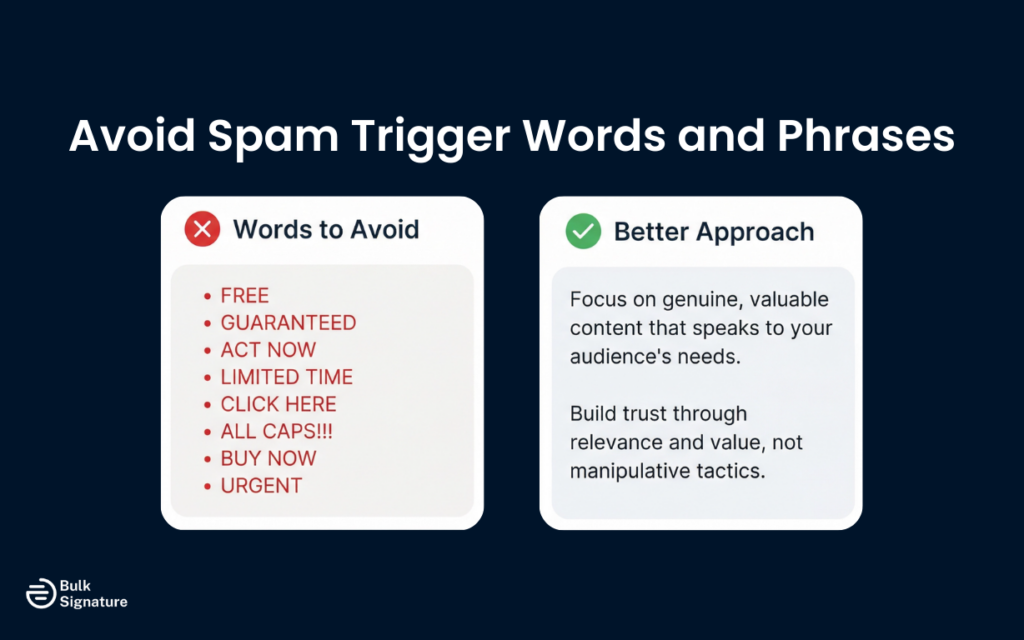
Common spam trigger words include “free,” “guaranteed,” “act now,” “limited time,” “click here,” and excessive use of all caps or exclamation points. Instead of relying on these tired phrases, focus on creating genuine, valuable content that speaks to your audience’s needs.
Write Clear, Honest Subject Lines
Misleading subject lines are a major spam trigger. If your subject line promises one thing and your email delivers something else, recipients will feel deceived, and they’re likely to mark your email as spam.
Your subject lines should accurately reflect the content of your email. Avoid clickbait, false urgency, and deceptive tactics. A clear, honest subject line will improve your open rates and build trust with your audience.
Balance Text and Images
Emails that are all images and no text can trigger spam filters. Spam filters can’t read images, so if your email is just a big picture with no text, it looks suspicious.
Aim for a healthy balance of text and images. Include enough text to convey your message even if images don’t load, and make sure your email is accessible to people using screen readers or email clients that block images by default.
Include a Physical Address
The CAN-SPAM Act requires all marketing emails to include a valid physical address. This is typically your business address or a P.O. box. Failing to include this information is not only illegal, but it also signals to spam filters that your email might not be legitimate.
Most email service providers automatically add this information to your email footer, but it’s worth double-checking to make sure it’s there.
Make It Easy to Unsubscribe
Every marketing email should include a clear, easy-to-find unsubscribe link. This is another requirement of the CAN-SPAM Act, and it’s also good practice. If people can’t easily unsubscribe, they’re more likely to mark your email as spam, which is far more damaging to your sender reputation.
Place your unsubscribe link in a visible location, typically in the footer of your email, and honor unsubscribe requests promptly (ideally within 24 hours).
Tip #4: Optimize Engagement Metrics
Engagement metrics like open rates, click-through rates, and reply rates are critical signals that tell inbox providers whether your emails are wanted. High engagement suggests that your emails are relevant and valuable, while low engagement suggests the opposite. If you’ve noticed that engagement has started to slip, here’s what you can do to improve it.
Segment Your List and Send Targeted Content
Not all subscribers are interested in the same content. By segmenting your list based on interests, behavior, or demographics, you can send more targeted, relevant content that drives higher engagement.
For example, you might segment your list by purchase history, engagement level, or geographic location. Then, you can customize your email content to each segment, increasing the likelihood that recipients will open, click, and engage with your emails.
Focus on Your Most Engaged Subscribers
If you’re struggling with deliverability, focus your efforts on your most engaged subscribers. These are the people who consistently open and click your emails. By sending to this group first, you can boost your engagement metrics and signal to inbox providers that your emails are valuable.
Once your sender reputation improves, you can then gradually expand your sending to include less engaged subscribers. This strategy, sometimes called “engagement-based sending,” can help you recover from deliverability issues and rebuild your reputation.
Encourage Recipients to Interact
The more recipients interact with your emails, the better your deliverability will be. Encourage recipients to reply to your emails, add you to their email contacts, or move your emails to a specific folder. These actions signal to inbox providers that your emails are wanted.
You can also ask new subscribers to whitelist your email address or add you to their address book. This simple step can significantly improve your inbox placement, especially with new subscribers who don’t have a history of engaging with your emails.
Tip #5: Monitor and Improve Your Email Deliverability
Protecting your sender reputation requires ongoing monitoring and optimization. Here’s how to stay on top of your deliverability and address issues before they become serious problems.
Track Key Deliverability Metrics
Think of monitoring email deliverability like you’re monitoring your credit score or website traffic. If something starts trending in the wrong direction, you want to catch it early, not months later when your email campaigns are already suffering.
Here’s what to watch:
Key Email Engagement and Deliverability Metrics
Metric | What It Measures | Why It Matters |
Inbox placement rate | Percentage of emails that land in the inbox | Directly measures deliverability success |
Bounce rate | Percentage of emails that fail to deliver | High bounce rates damage sender reputation |
Spam complaint rate | Percentage of recipients who mark emails as spam | Even a small percentage can hurt deliverability |
Open rate | Percentage of recipients who open your emails | Indicates engagement and relevance |
Click-through rate | Percentage of recipients who click links | Shows that content is valuable and engaging |
Unsubscribe rate | Percentage of recipients who opt out | High rates suggest content isn’t resonating |
Use Seed Testing
Seed testing involves sending your emails to a list of test accounts across multiple email providers (like Gmail, Outlook, and Yahoo) to see where they land. This allows you to identify any deliverability issues before you send to your entire list.
Many email service providers and third-party tools offer seed testing as part of their platform. Use this feature regularly, especially when making significant changes to your email program.
Monitor Feedback Loops
Most major inbox providers offer feedback loops, which notify you when a recipient marks your email as spam. By monitoring these feedback loops, you can quickly identify and remove recipients who don’t want your emails, reducing spam complaints and protecting your sender reputation.
Your email service provider should automatically handle feedback loop registration and processing, but it’s worth confirming that this is set up correctly.
Mastering Email Deliverability With BulkSignature
The key takeaway is this: staying out of spam folders is all about having the right systems in place.
However, these systems can become increasingly difficult to manage as your organization grows.
Once you’re managing multiple departments, domains, or team members, email settings can easily become fragmented, and this is the point where centralized email signature management becomes worth exploring.
For example, tools like BulkSignature can help you:
- Standardize authentication processes
- Maintain compliance
- Make sure every email leaving your organization is properly configured and on-brand
When everything is managed in one place, you can reduce the risk of human error and protect your sender reputation across the board. No more wondering if one department forgot to update DNS records, and no more inconsistent signatures or rogue senders damaging trust with inbox providers.
Ready to take control of your email deliverability with consistent email signatures? Book a free demo with BulkSignature today!
Frequently Asked Questions About Email Deliverability
Why are my emails landing in the spam folder?
There are several common reasons emails end up in spam, including:
- Poor sender or IP reputation
- Missing or misconfigured authentication
- High spam complaint rates
- Low engagement (few opens or clicks)
- Sending to outdated or purchased lists
- Sudden spikes in bulk email volume
Modern spam filters look at patterns, not just content. So if your engagement is low or complaints are high, inbox providers may treat your messages as unwanted emails.
What does email “authentication status” mean?
Your authentication status refers to whether your SPF, DKIM, and DMARC records are properly configured and passing validation checks.
If your authentication status fails, inbox providers may treat your messages as suspicious. This increases the likelihood of landing in spam or being rejected entirely.
Always verify that your authentication setup is active and correctly configured for your sending domain.
How do I fix a bad sender reputation?
If you’ve developed a bad reputation, recovery is possible. But it will take some time and consistency to resolve.
Here are a few practical steps you can take:
- Pause sends to unengaged subscribers.
- Clean your list of invalid and inactive addresses.
- Temporarily reduce sending volume.
- Focus on your most engaged audience.
- Make sure email authentication is fully set up.
Over time, these actions can help rebuild trust with email providers, and your sender score and IP reputation should gradually recover.
How can I prevent my emails from being marked as spam?
The best way to prevent spam complaints is to:
- Use double opt-in.
- Set clear expectations at signup.
- Send relevant, targeted content.
- Make it easy to unsubscribe.
- Avoid misleading subject lines.
When your email recipients expect your emails and find them valuable, they’re far less likely to report them as spam.


