
If you’ve ever managed email for an organization, you’ve probably run into moments where someone tries to email, but they’re left staring at an error message like “SMTP authentication required” or “authentication failed.”
It’s definitely annoying. But it’s not your mail server being difficult, it’s just doing its job.
So if you’ve ever been confused by an SMTP error, or maybe you’re just a bit curious about what it actually does, read on for a full breakdown of what SMTP authentication is, how it works behind the scenes, and why it’s a foundational requirement for modern email security.
Understanding SMTP and the Simple Mail Transfer Protocol
Before diving into authentication specifically, it helps to understand what SMTP is and how it functions as the foundation of email delivery.
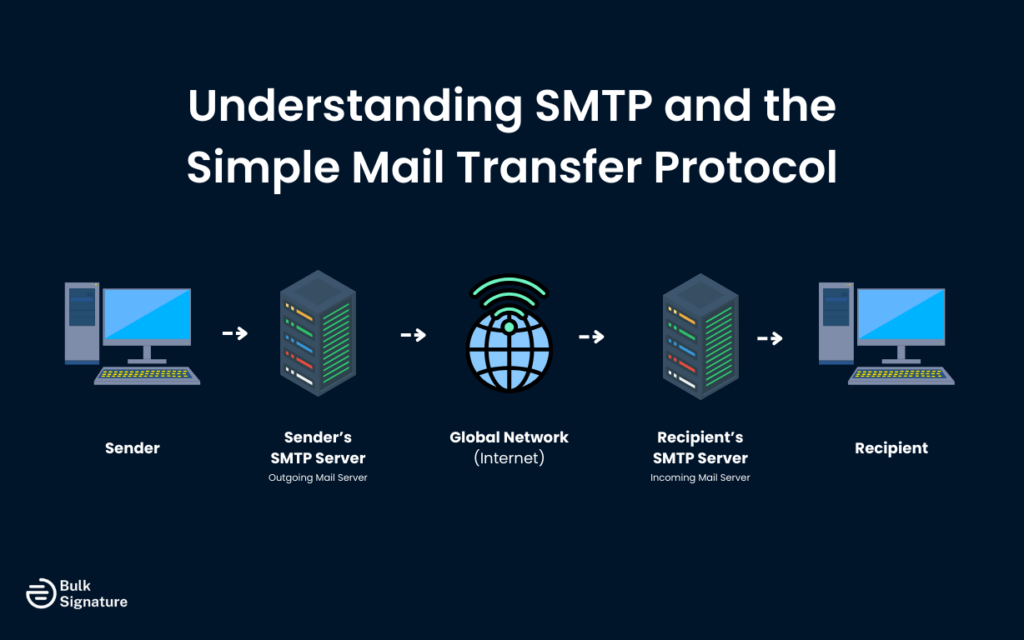
SMTP stands for Simple Mail Transfer Protocol, and it’s the protocol that email servers use to send messages across the internet. When you click “send” in your email client, SMTP is what carries that message from your device to your mail server, and then from your mail server to the recipient’s mail server. Think of SMTP as the postal service of the internet, responsible for moving email messages from one location to another.
The protocol itself is relatively straightforward, which is reflected in its name. An SMTP client connects to an SMTP server, identifies itself, specifies the sender and recipient, and then transmits the email message. The server accepts the message, and either delivers it locally if the recipient is on the same server, or forwards it to another mail server if the recipient is elsewhere. This process happens in seconds, making email feel instantaneous even though messages may pass through multiple servers on their journey.
Why SMTP’s Simplicity Creates Security Gaps
However, the simplicity that makes SMTP efficient also creates security vulnerabilities. The original SMTP specification from 1982 included no authentication mechanism, so any SMTP client could connect to any SMTP server and request that it send mail. This made sense in the early internet when users were primarily researchers at trusted institutions, but it became a massive problem as the internet grew and malicious actors discovered they could exploit open relay servers.
What SMTP Authentication Is and How It Works
Now, let’s answer the burning question: What is SMTP authentication?
SMTP Authentication (often abbreviated as SMTP AUTH) is basically an extension to the Simple Mail Transfer Protocol that requires users to authenticate before the mail server will send messages on their behalf.
Here’s how SMTP authentication works:
- An email client or application connects to your SMTP server.
- The client tells the server it supports modern SMTP features, including authentication.
- The server responds with the security options it supports and indicates whether authentication is required.
- The client submits its login credentials using one of the supported authentication methods.
- The server checks those credentials against its user database.
- If the credentials are valid, the server allows the email to be sent.
- If the credentials are invalid or missing, the server blocks the message and returns an authentication error.
This process happens automatically in the background every time you send an email through a properly configured email client. Your email client stores your credentials and presents them to the SMTP server whenever you send a message, and you’ll only notice the authentication process when something goes wrong and you receive an “authentication failed” error.
Why SMTP Authentication Matters for Organizational Email Security
The importance of SMTP authentication extends far beyond preventing unauthorized access to individual email accounts. It’s a fundamental security measure that protects the entire email ecosystem. Here are just a few of the most relevant security benefits for organizations.
Key Security Benefits of SMTP Authentication
Security Benefit | What It Means | Why It Matters for Organizations |
Prevents open relay abuse | Only approved users and systems can send emails through your server. | Stops spammers from hijacking your mail server and sending bulk spam. Reduces the risk of your IP addresses or domain getting blacklisted. |
Protects your domain reputation | Your server won’t send email for unknown or unauthorized senders. | Keeps your company’s emails landing in inboxes instead of spam folders, protecting customer trust and deliverability. |
Blocks unauthorized senders | Attackers can’t use your infrastructure without valid credentials. | Prevents phishing attacks, spoofing, and malicious campaigns from appearing to come from your organization. |
Adds accountability | Every sent email is tied to a specific user or system. | Makes it easier to trace issues, investigate incidents, and meet internal or regulatory compliance requirements. |
Improves visibility and monitoring | You can see who exactly is sending emails and how often. | Helps detect compromised accounts, misconfigured apps, or unusual sending behavior before it becomes a bigger problem. |
Enables rate limiting and controls | Sending limits can be applied per user or system. | Reduces damage if an account is compromised and prevents any one user or tool from overwhelming your mail server. |
How to Enable SMTP Auth and Configure It Securely
Implementing SMTP authentication requires configuration on both the server side and the client side. Understanding both perspectives helps you troubleshoot issues and maintain secure email systems.
Server-Side Configuration
On the server side, enabling SMTP AUTH typically involves configuring your mail server software to require authentication for outbound mail relay. Most modern mail servers, including popular options like Postfix, Sendmail, and Microsoft Exchange, support SMTP authentication and often enable it by default.
The key security consideration here is to make sure that authentication is always combined with encryption. As a rule of thumb, always require TLS encryption for all SMTP sessions that use authentication, so credentials are never transmitted in plain text across the network. Most servers support this through configuration options that enforce TLS before allowing authentication, but it’s worth double-checking if you’re not sure.
You should also configure which authentication methods your server accepts. It’s a good idea to disable less secure methods like AUTH LOGIN and AUTH PLAIN, unless they’re used in combination with TLS encryption.
Client-Side Configuration
On the client side, configuring SMTP authentication means providing your email client with the credentials it needs to authenticate with your mail server. This typically involves entering your username and password in your email client’s account settings, along with the SMTP server address and port number.
Most email clients will automatically detect whether the server requires authentication and which authentication methods it supports. However, you may need to explicitly enable authentication in some clients, particularly older ones. The typical configuration includes the SMTP server address, port 587 or 465, your username, your password, and TLS encryption enabled.
4 Best Practices for SMTP Authentication
SMTP authentication should be implemented in a way that balances security and usability. Overly strict configurations can disrupt legitimate email sending, while weak configurations expose your organization to risk.
Here are four best practices that help maintain that balance.
1. Always Use Encryption
If SMTP authentication is the lock on the door, encryption is what keeps someone from copying the key while it’s being used.
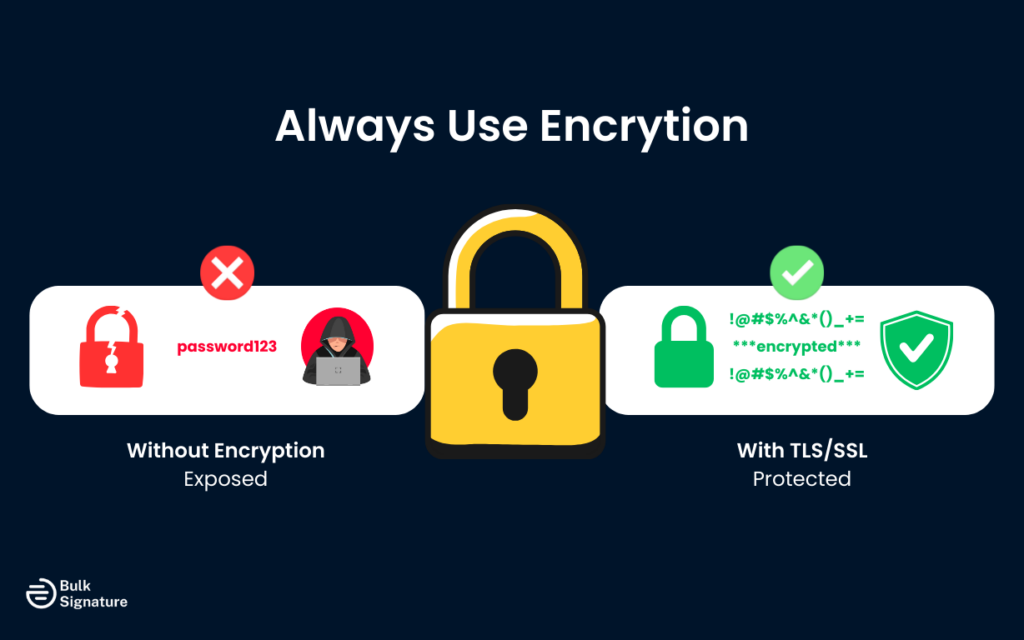
Any time credentials are sent without encryption, they’re exposed. That’s why SMTP authentication should always be paired with TLS or SSL. Encryption is the only way to make sure usernames and passwords aren’t readable as they move across the network, even if traffic is intercepted.
At the server level, require TLS before allowing authentication. This prevents misconfigured apps or older clients from accidentally sending credentials in plain text. Most modern mail servers support this and often enable it by default, but it’s worth double-checking, especially when troubleshooting email issues.
To learn more about email encryption, read this: Secure Email 101: When You Actually Need Proton-Style Encryption (and When You Don’t)
2. Use Strong, Unique Credentials
SMTP authentication is only as secure as the credentials behind it.
For user accounts, that means strong, unique passwords that aren’t reused across other services. A leaked password from an unrelated platform can quickly turn into an email security incident if the same credentials are used for SMTP.
For applications that send email (like CRMs, ticketing systems, or website forms), avoid using personal inbox credentials. Instead, use app-specific passwords or dedicated service accounts with limited permissions. This makes it easy to disable one tool’s access without disrupting everything else.
3. Monitor and Log Authentication Activity
One of the biggest advantages of SMTP authentication is visibility. When every message is tied to a user or system, you can actually see what’s happening on your mail server.
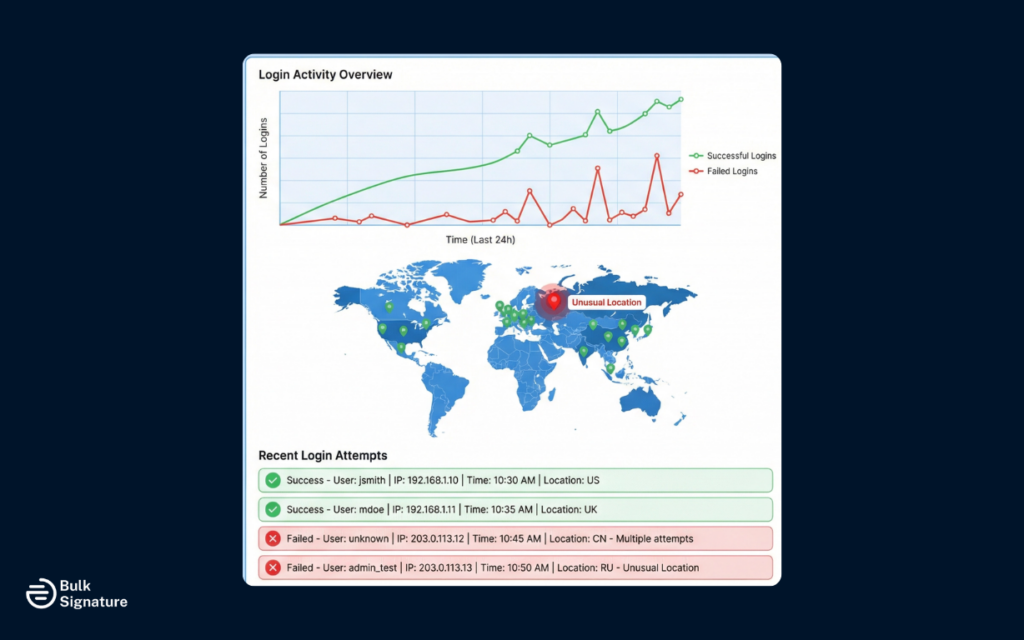
Make sure all authentication attempts, both successful and failed, are logged. These logs help you spot early warning signs, like repeated login failures, unexpected login locations, or accounts that suddenly start sending far more email than usual.
Setting up alerts for unusual activity can also make a big difference. By catching a compromised account early, you can help prevent spam outbreaks, domain blacklisting, and painful cleanup work later on.
4. Implement Rate Limiting
Even with strong passwords and monitoring, things can still go wrong. This is where rate limiting acts as a safety net.
By limiting how many messages a user or system can send in a given time period, you reduce the damage a compromised account can cause. An attacker might get access, but they won’t be able to flood the internet with spam using your domain.
The key is setting reasonable limits. Look at how your users and systems normally send email, then set thresholds that allow legitimate activity while blocking abuse. Review and adjust these limits as your organization grows or your sending patterns change.
Making Email Security Work for Your Organization
SMTP authentication plays a critical behind-the-scenes role in keeping organizational email secure. By verifying who’s allowed to send email through your systems, it protects your domain from abuse, preserves your sender reputation, and adds a layer of accountability to every message sent.
And when paired with encryption and ongoing monitoring, SMTP authentication helps create an email environment that’s both secure and reliable for all stakeholders.
If you’re already taking email security seriously, a centralized email signature management tool (like BulkSignature) is a natural complement. Book a free demo to see how centralized, professional email signatures support trust, branding, and professionalism at scale.
Frequently Asked Questions About SMTP Authentication
What is the SMTP AUTH command?
The AUTH command is how an email client proves its identity to an SMTP server. After connecting, the client uses the AUTH command to send its login credentials using a supported authentication method. If the server verifies those credentials, it allows the client to send email. If not, the message is rejected.
For organizations, this is what prevents unauthorized users or applications from sending email through your infrastructure.
What does “SMTP relay” mean?
SMTP relay refers to a mail server accepting an email and forwarding it to another mail server on behalf of the sender. Most organizational mail servers are configured to relay messages only for authenticated users. Without authentication, allowing relay would turn the server into an open relay, something attackers can exploit to send spam or phishing emails using your domain or IP addresses.
How does extended SMTP (ESMTP) work?
Extended SMTP (ESMTP) lets email clients and servers negotiate modern features before sending a message.
So when a client connects using the EHLO command, the server responds with the capabilities it supports, such as authentication and encryption. The client then uses the available features, like SMTP authentication or TLS, to send the email securely. This flexibility is what enables secure, authenticated email delivery in modern systems.


