
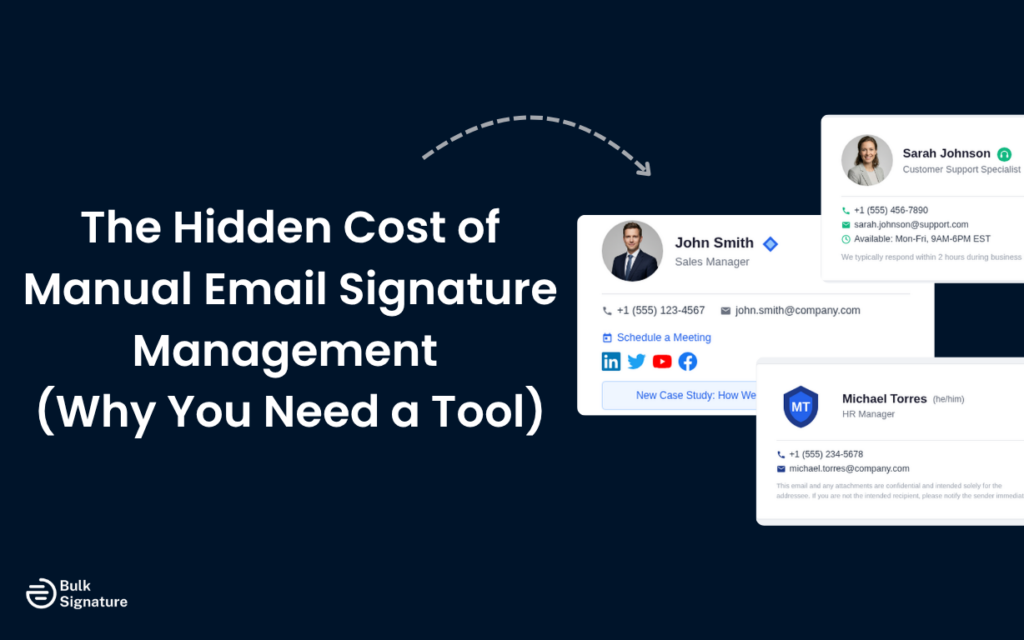
It starts with a simple request: Hey everyone, can you please update your email signature with our new format? Here’s a template you can use.
It seems easy enough… but then comes the chaos.
Some people try their best to follow the template (but it never looks quite right). Some don’t even bother (people are busy, it happens!). And then there’s always that one person who updates almost everything correctly, except they’ve still kept the same logo from two rebrands ago.
Sound familiar?
Most organizations treat email signature management as a minor admin task. It gets delegated, forgotten, or handled inconsistently, and even minor mistakes like a missing disclaimer or a broken link are brushed off as no big deal.
However, those inconsistencies come at a cost. And in this article, we’re breaking down the specific ways manual email signature management is costing your organization, and why a dedicated email signature management tool can make all the difference.
What "Manual" Email Signature Management Actually Looks Like
Before we get into the specific manual email signature management costs, it helps to be clear about what manual email management involves.
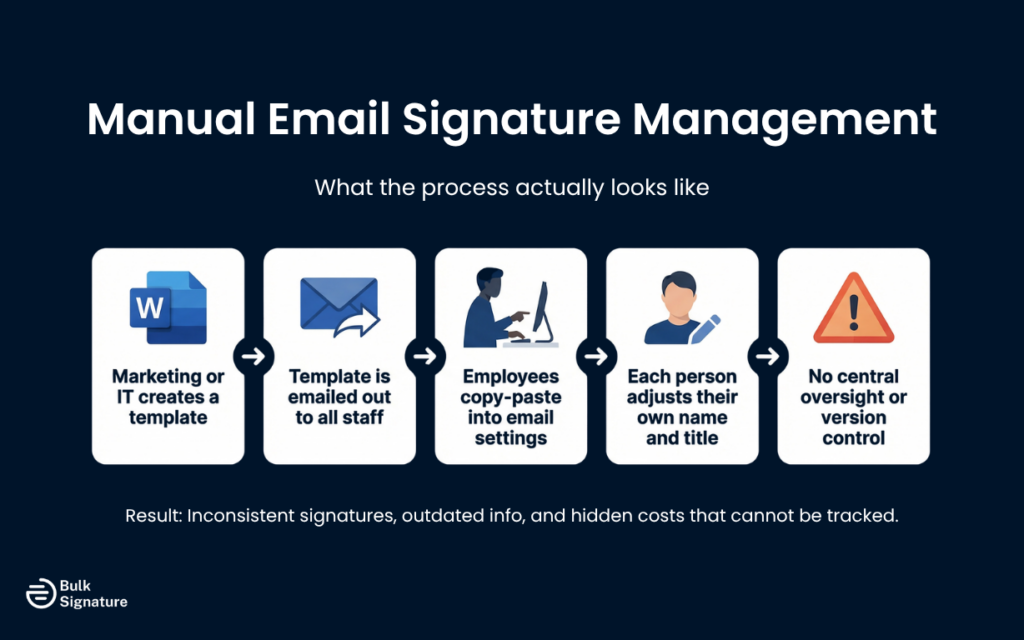
In most organizations without dedicated email signature software, the process looks something like this:
- Someone in marketing or IT creates a signature design and template, usually in a Word document or HTML file.
- That template gets emailed out to staff.
- Employees are expected to copy and paste it into their email client settings, adjust their own name and title, and update it whenever something changes.
That’s a lot of moving parts with no central oversight.
Some teams try to manage this through onboarding checklists or IT helpdesk tickets, others rely on periodic reminder emails, and a few just hope for the best. But none of these approaches scale well, and all of them carry hidden costs that can’t really be tracked in a spreadsheet.
The Real Costs of Manual Email Signature Management
So, what are the hidden costs of email signature management, and how do those costs impact long-term ROI? Let’s take a look!
1. Wasted IT and Admin Time
Every time your company rebrands, runs a new campaign, or updates contact details, someone has to create a new email signature template. They then have to communicate that template to staff, and then continue to follow up with the people who haven’t updated yet.
For a team of 50, that might take a few hours. But for a team of 500, it becomes a significant project, and it repeats every time something changes.
Potential Financial Impact: Based on 10 to 15 minutes per employee at a blended hourly rate of $30 to $50, a 500-person company can expect $2,500–$6,000 per update cycle. This estimate assumes two to three update cycles per year for a typical rebrand or campaign cadence.
2. Brand Inconsistency Across Your Organization
When employees manage their own signatures, consistency becomes a matter of individual effort rather than organizational control.
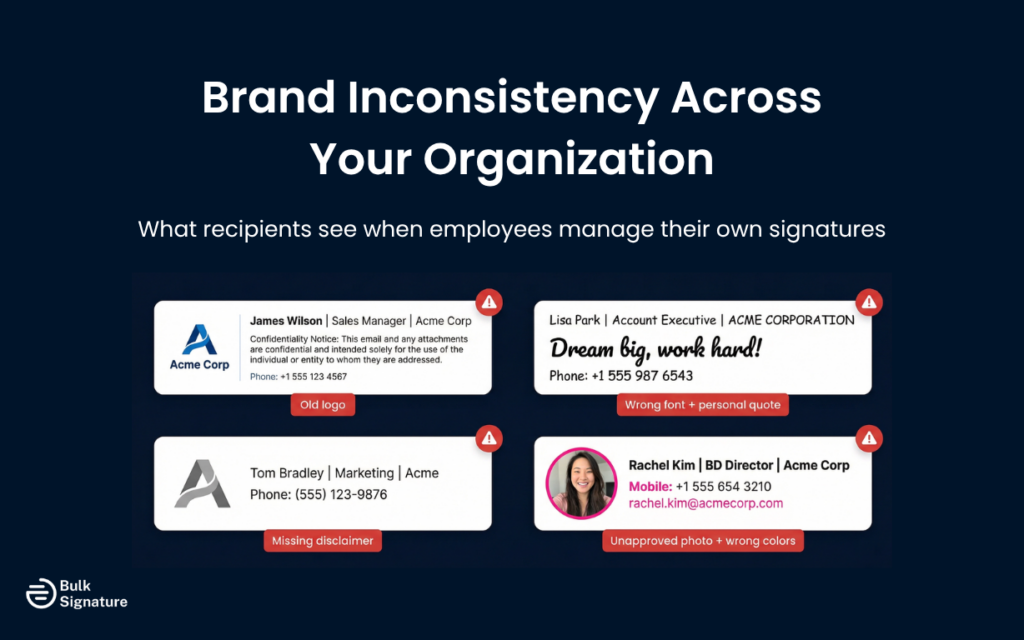
Some people will use the right company logo (others will use an old one). Some will include the correct disclaimer (others will skip it entirely). And a few will customize their signature in ways that don’t align with brand guidelines, adding personal quotes, changing fonts, or using a headshot that wasn’t approved.
From a recipient’s perspective, receiving emails from different people at the same company with wildly different signatures creates a fragmented impression. It signals a lack of internal coordination, even if the rest of your communication is polished.
For organizations that invest in brand consistency across their website, social media, and marketing materials, the email channel is often the weakest link.
Potential Financial Impact: While harder to measure directly, inconsistent branding can reduce trust and response rates. Even a 1-3% drop in email engagement or conversion rates can translate into tens of thousands of dollars in lost revenue annually for sales-driven teams.
In fact, research from Marq (formerly Lucidpress) has also found that consistent branding can increase revenue by 10% to 20%, showing just how valuable brand consistency can be to business growth.
3. Non-Compliance and Legal Risk
Email disclaimers aren’t optional for many organizations. Depending on your industry and jurisdiction, you may be legally required to include specific language in every outgoing email, covering things like confidentiality, data protection, or regulatory status.
When signatures are managed manually, there’s no reliable way to verify that every employee’s email includes the correct disclaimer. One missing or outdated disclaimer in the wrong email thread could create a compliance gap that’s difficult to defend.
This is particularly relevant for organizations operating under the General Data Protection Regulation (GDPR), financial services regulations, or legal professional rules. In these environments, even a small oversight in an email signature can quickly escalate into a serious legal, regulatory, or data security issue.
Manual management makes it very difficult to audit, enforce, or update disclaimers at scale. And when a compliance issue arises, the inability to demonstrate that controls were in place is often just as damaging as the gap itself.
Beyond legal disclaimers, there’s also the question of data accuracy. If an employee’s signature contains an incorrect phone number or an outdated job title, and that information is referenced in a contract or formal correspondence, the consequences can extend well beyond a minor inconvenience. Centralized management eliminates this risk by making sure signatures are always populated from a verified, up-to-date source.
Potential Financial Impact: Regulatory fines vary, but under GDPR, penalties can reach up to $20+ million or 4% of annual global turnover. Even minor compliance breaches or disputes can result in legal fees, internal investigations, and reputational damage costing thousands to tens of thousands of dollars per incident (and wasting valuable time in the process).
4. Onboarding Delays and New Starter Errors
New employees are often the most inconsistent when it comes to email signatures. They’re setting up their accounts quickly, following instructions that may be out of date, and making formatting decisions without the context to know what’s correct.
The result is a wave of new starters sending emails with incorrect, incomplete, or broken signatures from day one. That’s not a great first impression for a new hire, and it’s not a great look for the organization either.
Without a centralized email signature management tool, there’s no way to push a correct, pre-formatted signature to a new employee’s inbox automatically. It has to be done manually, which means it’s prone to error and delay.
Potential Financial Impact: If onboarding fixes take just 15 to 30 minutes per new hire, a company hiring 100 employees a year loses 25-50 hours annually. At typical admin or IT rates, that’s around $1,000-$2,500 per year.
Research from the Society for Human Resource Management also shows that a quality onboarding process is essential for a new hire’s long-term success and productivity, and even the smallest inefficiencies during this phase (like inconsistent email setup) can extend time-to-productivity.
5. Campaign Banners That Never Get Deployed Properly
Many marketing teams use email signatures as a channel for promoting events, product launches, or seasonal campaigns. In theory, it’s a low-cost, high-reach channel. Every outgoing email becomes a touchpoint.
In practice, though, manual deployment of these campaigns across personalized email signatures is a nightmare. Marketing creates an email signature banner or ad, sends it to IT, IT sends instructions to staff, and then a fraction of employees actually update their signature in time for the campaign. By the time most people have updated, the campaign window has passed, with some employees keeping the old banner running for weeks after it’s no longer relevant.
The result is a marketing channel that looks promising on paper but consistently underdelivers because there’s no reliable way to push updates to every inbox at once.
Potential Financial Impact: If only 30-50% of employees adopt a campaign banner, you’re effectively losing half your potential reach. For a company sending 10,000+ emails per week, that could mean thousands of missed impressions and clicks, reducing campaign ROI and potentially costing $5,000-$20,000+ in lost pipeline or engagement per campaign.
6. Outdated Contact Details
Email signatures are often treated as static, but employee information changes all the time. When signatures are managed manually, these updates rely on individuals remembering to make changes themselves. But in reality, many don’t, meaning outdated or incorrect details can persist for months.
This creates unnecessary friction for customers and partners trying to get in touch, and in some cases, it can lead to missed opportunities or delays in communication. It also undermines trust when basic contact information is inaccurate or inconsistent.
Without a centralized system pulling from a single source of truth, there’s no reliable way to make sure every signature reflects the most up-to-date information.
Potential Financial Impact: Even a small number of missed or misdirected inquiries can have a measurable impact. If outdated contact details cause just 1 or 2 missed opportunities per month, the resulting loss in potential revenue could easily reach $10,000 to $50,000+ annually, depending on deal size and sales cycle.
Why Email Signature Software Is a Smarter Way to Manage Company-Wide Email Signatures
The core value of a dedicated email signature management tool, like our own tool at BulkSignature, is total and complete control.
Instead of relying on individuals to manage their own signatures correctly, a centralized platform allows you to define the template, populate it with accurate data from your directory, and push it to every inbox automatically. That means updates happen in minutes, not days. And compliance is enforced by default, not by hope.
Here’s how that maps to the manual email signature management costs outlined above:
Hidden Manual Email Signature Problems (and How Centralized Tools Help)
Manual Email Signature Management Problem | What Centralized Email Signature Management Addresses |
IT time spent on updates, follow-ups, and tickets (which have increased by around 16% since 2020). | Centralized deployment removes the need for manual rollout |
Brand inconsistency across staff. | Templates are locked and applied uniformly |
Missing or outdated disclaimers, creating potential compliance risks. | Disclaimers are embedded at the platform level, not left to individuals |
New starter errors. | Signatures can be created automatically during onboarding |
Campaign banners deployed late or inconsistently across desktop and mobile devices. | Banners can be scheduled and pushed to all inboxes simultaneously |
Outdated contact details. | Data pulls from your directory, so changes update automatically |
Want to learn more about what to look for in an email signature management tool? Read this: The IT Buyer’s Final Checklist for Company-Wide Email Signature Management
The Added Knock-On Effect on Employee Experience
There’s another cost of manual email signature management that rarely gets discussed: the frustration it creates for employees.
When someone joins a new company and spends 20 minutes trying to format a signature correctly, only to end up with something that looks wrong in half the email clients they test it in, that’s a poor experience. When a member of the marketing team has to send a company-wide email asking everyone to update their signature again, that’s a poor experience too.
Manual processes that rely on individual effort tend to create frustration at both ends. The people responsible for managing signatures feel like they’re constantly chasing, and the people expected to update them feel like they’re being asked to do something fiddly and low-priority.
Neither group is wrong. The process itself is the problem.
A centralized tool removes this frustration entirely. Employees don’t need to think about their signature, IT teams don’t have to chase anyone, and marketing can finally deploy promotional banners to their heart’s content.
Is Manual Management Ever Acceptable?
For very small teams, manual management may work. For example, if you have five people, a shared template, and a stable brand, the overhead is low enough to manage without dedicated software.
But the tipping point comes earlier than most organizations expect. Once you have more than 20 or 30 employees, the combination of turnover, role changes, campaign activity, and compliance requirements makes manual management increasingly difficult to sustain without visible errors.
In our experience, manual management becomes unreliable when any of the following are true:
- More than one department needs different signature templates.
- You have active marketing banners or images that need to change on a schedule.
- Your industry has mandatory disclaimer requirements.
- You’re hiring more than 10 to 15 people per year.
- Employees regularly work from personal or unmanaged devices.
Below these thresholds, a well-maintained shared template with a disciplined rollout process may be sufficient. Above them, the compounding inconsistency risk typically exceeds the cost of a dedicated tool.
Protecting Your Brand Across Every Digital Touchpoint
Email is still one of the highest-volume communication channels in most organizations. Every email sent by every employee is a touchpoint with a client, prospect, partner, or regulator. And the signature at the bottom of that email is part of your brand, your compliance posture, and your operational credibility.

Manual email signature management treats that touchpoint as an afterthought, but a centralized tool treats it as what it actually is: a consistent, controllable, and measurable part of how your organization communicates.
How BulkSignature Helps Teams Gain Complete Control Over Email Signatures
A 300-person professional services firm using Google Workspace recently came to us at BulkSignature after a compliance audit flagged that 40% of outgoing emails lacked the required confidentiality disclaimer. The disclaimers existed in the template, but employees simply hadn’t updated their specific signatures since the template was last revised 18 months prior.
What looked like a minor oversight quickly escalated. The audit triggered a legal review, and by the time the issue was fully addressed, the internal cost had already exceeded what a full year of centralized email signature management would have required.
Now, with BulkSignature, the firm maintains full control over every email signature, with any required disclaimers automatically applied across all users. No manual updates required.
If you’re ready to start managing your email channel properly across your entire organization, we’d love to help. Calculate your savings today and try BulkSignature for free! You can also book a demo for a more personalized walkthrough of all the key features and solutions relevant to your team.
Frequently Asked Questions About Email Signature Management Costs
How much time does manual email signature management actually waste?
The time varies by organization size, but the costs accumulate across several activities, including creating and distributing templates, following up with non-compliant staff, troubleshooting broken layouts, and deploying marketing campaign updates. For organizations with 50 or more individual users, this can easily add up to several hours per update cycle, multiplied across every campaign, rebrand, or personnel change throughout the year.
What are the compliance risks of managing email signatures manually?
The main risks involve missing or outdated disclaimers, which may be legally required depending on your industry and jurisdiction. Without centralized control, there’s no reliable way to verify that every outgoing email includes the correct legal language. This creates potential exposure under regulations like GDPR, financial services rules, or legal professional conduct standards.
At what point should an organization switch to professional email signature management software?
Most organizations find that manual management becomes unworkable somewhere between 20 and 50 employees, especially once you factor in turnover, multiple departments, campaign activity, and compliance requirements. The earlier you centralize, the less time you spend correcting inconsistencies that have already circulated externally.
How can I accurately estimate my organization’s manual email signature cost?
To get a realistic view of how much time and effort manual signature management actually consumes, consider these three factors:
- Update frequency: How many times per year do signatures need to change? (Rebrands, campaigns, personnel changes; typical organizations average 4 to 8 per year)
- Time per update cycle: How long does one full rollout take, including template creation, distribution, follow-up, and troubleshooting? Multiply by headcount
- Blended hourly rate: Use your IT or admin team’s loaded hourly cost
You can then multiply these factors together and compare them against the annual cost of a centralized tool. Most organizations with 50+ employees find the tool pays for itself within the first update cycle.
What are the best email signature software providers and third-party apps for managing email signatures?
Not all email signature tools are built for the same use case. Some are designed for individual users or small teams, while others focus on centralized control, compliance, and scalability across larger organizations.
In general, the best email signature management software includes:
- Centralized control across Google Workspace and Microsoft 365
- Support for Gmail and Outlook
- Automated signature updates and campaign management
- Role-based templates and directory integration (e.g., Azure Active Directory)
- Built-in compliance controls and disclaimer enforcement
BulkSignature works well for organizations that need scalable, centralized email signature management with strong control over branding, compliance, and marketing campaigns.
Is email signature management software secure?
Yes. When implemented correctly, email signature management software is designed to work without exposing sensitive information.
Most modern platforms integrate securely with directories like Azure Active Directory or Google Workspace, allowing user data to sync without storing email content or message bodies. Signatures are applied using secure server-side or client-side methods, depending on the setup, and access is controlled through strict role-based permissions.
This approach allows organizations to standardize email signatures across all users while maintaining strong data security and compliance standards.
What are the most common email signature mistakes?
Across organizations, many professionals struggle to maintain consistent and up-to-date email signatures.
Common mistakes include:
- Missing or outdated contact information
- Inconsistent branding across teams
- Broken formatting in Gmail, Outlook, or Apple Mail
- Overly complex HTML email signatures that don’t render properly on mobile
- Missing legal disclaimers or compliance text
- Lack of clear calls-to-action (e.g., meeting scheduling or campaign banners)
These issues can weaken brand perception, reduce the impact of every email touchpoint, and leave a negative lasting impression for brands.
How does email signature management software work
Email signature management software centralizes how signatures are created, updated, and deployed across an organization, replacing manual processes with controlled, automated updates.
There are two main approaches. Server-side signatures are applied after an email is sent (commonly in Microsoft 365) to enforce compliance and consistent formatting. Client-side signatures are applied within email clients like Gmail, Outlook, and Apple Mail, allowing users to see signatures while composing and supporting elements like marketing banners, social media icons, and meeting links.
Most modern solutions combine both approaches and integrate with Google Workspace and Microsoft 365, enabling automated updates, consistent signatures on all emails, and centralized control without manual intervention.
How does centralized email signature management help marketing campaigns?
Centralized email signature management helps marketing teams make better use of the emails employees already send.
With the right setup, marketing teams can use email signatures to:
- Deploy campaign banners and update them instantly.
- Add social media icons or QR codes to increase visibility.
- Improve click-through rates with targeted calls-to-action.
- Promote meeting scheduling links or events.
- Run one-click surveys directly from email signatures.
- Maintain consistent HTML email signatures across all devices.
Because updates are centralized, marketing teams can launch and adjust campaigns in real time, without relying on employees to make manual changes.


