
If you’ve landed here, there’s a decent chance you already know CodeTwo is solid software. It’s Microsoft certified, it’s been around since 2007, and its support staff answers the phone at 2 a.m. Most concerns about CodeTwo come down to fit rather than product quality.
CodeTwo was built for one world: Microsoft 365 and Exchange. If your company lives entirely inside that world, CodeTwo remains a strong contender. But plenty of organizations don’t. Some run Google Workspace exclusively.
Others ended up with a mix of both after a merger, an acquisition, or a slow department-by-department migration nobody ever finished. And even among shops running only one platform, some IT teams want marketing to run its own signature campaigns without filing a ticket every time a message or banner needs updating.
This guide compares seven CodeTwo alternatives for organizations that need broader platform support, easier rollout, or stronger marketing tools.
We looked at solutions that support lead generation through email signatures, including tools for campaign management, analytics, and cross-platform deployment.
Each company’s site lists its own pricing and version details, so check those directly before you commit.
Quick Answer: The seven CodeTwo alternatives compared here are BulkSignature, Exclaimer, WiseStamp, Letsignit, officeatwork, Xink and Rocketseed. CodeTwo is Microsoft 365 only, so the first reason to switch is Google Workspace support, which BulkSignature, Exclaimer and WiseStamp offer. The others matter when you need a specific angle: officeatwork for signatures inside Office apps, Xink for hybrid deployment, Rocketseed for enterprise support, Letsignit for multi-channel brand control. Weigh platform support, directory sync, per-user pricing and whether mail is routed through the vendor. The comparison and the questions to ask on a trial are below.
Why Companies Look Beyond CodeTwo
These platforms centralize signature creation, deployment, directory syncing, and campaign management across an organization, without being limited to CodeTwo’s Microsoft-only setup.
In practice, these solutions exist for IT teams that need broader platform support, a faster onboarding process, or marketing features CodeTwo doesn’t prioritize.
Google Workspace Support Is a Key Factor
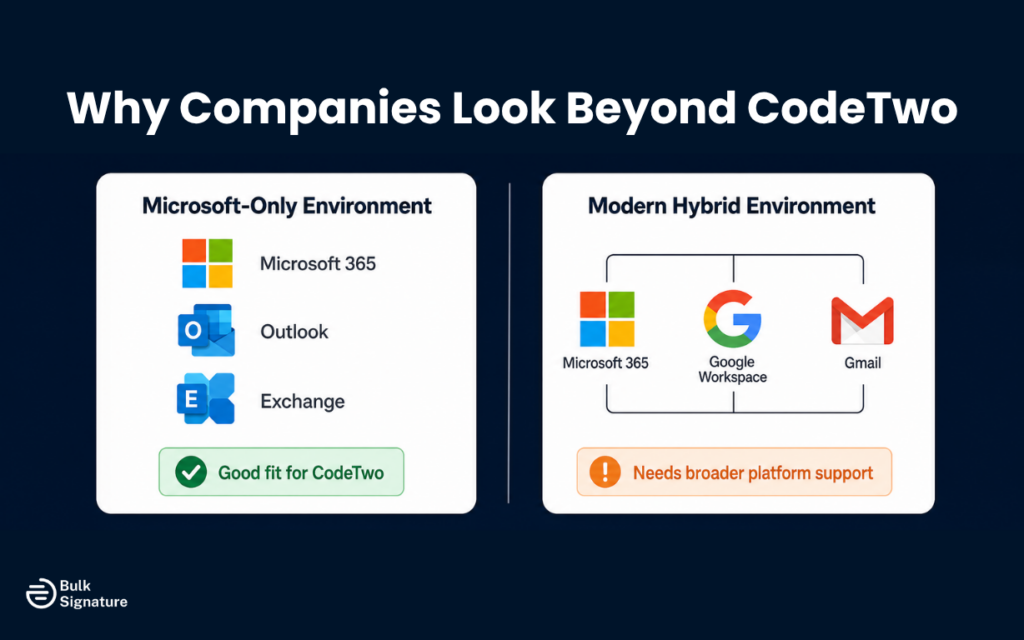
The most common reason companies start looking is the simplest one. Their company runs Google Workspace, and CodeTwo has no native support for it. Their company runs Google Workspace, and CodeTwo has no native support for it. If even one department uses Gmail, CodeTwo cannot cover the whole organization. That limitation is often the main reason teams begin comparing alternatives, especially when even one department uses Gmail.
The Trial Period Hides Issues
The second reason shows up after the trial period ends. CodeTwo’s signature rules and conditional logic are highly capable, but that power comes with a steep learning curve for new users.
Marketing professionals who want to update a campaign banner or launch a new promotion often find themselves waiting on IT rather than making the change themselves, which undercuts a lot of the point of having a company-friendly signature tool in the first place.
Price is Always a Factor
Pricing and contract structure play a role too. CodeTwo offers both yearly and monthly subscriptions, which is more flexible than some competitors, but its tiered pricing structure can be confusing for small businesses when all they actually want is consistent branding and a set of on-brand, personalized signatures across the company.
CodeTwo’s Microsoft 365 certification is a credible qualification, but it doesn’t help IT teams who need Google Workspace coverage, and it’s not a reason to skip comparing the competition.
The Real Cost of Manual Email Signatures
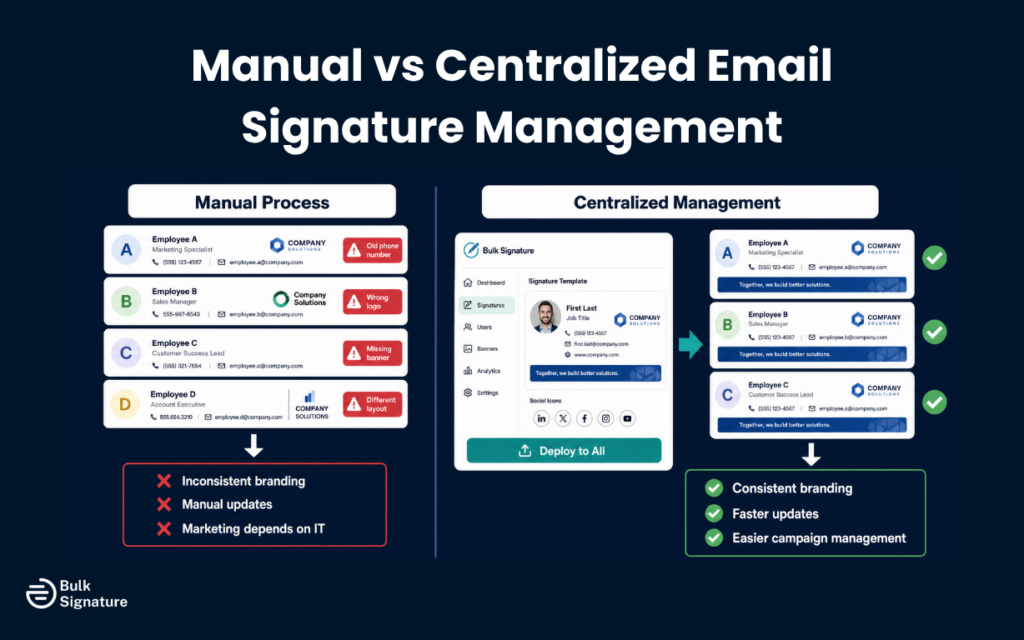
Before comparing specific platforms, it’s worth being honest about what happens without one. According to Exclaimer’s own research into IT labor costs, a 500-person company loses roughly 667 hours a year, close to $28,000 in labor, to manually creating, updating, and troubleshooting company-wide email signatures one employee at a time.
Exclaimer’s 2024 State of IT Report backs this up from another angle: nearly two-thirds of IT leaders say support requests eat most of their working hours, and about a third are actively trying to cut back on repetitive manual work like managing email signatures specifically.
Marketing Bears Costs Too
Marketing teams also lose valuable campaign visibility. Without centralized management, there’s no reliable way to track clicks or impressions on signature banners, and no built-in analytics to offer proof that a campaign actually worked.
Relying on multiple tools to distribute banners and report results creates a fragmented process with disconnected reporting, and every message sent by every employee ends up a missed opportunity instead of a small, steady source of engagement, the exact kind of return other channels get measured against every quarter.
7 Solutions Worth Considering
Each option below covers what the platform does, how it differs from CodeTwo, whether it supports Google Workspace, who it fits best, and the main trade-off to weigh before signing up.
1. BulkSignature Brings Google Workspace Into the Mix
BulkSignature directly addresses a major gap in CodeTwo’s platform: native support for both Google Workspace and Microsoft 365 in one solution. It connects directly to your Google Directory or Microsoft Entra ID (formerly Azure AD), syncing job titles, phone numbers, and departments automatically every 24 hours so directory data never drifts out of date.
What sets it apart for companies coming from CodeTwo is the AI-powered signature designer and drag-and-drop editor. Marketing can create and launch branded email signatures for a campaign without writing a line of HTML code, while IT keeps control over access permissions and the directory integration through role-based access for other teams.
BulkSignature is also SOC 2 Type II audited and GDPR compliant, and has an email compliance center. Its customer success team also provides direct onboarding support for new users.
Trade-off: It’s built for companies that want both platforms covered from day one, so a purely Microsoft-only enterprise with heavy routing needs may still find CodeTwo’s depth useful.
Best for: Any company using Google Workspace, hybrid Microsoft and Google environments, and marketing groups that want to manage campaigns without depending on IT for every update.
See the full BulkSignature vs CodeTwo comparison.
2. Exclaimer for Enterprise Scale Marketing Campaigns
Exclaimer covers similar ground to CodeTwo across Microsoft 365 and Google, but leans harder into promotional features. It has a dashboard for campaign banners, engagement tracking, and CRM integrations like Salesforce and HubSpot. It also supports conditional signature rules by department, location, or seniority. Most consider it the closest replacement for CodeTwo, though pricier.
That extra depth comes at a price and a commitment. Exclaimer’s minimum subscription is 12 months even on monthly billing, and its pricing generally targets larger organizations more than small businesses.
On the security side, Exclaimer holds SOC 2 Type II certification alongside ISO 27001 and ISO 27018, something CodeTwo does not independently hold.
Both carry a maximum “A” SecurityScorecard rating. Exclaimer’s GUI is easier than CodeTwo’s for setup, and it offers easier scaling than CodeTwo for signature management.
However, phone support is limited to Pro and Enterprise plans, which is a real difference from CodeTwo’s around-the-clock coverage. Overall, Exclaimer support is well regarded across independent review sites, even with that tier restriction, and it covers more email platforms than CodeTwo does out of the box.
In a CodeTwo comparison, the gap really comes down to how much extra depth your organization needs versus how much you want to pay for it.
Trade-off: The promotional feature set is legitimately strong, but the price and 12-month commitment make it a harder sell for a smaller company.
Best for: Large enterprises with the IT resources to manage a feature-heavy platform and a genuine need for complex signature routing.
See our full list of Exclaimer alternatives.
Comparing Exclaimer and CodeTwo directly? Read our Exclaimer vs CodeTwo comparison.
3. WiseStamp for Design-First Small Companies
WiseStamp approaches signatures from a design and branding angle, not an IT-control one. It integrates with Google’s platform, Microsoft 365, and Exchange. The editor is built for new users, with a large template library and an easy way to add social links or promotional banners without touching code.
WiseStamp is known for being user-friendly and marketing-team-friendly, and it’s faster and easier to set up than CodeTwo.
WiseStamp security credentials include SOC 2 Type II, ISO 27001, and ISO 27018 certifications, plus HIPAA compliance, a stronger security posture than its design-first reputation might suggest. Automated provisioning means a new employee gets a branded, on-brand signature from their first day, no IT ticket required.
Ease of setup and user-friendly administration are key strengths of WiseStamp, unlike CodeTwo, which requires a steep learning curve for new users.
Trade-off: The design-first focus is a strength for small teams but means less of the deep routing logic that larger, more complex companies sometimes need.
Best for: Small to mid-sized teams and marketing groups that want design flexibility and CRM integrations more than deep routing rules.
See our full list of WiseStamp alternatives.
4. Letsignit for Multi-Channel Brand Consistency
Letsignit is a France-based platform that positions itself as more than a signature solution, extending into branded PowerPoint slides and digital business cards alongside email signature management.
It supports both Microsoft 365 and Google’s ecosystem, with automatic syncing and role-based permissions so IT and other departments can collaborate without stepping on each other.
Letsignit holds ISO 27001 and ISO 27018 certification and has a strong reputation for customer support, particularly among clients in Europe who want localized service.
Trade-off: The multi-channel branding tools (slides, business cards) add real value if you need them, but they’re extra surface area to manage if your only goal is email signatures.
Best for: Companies that want brand consistency across email, presentations, and digital business cards from one dashboard.
See our full list of Letsignit alternatives.
5. officeatwork Lives Inside Your Everyday Apps
officeatwork takes a different technical approach than most of the platforms here. It skips the separate server and the mail flow rule rebuilding that other tools require. Instead, it works as a native add-in inside the Microsoft 365 apps your company already uses daily, including Outlook, Word, and PowerPoint. One template updates every user’s signature automatically, without the manual edits that plague native Microsoft tools.
Because it’s built specifically for the Microsoft ecosystem, officeatwork won’t help if your organization also runs Google Workspace. But for a Microsoft-only office that wants signature management to feel like part of the existing software, not a bolt-on IT project, it’s a significantly different setup than CodeTwo’s.
Signatures need no external systems to manage, and there are no complex MX record changes to worry about.
Trade-off: The native integration is elegant for Microsoft-only companies, but there’s no version built for Google’s platform, so it’s off the table for any hybrid setup.
Best for: Microsoft-only teams that want signature management built into the apps employees already have open, without adding a separate management portal.
6. Xink for Flexible Hybrid Deployment
Xink supports both Microsoft 365 and Google’s platform, which makes it workable for teams running a practical hybrid environment. It offers both server-side and client-side deployment, centralized management, and analytics for tracking campaign performance across every device and email client. Keep in mind that Xink requires DNS changes similar to CodeTwo for email signatures.
Some users report that Xink’s template editor feels a step behind more modern competitors, but its flexibility across deployment methods is a real advantage for IT departments managing a complicated environment where one deployment approach doesn’t fit every device or user group.
Trade-off: The deployment flexibility is real, but the editor experience lags behind newer platforms, which matters more if your promotions group manages campaigns day to day.
Best for: Mid-market to enterprise organizations that need flexible deployment options across mixed email platforms.
7. Rocketseed for Enterprise Support and Scale
Rocketseed syncs directly with Active Directory, Entra ID (Entra ID), and Google Directory, automatically pulling names, titles, and departments so signatures update without any manual input.
Its Signature on Compose feature is worth calling out specifically. CodeTwo and most competitors apply the signature server-side after the email is sent. Rocketseed shows the finished signature to the sender directly in the Outlook compose window, so what they see is exactly what the recipient gets. It also connects with Google Analytics and Salesforce for teams that want deeper campaign reporting.
Rocketseed includes campaign banners, analytics, and CRM integrations in a single plan instead of gating them behind higher tiers, and its infrastructure is ISO 27001 certified. Support runs 24/7, backed by a dedicated account manager for onboarding and training. That’s a level of hands-on focus not every competitor offers at this scale.
Trade-off: the all-in-one plan and enterprise support come with a setup fee and minimum team size, so it’s a heavier commitment than a self-serve platform.
Best for: mid-size to enterprise companies that want an all-in-one plan with strong support and no feature lockouts.
How the Seven Stack Up Side by Side
|
Platform |
Best For |
Google Workspace Support |
Directory Sync |
Notable Difference From CodeTwo |
|
Google Workspace and Microsoft 365 in one plan |
Yes |
Every 24 hours |
Native support for both platforms in one plan |
|
|
Enterprise-scale marketing campaigns |
Yes |
Twice daily |
SOC 2 Type II audited; CodeTwo is not |
|
|
A design-first tool for a small business |
Yes |
Automated |
Design-first editor built for non-technical staff |
|
|
Branding across signatures, slides, and business cards |
Yes |
Automated |
Extends beyond email into slides and digital cards |
|
|
A Microsoft-only environment with native app integration |
No |
Native Microsoft sync |
Lives inside Outlook instead of a separate portal |
|
|
Flexible deployment across a hybrid environment |
Yes |
Automated |
Offers both server-side and client-side deployment |
|
|
Enterprise support with everything in one plan |
Yes (Google Directory) |
Real-time, Entra ID |
Shows the signature live in the compose window |
How Directory Sync Keeps Signatures Accurate
Directory sync is the feature that separates a real email signature management solution from a template someone copies and pastes into Outlook. It connects the software to your Google Directory or Microsoft 365 directory, so when someone’s job title, phone number, or department changes at the source, their signature updates without anyone touching it by hand.
Sync frequency varies by vendor, and it matters more than it sounds like it would. CodeTwo syncs every 15 minutes, with manual syncs available in real time. BulkSignature syncs automatically every 24 hours, with manual syncs applying immediately when needed. Exclaimer syncs twice a day by default.
None of these are wrong exactly. But a company going through rapid hiring or reorganizing departments will feel the difference between a 15-minute cycle and a twice-daily one, especially when dozens of new employees need accurate contact data on their first day.
What to Look for in Email Signatures
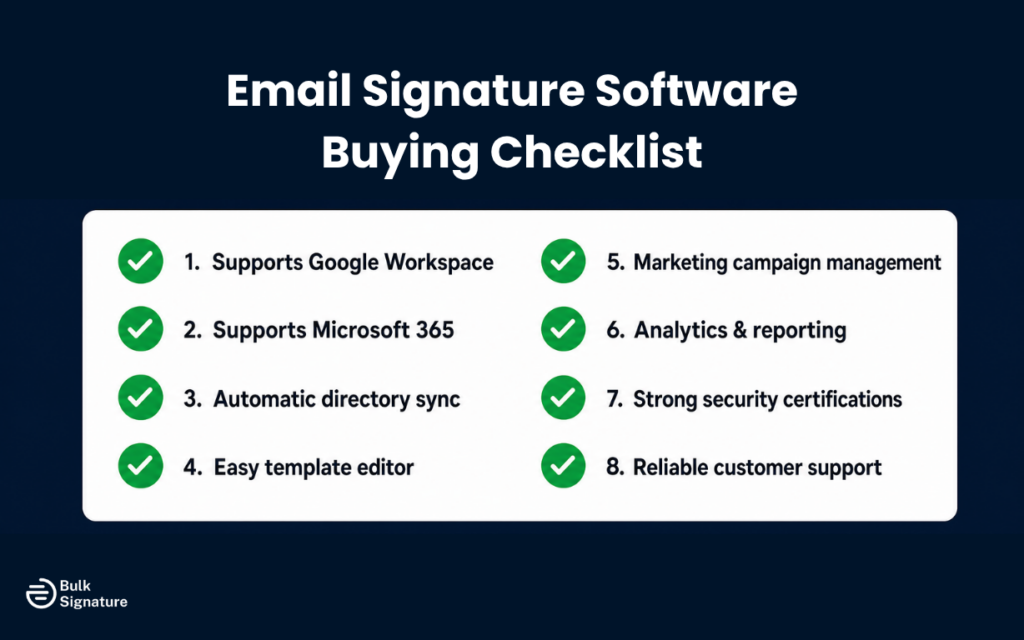
Comparing platforms feature by feature is useful, but a handful of questions matter more than the rest once you’re actually choosing a centrally managed solution for a growing list of users. For example, a platform with strong brand controls and tight security access rules will save more headaches long-term than one with flashier features and looser access controls.
Does it render correctly across every email client and device your company uses, even the ones your IT department doesn’t test regularly? Newoldstamp, for instance, is highly rated for customization across devices.
- Does directory sync happen automatically, or does someone still need to trigger it manually?
- Can marketing manage banners and campaigns without opening an IT ticket for every change?
- What security certifications does the vendor publish, and are they specific, like SOC 2 Type II or ISO 27001, rather than vague claims about “enterprise-grade security”?
For context, CodeTwo holds ISO 27001 and ISO 27018 certifications, and its components are regularly reviewed and pen-tested by Microsoft. It also has 18 active Azure datacenters globally.
- Is support available around the clock, not tied to one time zone?
CodeTwo offers 24/7 support via email and phone, with an average phone answer time of 16.5 seconds. Over 51% of CodeTwo’s support team has more than five years of experience, and it consistently receives higher support ratings than Exclaimer.
None of these questions has a universal right answer. A 40-person startup on Google’s platform has different priorities than a 2,000-person hybrid company with a compliance department watching every access log, and neither one benefits from picking a platform based on which competitor has the flashiest homepage.
The point is checking each vendor’s site and asking all of these questions before signing a contract. Don’t stop at the one or two that happen to come up in a sales call.
Choosing the Right Fit for Your Company
If your company runs entirely on Microsoft 365, has a large IT department, and needs complex routing rules, CodeTwo remains a legitimate choice, and so does officeatwork if you’d rather signatures live inside the apps your company already uses. Signature 365 also focuses on Microsoft 365 environments for email signature management. But if Google’s platform is part of your setup, or you want marketing to run campaigns without waiting on IT, one of the other six solutions here deserves a closer look.
In a BulkSignature vs CodeTwo comparison, the clearest difference is platform support. CodeTwo focuses on Microsoft 365 and Exchange. BulkSignature covers both Google Workspace and Microsoft 365 from a single dashboard, with an AI-powered editor that doesn’t require code and a customer success team that provides direct support when needed.
Pricing starts at $0.88 per user per month, billed annually, with a 14-day free trial and no long-term contract to sign first.
If you’re ready to see whether it fits your company, book a demo and bring your specific platform mix to the conversation.
Frequently Asked Questions
Does CodeTwo support Google Workspace?
No. CodeTwo is built exclusively for Microsoft 365 and Exchange, with no native Google Workspace support. Companies running Gmail, or a hybrid mix of Google and Microsoft, need a platform like BulkSignature, Exclaimer, or WiseStamp that covers both.
What’s the best overall option instead of CodeTwo?
For most companies outside the Microsoft-only, high-complexity use case, BulkSignature is the strongest overall pick, since it’s the only platform here built equally around Google’s ecosystem and Microsoft 365, instead of favoring one and supporting the other as an afterthought.
What’s the best option for a small business?
For small companies, BulkSignature and WiseStamp are both built with a lighter setup in mind. BulkSignature’s pricing starts at $0.88 per user per month, billed annually with a 14-day free trial, while Bybrand offers a lower-cost usage-based plan starting at $8 a month for companies that mainly need Google-based support without extra marketing features.
Can one platform manage multiple brands?
Yes. BulkSignature and Letsignit both support multi-brand companies, letting you create separate signature templates for each brand and assign them to the right organizational units or user groups from a single admin account.
How does directory sync work in email signature software?
Directory sync connects your signature platform to your Google Workspace or Microsoft 365 directory. When someone’s job title or phone number changes there, the platform pulls the update automatically and applies it to their signature, no manual data entry required, which is how email signature management software keeps every employee’s contact data current across the company.


