
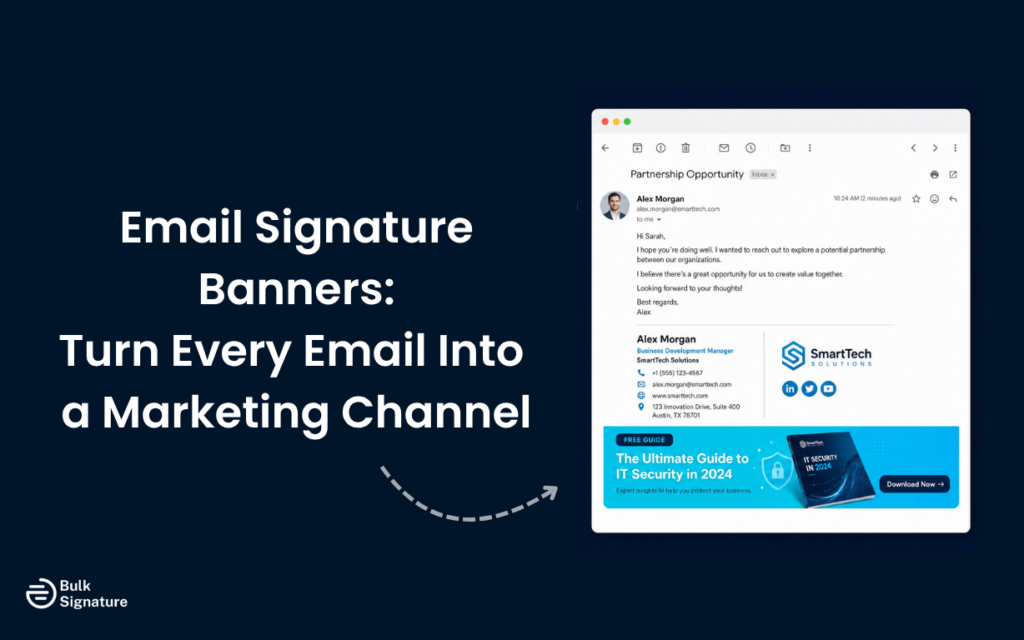
Email signature banners are one of the most underutilized marketing assets available to modern businesses.
Think about the sheer volume of emails your organization sends every single day. Each one of those messages represents a direct line of communication with potential customers, existing clients, partners, and vendors.
By including an email signature banner at the bottom of every email sent by every employee, you have the power to transform ordinary emails into a targeted marketing channel. You can promote new products, highlight upcoming events, or share important company news (without being intrusive). And because they appear naturally at the end of a conversation, they often generate more engagement than traditional email marketing blasts.
To help you get the most value from every email your team sends, we’re breaking down everything you need to know about email signature banners, including how they work, why they outperform many traditional marketing touchpoints, design best practices, and automation strategies for scaling as your organization grows.
The Evolution of Email Signature Marketing
Before we get into the specifics of email signature banners, it helps to understand how email signature marketing evolved into a recognized business strategy.
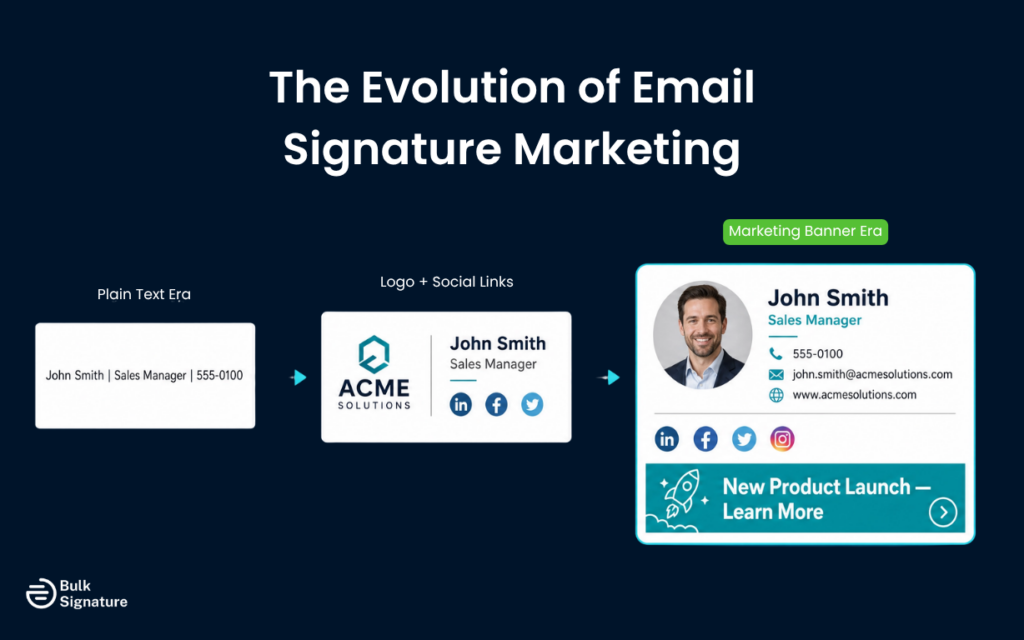
In the early days of digital communication, an email signature was nothing more than a few lines of plain text containing a name, job title, and phone number. It was purely functional, serving as a basic digital business card.
As email clients became more sophisticated, companies began adding logos and social media links to their signatures. This was definitely a step forward for brand identity, but it still treated the signature as a static element. The most meaningful shift occurred when marketers realized that the entire space at the bottom of an email is valuable marketing real estate, and that every employee email could double as an opportunity to promote campaigns, share content, and strengthen brand visibility.
This brings us to today, where email signature marketing is recognized as a legitimate marketing strategy that fully utilizes the signature block to distribute content, promote offers, and drive specific actions. The banner is the centerpiece of this strategy, transforming a passive sign-off into an active marketing tool and allowing companies to leverage the thousands of emails their employees send every day.
What Is an Email Signature Banner?
So, what exactly is an email signature banner?
In the simplest terms, an email signature banner is a visual, promotional element placed at the bottom of a professional email signature. It typically sits just below the sender’s name, job title, and contact details. And unlike the static text of a standard signature, a banner is designed to catch the eye and prompt the recipient to take a specific action.
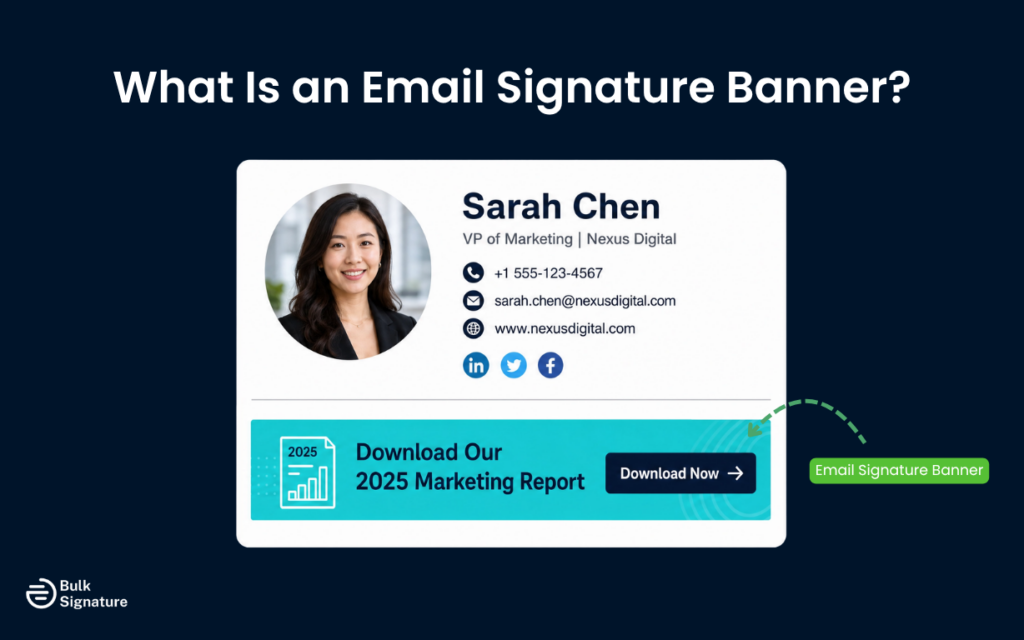
These banners can take many forms, depending on your marketing goals. They might feature eye-catching imagery to promote a product launch, a bold call to action button driving traffic to a landing page, or a simple email banner highlighting a recent company award. The key is that they integrate smoothly into your daily communication, providing a polished touch that keeps customers informed without feeling like a hard sell.
For a more in-depth look at the different types of banners and how they function as advertisements, read this: What Is an Email Signature Ad, and How Can You Use It for Marketing?
The Benefits of Using Promotional Banners in Email Signatures
Promotional banners in email signatures offer several advantages over traditional marketing channels. Here are just a few of the biggest benefits.
Greater Visibility Without Interrupting the Experience
Every single employee email is an opportunity to reinforce your brand. Your team is already communicating with key people every day, making email signature banners a highly targeted touchpoint.
By adding a well-designed banner to those emails, your business can consistently promote campaigns, events, product launches, or resources without disrupting the conversation. This subtle visibility helps keep your company top of mind and can significantly increase engagement over time.
A Low-Cost, High-Impact Marketing Channel
Unlike paid advertising, email signature banners do not require media spend or bidding budgets. You are using a channel your organization already owns.
This makes signature marketing one of the most cost-effective ways to drive website traffic, promote limited-time offers, or increase awareness around key initiatives. For businesses looking to expand visibility without increasing marketing costs, the ROI can be substantial.
More Personal and Trust-Based Engagement
Traditional promotional emails are often recognized immediately as marketing. Recipients skim them quickly or ignore them altogether.
Email signature banners are completely different. Because they appear at the end of one-to-one conversations, they benefit from the trust already established between sender and recipient. A webinar invitation, product announcement, or customer resource feels more like a helpful recommendation than a sales pitch, often leading to stronger click-through rates and engagement.
Supporting the Entire Customer Journey
The real strength of email signature banners lies in their versatility. They can support nearly every stage of the customer journey, and they can easily adapt to different business goals.
For example, at the awareness stage of a campaign, banners can promote webinars, guides, or educational resources to generate interest and capture leads. Or, for employees primarily working with customers at the consideration phase, they can highlight product demos or free trials that help prospects evaluate solutions. And for employees working with existing customers, banners can introduce new features, customer events, or upgrade opportunities that improve retention and encourage upsells.
When aligned with broader marketing goals, email signature banners can be a powerful, consistent tool for driving customer engagement and business growth.
How to Design an Effective Custom Email Signature Banner
Creating an email signature banner that actually drives results requires more than just slapping a logo onto a colorful background. You need to consider the design, the messaging, and the technical constraints of various email clients.
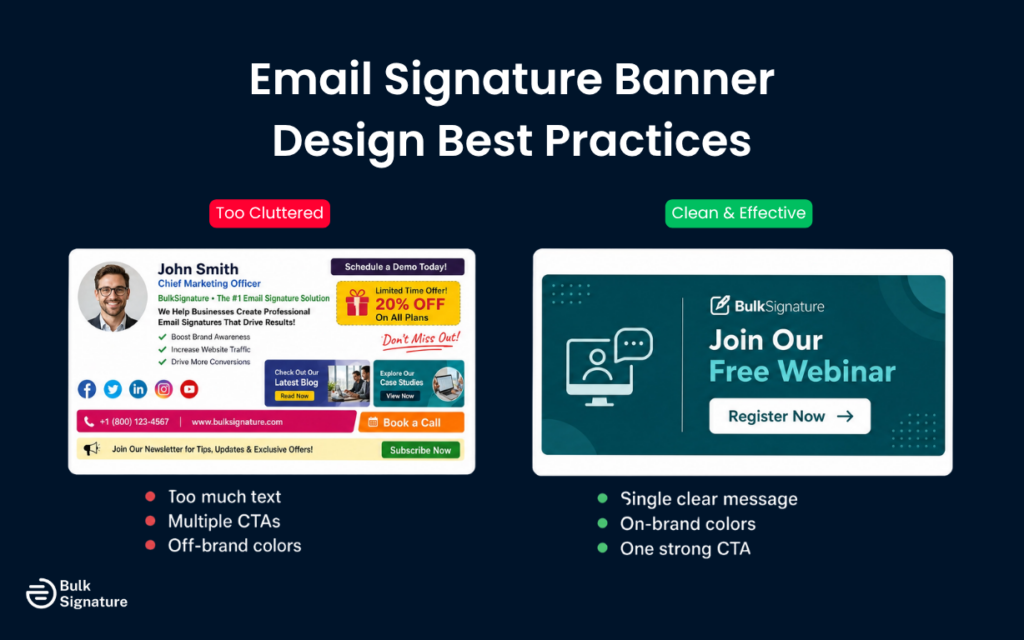
Here are a few practical design tips to help your banner stand out and drive real engagement.
Keep the design simple and focused
The most common mistake people make when designing signature banners is trying to include too much information. A cluttered banner is difficult to read and often gets ignored. Instead, focus on a single, clear message. If you’re promoting a new product, use a high-quality image of the product and a short, punchy headline.
Maintain brand consistency
Your email signature banner should look like a natural extension of your brand. Use your official brand colors, typography, and logo. This consistency helps build trust and reinforces your professional appearance. If your banner looks completely different from your website or your other marketing materials, it can confuse recipients and dilute your brand identity.
Include a clear call to action
Every banner needs a clear call to action (CTA). What do you want the recipient to do after they see the banner? Whether it’s “Download the Guide,” “Register Now,” or “Shop the Sale,” your CTA should be prominent and easy to click.
Choosing the Right Imagery and Graphics
The visual elements of your banner are just as important as the text. If you’re promoting a physical product, use high-quality photos that showcase the item clearly. If you’re promoting a service or an event, consider using custom graphics or illustrations that align with your brand style.
A best practice is to avoid using generic stock photos that look staged or unnatural. Authenticity is what resonates with audiences, so try to use imagery that reflects your actual company culture and personality. If you have creative professionals on your team, encourage them to experiment with different visual approaches to see what drives the most engagement.
For more detailed design tips and step-by-step instructions, including guidance on email signature banner design dimensions and file formats, read this: How to Create Simple & Effective Marketing Banners for Email Signatures.
Best Practices for Email Signature Banner Templates
If you’re managing email signatures for an entire company, using email signature banner templates is the best way to maintain consistency across teams (and save a ton of time in the process!).
Templates allow you to establish a standard layout while giving individual departments the flexibility to swap out the banner image based on their specific goals. If you’re not sure where to start, there’s no shortage of free templates out there you can customize to match your brand and adapt over time.
When creating templates, always prioritize mobile responsiveness. A significant portion of your audience will read your emails on their smartphones. So if your banner is too wide, it will break the layout of the email or become unreadable on a small screen. A good rule of thumb is to keep your banner width between 400 and 600 pixels.
Additionally, be mindful of file sizes. Large images can slow down email load times and may even trigger spam filters. Always compress your graphics before you upload them to your signature template.
The Role of Templates in Compliance and Security
Beyond marketing, templates also play a crucial role in compliance. Many industries require specific legal disclaimers to be included in all external communications. By using standardized templates, you can guarantee that these disclaimers are always present and formatted correctly, reducing the risk of legal issues.
Centralized templates also help protect your brand from unauthorized modifications. When employees are allowed to create their own signatures, they may inadvertently use outdated logos or disclaimers, incorrect job titles, or inappropriate messaging. Templates lock down the essential elements of the signature, guaranteeing that your brand is always represented professionally.
Automating Your Email Signature Campaigns
Managing email signature banners manually is a tedious and error-prone process. If you rely on employees to update their own signatures every time you launch a new campaign, you’ll inevitably end up with outdated banners and inconsistent branding.
The solution to this problem is automation. By using a centralized email signature management platform, you can control the banners for your entire organization from a single dashboard. This allows you to schedule campaigns in advance and make sure every employee is displaying the right banner at the right time.
For example, you can set a banner promoting a holiday sale to automatically appear in everyone’s signature on December 1st and disappear on December 26th. You can also segment your campaigns, showing different banners to different audiences. So if your sales team has a banner promoting a free consultation, but your customer support team has a banner linking to a helpful FAQ page, an automated email signature tool allows you to meet both teams’ objectives at the same time.
Tracking the Success of Your Signature Banners
To get the most engagement out of your email signature banners, you need to track their performance.
According to research published by HubSpot, email remains one of the highest-ROI marketing channels available, and signature banners amplify that return by adding a visual, clickable element to every message sent.
However, without any data on how your banners are performing, it’s impossible to know what’s really working (and what isn’t).
Most advanced email signature management tools will allow you to track clicks and impressions for every single banner you deploy. By analyzing this data, you can identify which designs, messages, and CTAs resonate most with your audience. And if a particular banner is underperforming, you can quickly swap it out for a new version and measure the difference.
Tracking also allows you to prove the ROI of your email signature marketing efforts. When you can show exactly how much traffic and how many leads your banners are generating, it becomes much easier to justify the investment in a centralized management platform.
For a comprehensive overview of how to track and manage your campaigns, read this: All You Need to Know about Campaign Management in BulkSignature.
Don't Let the Space at the Bottom of Your Emails Go to Waste
Since employee emails are already part of daily communication, they create a natural opportunity to reach customers and prospects. Email signature banners help marketing teams make the most of that visibility by promoting campaigns, events, resources, and offers inside conversations already happening every day. And the best part is they do it without interrupting the customer experience or taking up a big chunk of your marketing budget.
Ready to get more from every email your team sends with branded email signature banners? Try BulkSignature for free today — no credit card required!
Frequently Asked Questions About Email Signature Banners
Do email signature banners boost engagement?
Yes. Email signature banners can help boost engagement by adding a clickable promotion to emails your team already sends every day. And because they appear inside trusted, one-to-one conversations, they often drive more attention than traditional marketing emails.
What should an email signature banner include?
The best promotional banners communicate key messages quickly with concise copy, branded visuals, and a clear CTA like “Book a Demo” or “Download the Guide.” Too much information can reduce clicks, so try to keep things as simple as possible.
What can you promote with an email signature banner?
Email signature banners are incredibly versatile. You can use them to promote product launches, webinars, case studies, events, free consultations, downloadable resources, and even exclusive discounts or limited-time offers. The key is to focus on one campaign at a time and match the message to your audience for stronger engagement.


