
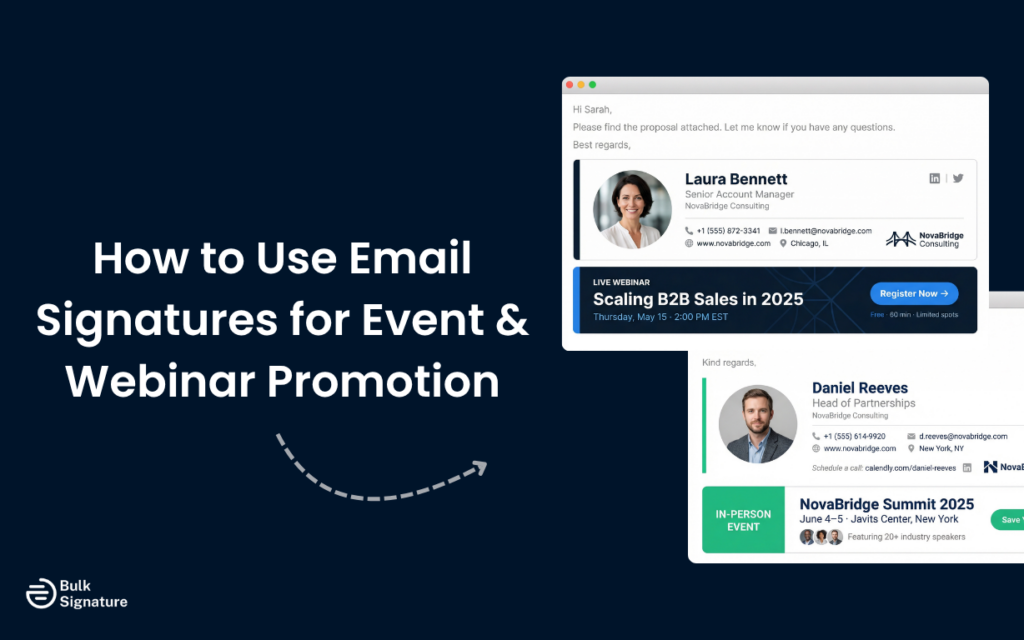
Most organizations send hundreds, sometimes thousands, of emails every day to clients, partners, and external stakeholders. Individually, they’re just routine communication. But collectively, they represent a massive, untapped distribution channel.
And while everyday emails aren’t a “traditional” email marketing channel like a newsletter or nurture sequence, they’re still key touchpoints worth maximizing, especially when promoting initiatives that are relevant to other businesses, like events and webinars.
However, there is an art to promoting events through everyday emails. You want to create a bit of buzz, but you don’t want to add unnecessary noise to people’s (already crowded) inboxes.
So in this article, we’re covering everything you need to know about email signature event promotion, including how to do it well, what to avoid, and how to manage it across your organization without creating an IT headache.
Why Email Signatures Work for Event Promotion
Before we get to the mechanics of email signature event promotion, it’s worth understanding why this channel performs as well as it does.
To start, the average employee receives an estimated 117 emails per day. Some of these emails are marketing emails, while others are day-to-day business communication. And unlike a marketing email that lands in a promotional inbox tab, a signature banner appears at the bottom of a genuine conversation, which means the recipient is already engaged.
That context matters. A webinar promotion appearing in a reply from your account manager carries more weight than the same promotion arriving as a campaign email. The relationship between sender and recipient lends credibility to the banner message, even when the recipient knows that the promotional banner is automated.
It’s also persistent in a way that other channels aren’t. A social post has a lifespan of hours, and a paid ad runs until the budget runs out. A signature banner, on the other hand, runs on every email your entire team sends, for as long as you want it to, at no additional cost per impression.
What a Good Event Signature Banner Looks Like
The banner itself is the most visible part of the signature banner webinar or event setup, so it’s worth getting right.
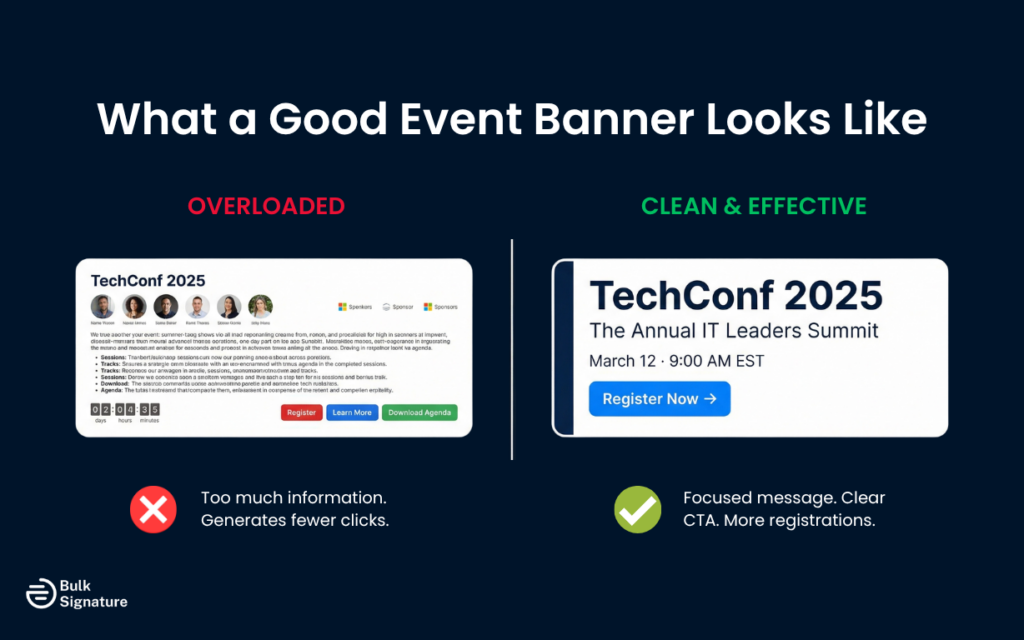
A well-designed event banner in an email signature typically includes:
- The event name and a short descriptor (what it is and who it’s for)
- The date and time, including the time zone
- A clear call to action button, such as “Register Now” or “Save Your Spot”
- A clickable link to the registration page and any relevant contact details
What it should not include is everything else. The temptation is to add speaker names, session topics, sponsor logos, related blog posts, social media links, and a full agenda summary. Resist it. A signature banner is a small piece of real estate, and the goal is to generate a click, not to replace the landing page.
Visually, the banner should align with your brand. Use your brand colors, your standard font, and your company logo if space allows. It should look like it belongs in your email, not like an ad that was dropped in from somewhere else.
And one last tip: keep the file size small. Large images slow down email loading times and are more likely to be blocked by email clients. An email banner that’s 600 pixels wide and under 100KB will render reliably across most clients and devices.
Looking for more advice on how to design the perfect banner? Read this: How to Create Simple & Effective Marketing Banners for Email Signatures
Setting Up the Promotion Across Your Organization
Designing the banner is the easy part, but getting it into every relevant employee’s email signature, on time, and in the right format, is where the biggest headaches happen.
There are two ways to approach this:
The Manual Approach
This involves creating the banner, sending instructions to all staff, and asking everyone to update their signature before the event.
Some people do it immediately, some do it a week later, and some don’t do it at all. And by the time the event date rolls around, you have a patchwork of signatures across the organization, with some employees promoting the event and others not.
This approach works for very small teams where you can personally verify that everyone has updated their signature. But for anyone managing more than 10 or 15 people, it’s unreliable.
The Centralized Approach
A centralized email signature management platform lets you update every employee’s signature from a single interface.
For example, you can upload the banner, configure which employees or departments should display it, set the start and end dates, and publish. The banner appears in every relevant outgoing email from that point forward, without any action required from individual employees.
This is how event marketing email signature campaigns actually scale. Instead of relying on 200 people to remember to update their settings, you make one change, and it propagates automatically.
Platforms like BulkSignature are built specifically for this, allowing you to schedule new banners in advance, target specific teams, and revert to the standard email signature template automatically once the event date has passed.
Want to see what manual signature management is really costing your team? Read this: The Hidden Cost of Manual Email Signature Management (Why You Need a Tool)
Targeting the Right Employees
Not every event is relevant to every part of your organization, and not every employee’s email audience is the right fit for every promotion.
Think about who your event is for, and which employees are most likely to be emailing that audience.
If you’re running a product webinar aimed at IT decision-makers, the signatures most likely to reach that audience belong to your sales team, your account managers, and your technical pre-sales staff. Adding the banner to the signatures of your customer support team or your internal finance department is unlikely to generate meaningful registrations.
If you’re running a customer-facing event, your customer success team and account management team are the highest-value group, because their emails go directly to the people you’re trying to reach.
Most centralized signature platforms allow you to apply professional banners to specific groups, departments, or individuals rather than your entire organization. Using that targeting capability makes the campaign more relevant and avoids promoting events to audiences that have no connection to the topic.
More tips on using email signatures as a marketing channel here: What Is an Email Signature Ad, and How Can You Use It for Marketing?
Timing Your Email Signature Marketing Banner Campaign
The timing of your event signature banner campaign matters a lot more than you might think.
If the same banner appears in every email for two months before the event, recipients who interact regularly with your team will stop noticing it. But starting too late means you miss the window when people are making decisions about their calendars.
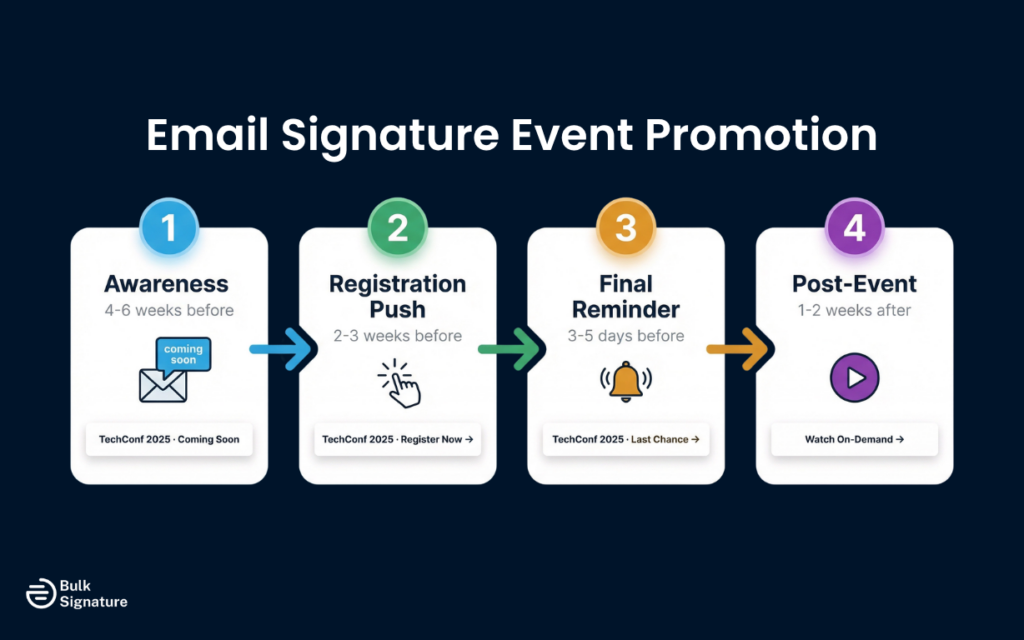
A practical approach for most events looks like this:
Email Signature Marketing Campaign for Events: Timing Tips
Phase | Timing | Banner Focus |
|---|---|---|
Awareness | 4-6 weeks before the event | Event name, date, and “coming soon” messaging |
Registration push | 2-3 weeks before the event | Clear CTA, registration link, key details |
Final reminder | 3-5 days before the event | “Last chance” or “This week” messaging with urgency |
Post-event | 1-2 weeks after | On-demand recording link or follow-up resource |
Updating the banner at each phase keeps the key message fresh and matches the communication to where the audience is in their decision-making process. Someone who ignored the awareness banner might register when they see the final reminder.
The post-event phase is often overlooked but worth including. Many people who couldn’t attend a live event will watch a recording if they’re reminded that it exists. A signature banner pointing to the on-demand version extends the value of the event well beyond the live date.
Measuring the Impact of Your Email Signature Campaign
One of the practical advantages of using a dedicated signature management platform is the ability to track clicks on your event banner.
Most platforms provide click-through data that shows how many times the banner link was clicked, and in some cases, which employees’ emails generated the most clicks. This data is useful for two reasons.
First, it tells you whether the banner is working. If click-through rates are low, it may indicate that the banner design needs adjustment, the call to action isn’t compelling enough, or the event isn’t resonating with the audience being reached.
Second, it helps you build a case for the channel internally. If you can show that your email signature event promotion generated 150 registration clicks over a three-week campaign, that’s a concrete number that demonstrates the value of the channel beyond anecdote.
If your platform doesn’t provide built-in click tracking, you can use UTM parameters on the registration link to track traffic from the signature banner in your analytics platform. This allows you to see signature-driven registrations separately from other traffic sources in Google Analytics or your CRM.
What Is a Good CTR for an Email Signature Banner?
Unlike traditional email marketing, signature banners sit in 1:1 ongoing conversations, which means engagement behaves a bit differently.
Industry benchmarks for email signature banner click-through rates (CTR) typically fall within these ranges:
- 0.5% to 1.5% CTR: Common baseline for most organizations
- 1.5% to 3% CTR: Strong performance with clear CTA and relevant audience segment
- 3%+ CTR: High-performing campaigns (often tied to timely, high-interest events or highly targeted outreach)
For context, traditional marketing emails typically generate click-through rates in the 2-5% range, but those results come from carefully planned, one-off email marketing campaigns that require time, budget, and dedicated sends. That’s why even a modest 1% CTR in an email signature banner campaign can have a meaningful impact. When you apply it across thousands of emails sent each day, those small moments of engagement really add up.
Common Mistakes to Avoid When Using Email Signature Banner Campaigns
A few patterns consistently undermine signature banner campaigns, and they’re worth knowing about before you launch.
Mistake #1: Overloading the Banner with Information
This is the most common mistake. A banner that tries to communicate the full event agenda, all five speakers, three sponsor logos, and a countdown timer will look cluttered and generate fewer clicks than a simple, focused email signature design. Keep this in mind when briefing your design team.
Mistake #2: Using a Banner that Doesn’t Match the Rest of the Signature
If your standard signature uses a clean, minimal design and the event banner is a bright, heavily styled graphic, the contrast looks jarring. The banner should feel like a natural extension of the signature, not an interruption.
Mistake #3: Forgetting to Remove the Banner After the Event
This is especially common when email signatures are managed manually. A banner promoting an “upcoming” webinar that happened three weeks ago undermines credibility, so make sure to build in a clear process for your team to update/remove it on time. If you’re using a centralized platform, set an end date when you configure the banner so it reverts automatically.
Making the Most of Every Email Your Team Sends
Most organizations are already sending thousands of emails to a highly engaged audience. The only question is whether those emails are fully maximized to support your broader marketing and event goals.
Adding a well-designed, well-timed event banner to your team’s email signatures is one of the more straightforward ways to extend the reach of an event campaign, without adding to anyone’s workload. It’s simple to implement, easy to scale, and has the potential to bring in dozens of registrations that might have otherwise been missed.
Ready to promote your next event to every inbox? Try BulkSignature today!
Frequently Asked Questions About Email Signature Event Promotion
How do I make sure the event banner appears in all outgoing emails, not just new messages?
This depends on your email platform and how your signature is configured. In most centralized signature management tools, the banner is applied at the server level, which means it appears on all outgoing emails regardless of whether they’re new messages or replies.
If your signatures are managed client-side, you’ll need to verify that the signature is set as the default for both new messages and replies in each employee’s email settings.
Can I use different banners for different teams?
Yes, and in most cases you should. A centralized email signature manager allows you to apply different banners to different groups or departments. This lets you tailor the promotion to the audience each team is most likely to be emailing, which generally produces better results than a broader approach.
What image format works best for professional email signature banners?
PNG is generally the most reliable format for email signature banners. It supports transparency, renders cleanly across most email clients, and compresses well without significant quality loss.
JPEG works for photographic images but doesn’t support transparency. As a rule of thumb, always avoid GIF animations in signature banners, as they’re not supported in all email clients and can increase file size significantly.
Should I include links to social media channels in an email banner?
In most cases, social media links are better placed in the core signature elements, not inside the event banner itself.
A signature banner has one job: drive clicks to a specific outcome, like event registration. Adding multiple links (such as social media icons or additional navigation) can distract attention from the primary call to action and reduce overall click-through rates.
How do email signature banners fit into a broader email marketing strategy?
Email signature banners work best as a complement to your existing marketing efforts, not a replacement.
They reinforce campaigns that are already running across newsletters, nurture sequences, paid advertising, social media, and sales outreach.
Because signature banners appear in ongoing business email conversations, they extend campaign visibility into touchpoints that traditional marketing doesn’t always reach.
This makes them particularly effective for:
- Generating incremental event registrations
- Promoting seasonal offers
- Supporting future campaigns through repeated exposure
- Strengthening brand identity across external and internal emails
Over time, they help create a more consistent and connected marketing presence across all communication channels.
Should I use a separate email signature for campaigns?
In most cases, there is no need to create a separate email signature for campaigns. A more effective approach is to maintain a consistent signature structure and introduce campaign elements, such as banners, within that framework.
Keeping a single, standardized signature helps preserve a professional appearance across the organization and keeps essential details like contact information and job titles consistent. Campaign banners can then be added or updated centrally without disrupting the overall format. This makes it easier to manage promotions at scale, while still maintaining clarity and brand consistency.
Can email signature banners help generate leads?
Yes, email signature banners can be a reliable source of lead generation, especially when used to promote high-intent offers such as webinars, product launches, or gated content.
And because they appear within everyday business emails, they reach recipients who already have some level of familiarity with your company. That context often leads to more meaningful engagement and higher-quality clicks compared to colder outreach channels. Over time, this steady exposure can drive more traffic, attract new customers, and contribute directly to pipeline growth without requiring additional campaign sends.


